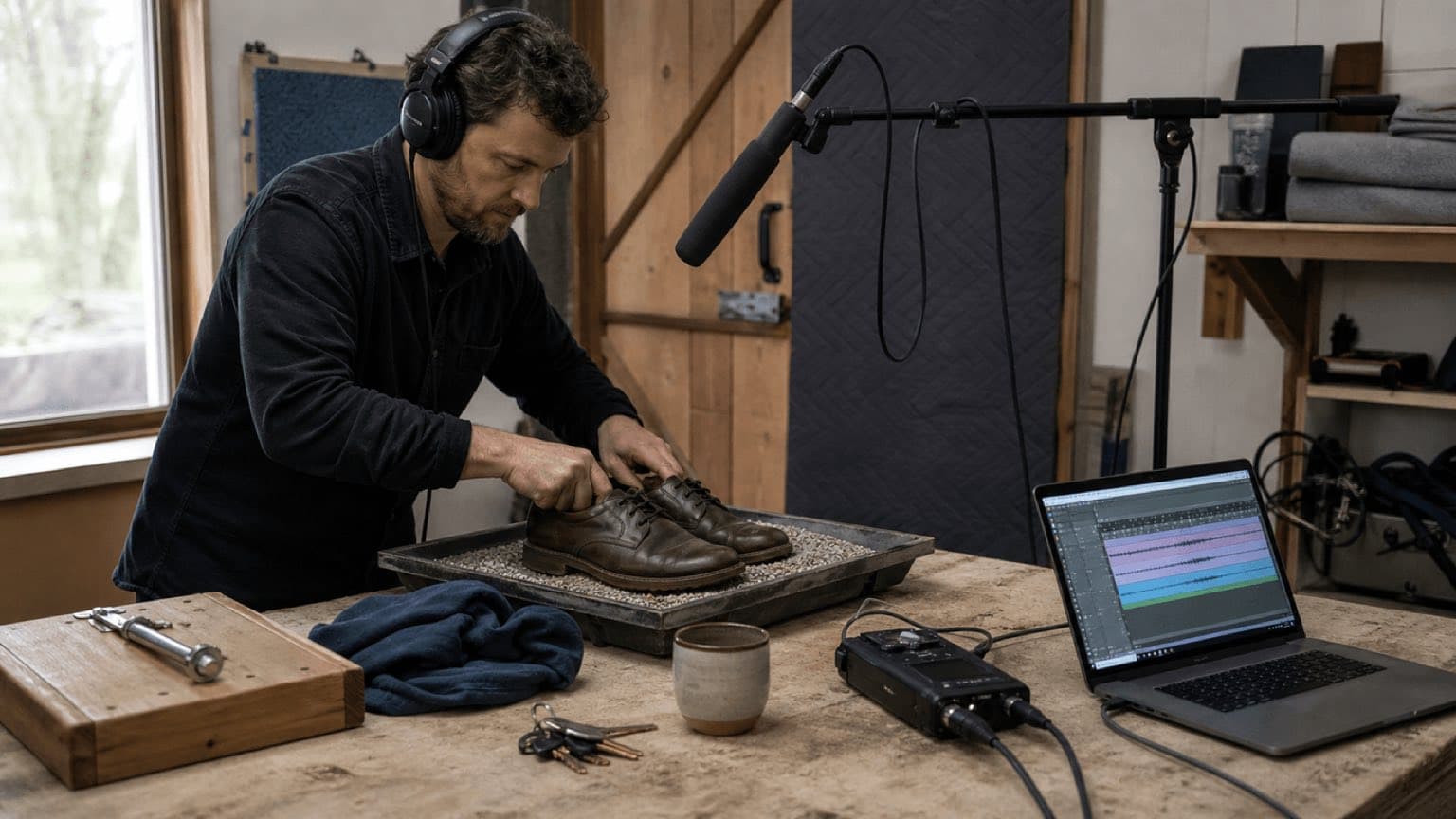
Sonilo publishes this guide and appears in the generated-SFX section. Adobe did not sponsor or review it. DAW menus and generation features change. Never record impacts, weapons, vehicles, fire, pressurized objects, electricity, glass, chemicals, animals or public spaces in a way that risks injury, damage, alarm, trespass or unlawful recording. Substitute safe props, keep distance and hearing protection where appropriate, and use qualified production-safety supervision for hazardous work.
Last verified: August 21, 2026. Adobe Audition’s current documentation describes generated tones, sweeps, modulation and white, pink and brown noise as starting material for sound design. Sonilo’s current product and API pages distinguish text-to-SFX for standalone clips from video-to-SFX for effects aligned to visible events. Product capabilities, prices, plan rights and interfaces can change; verify them at use.
Choose the method from the job the sound must do
Performed to picture
Footsteps, cloth, hand contact and prop movement. Best when performance and micro-timing matter.
Capture the real source
Doors, machines, rooms, weather and crowds. Best for authentic material and acoustic detail.
Build from signal
Tones, sweeps, noise, envelopes and modulation. Best for UI, sci-fi, transitions and controlled variations.
Describe or supply video
Fast standalone or picture-aware candidates. Best when the brief is clear and every output will be reviewed.
These methods combine. A convincing heavy door might use a real latch for identity, a performed wood movement for timing, a pitched mechanical recording for mass and a short low-frequency synthesized layer for scale. The method is not the outcome: if one clean recording tells the story, do not add layers merely to look sophisticated.
01
Write a cue sheet before touching the recorder or prompt box
A useful cue describes what the audience should perceive, not only the object name. “Door” is vague. “Small interior wooden door, dry latch click, restrained close, three meters away, no slam, no music” defines material, action, intensity, perspective and exclusions. For video, add a time or frame reference and note whether the sound begins before motion, lands on contact or continues after the object leaves frame.
| Field | Question | Example |
|---|---|---|
| Source | What physically produces the sound? | Leather sole on loose gravel |
| Action | What changes over time? | One cautious step, weight transfer, lift |
| Material/scale | What is it made of and how large? | Dry stones, adult weight, close detail |
| Perspective | How far and in what space? | Two meters, small exterior courtyard |
| Timing | Where are onset, contact, peak and tail? | Heel at 00:03:12:08; short debris tail |
| Mix role | What must remain clear? | Dialogue has priority; no wide rumble |
| Exclusions | What should not appear? | No second step, music, voice or birds |
| Delivery | What files are required? | Clean mono source, designed mono, stereo room |
Make a cue list for the whole scene and rank it. Hero cues carry story: a key turn, reveal impact, creature movement or product interaction. Support cues establish continuity: cloth, hand contact and subtle machinery. Beds establish a space. Optional sweeteners add scale or style. Intentional silence belongs on the list too; filling every cut with a whoosh makes important moments smaller.
02
Record useful source material, not a finished fantasy
- Choose a safe substitute. A heavy book, leather glove, celery, gravel tray or small metal mechanism can provide components without recreating a dangerous event. Never discharge, crash, break, burn or strike hazardous objects for realism.
- Control the room. Turn off avoidable fans and notifications, listen for traffic and electrical hum, and record room tone. A dead room gives flexible close detail; a real location gives perspective but less control.
- Place the microphone for the layer. Close placement captures detail; farther placement captures the object in a space. Aim to reduce unwanted reflections and handling noise. Record both when delivery may need perspective changes.
- Set conservative gain. Rehearse the loudest action and leave headroom. Clipped transients cannot be restored by lowering a fader. Monitor with headphones at a safe level and never normalize the raw file destructively.
- Perform variations. Record soft, medium and hard versions, changes in speed, object orientation and surface. Leave silence between takes and speak or log identifiers without contaminating the usable tail.
- Capture wild tracks. Record isolated latch, body movement, contact, debris and room decay. Separate components are easier to synchronize and remix than one chaotic performance.
- Back up and log. Preserve original files, sample rate, bit depth, channel configuration, microphone, recorder, prop, surface, performer, location, date, take and rights/consent notes.
A little friction, unevenness and room response can make a sound believable. Remove traffic, voices, hum or handling only when they interfere. Heavy denoising can create watery artifacts and erase the texture you wanted to record.
03
Turn a source into a designed effect
Work nondestructively on duplicates. Trim unusable setup, add short fades to prevent clicks and keep enough pre-roll or tail to reposition the sound. Align layers by listening and waveform, then make each layer answer a different perceptual question.
| Layer | Purpose | Typical treatment | Failure to watch |
|---|---|---|---|
| Identity | Recognizable material or mechanism | Precise edit, light EQ, little processing | Loses realism under effects |
| Body | Weight and scale | Lower source, pitch shift, transient control | Mud or speaker-dependent sub energy |
| Detail | Click, debris, scrape, spark or texture | High-pass, short envelope, close perspective | Harshness or distracting repetition |
| Motion | Approach, pass, acceleration or transition | Envelope, pitch/filter movement, panning | Generic whoosh unrelated to action |
| Space | Distance and environment | Room recording, early reflections, reverb send | Reverb printed too long or too wide |
| Tail | Decay and consequence | Separate resonance, debris or ambience return | Ends at the cut instead of naturally |
Shape before you stack. Use clip gain and envelope first. EQ should solve a reason: remove unusable rumble, make material clearer or create perspective. Pitch changes apparent size but extreme shifting exposes artifacts. Compression can control an unruly transient, yet over-compression removes impact. Reverb places a source in a space; render or print it only when the delivery requires a committed effect.
For synthesized effects, start simple. Adobe documents tones, frequency sweeps, modulation and multiple waveform shapes, plus white, pink and brown noise. A short tone with a falling pitch envelope can become a UI confirmation; filtered noise with a fast attack and curved decay can become air, steam or a transition; a low tone layered quietly under a real impact can add mass. Begin and end generated waveforms near a zero crossing or use micro-fades to avoid clicks. Avoid assuming that a named noise color automatically sounds like a finished natural event—it is raw spectral material.
04
Four practical sound-effect recipes
Footstep on gravel
- Record the shoe and surface that match character weight and movement; separate heel/contact from lift if timing is complex.
- Choose one performance with correct rhythm, then align contact to the visible weight transfer rather than the first leg motion.
- Add a restrained debris tail from another take only if the surface needs continuity.
- Adjust perspective with microphone distance, EQ and room—not only volume. Alternate variations so repeated steps do not machine-gun.
Door close
- Record latch, hinge/body and room tail separately. The pictured door may need a safe substitute with a similar material response.
- Place handle movement before the panel motion, body contact on the visible stop and latch click where the mechanism engages.
- Add low body only for perceived size; keep the recognizable latch near the center.
- Let the room return after contact. A tail cut at picture edit often sounds less real than a short overlap.
UI confirmation
- Generate or synthesize a short tone with a clear pitch relationship; keep the envelope compact.
- Add one quiet tactile click if the interaction should feel physical. Avoid musical phrases that compete with notification meaning.
- Test on phone speakers at low level and confirm it is distinguishable from error, warning and destructive-action cues.
- Export consistent variations and naming for hover, success, error and disabled states rather than randomly redesigning each event.
Cinematic impact
- Start with a sharp transient for timing, a midrange body for material and an optional low layer for scale.
- Move layers by milliseconds until they read as one event without smearing the contact.
- Reserve the biggest low-frequency and widest tail for the story’s largest moment. Loudness alone is not scale.
- Test in the full mix and on small speakers; if only sub-bass carries the effect, add audible midrange information.
05
Fit sound effects to picture frame by frame, then judge at normal speed
Mark four moments: onset when the cause begins, contact when surfaces meet, peak when the audience perceives maximum force, and decay when the world settles. They are not always the same frame. A swing begins before impact; a door creaks during movement; debris continues afterward. Align the most important transient precisely, then shape the lead-in and tail.
- Lock or version the picture so timing changes are traceable.
- Build separate tracks for Foley, hard effects, ambience and design sweeteners.
- Place hero cues first and listen to the scene without music.
- Add support only where it clarifies motion, material, scale, point of view or offscreen action.
- Check perspective across cuts: a close shot and wide shot should not sound identical by default.
- Restore dialogue and music, then automate level, frequency and space so each cue has a role.
- Review once frame by frame for placement, then at normal speed for perception and story.
- Watch the entire export outside the editor and inspect the first and last frames of every cue.
Do not synchronize every movement literally. A realistic scene contains continuous micro-sound, but a mix directs attention. If every hand gesture, camera move and cut receives a pronounced cue, the viewer hears the editing system instead of the world. Choose the few sounds that explain the image and let ambience connect the rest.
06
Use Sonilo where generation genuinely shortens the workflow
Use text-to-SFX when you need a standalone effect that you will place manually: “dry ceramic cup set on wood, close microphone, small room, no voice or music.” Use video-to-SFX when the visible timing is part of the request: Foley, ambience, impacts, UI events, transitions or motion cues aligned to the supplied cut. Sonilo’s AI-video sound-effects guide recommends naming visible sources, actions, materials, scale, perspective and exclusions, then reviewing timing before mixing.
| Start from | Use | Review before keeping |
|---|---|---|
| A written effect brief | Text-to-SFX candidate | Source identity, duration, texture, noise, tail and similarity |
| A locked video clip | Video-to-SFX candidate | Event coverage, frame timing, invented sounds, perspective and silence |
| A repeatable product workflow | Video-to-SFX API | Authentication, input authority, task state, downloadable asset, retries and records |
| A hazardous or impossible source | Safe generation plus conventional design | Believability, context, client acceptance and no false provenance |
Generated audio is a candidate, not proof. Preserve the prompt, authorized input reference, generation date, model/service information available to you, output identifier, chosen version, edits, reviewer and license evidence. Check current Sonilo licensing for personal, commercial, client, paid-media, product and distribution scope. Do not upload confidential or third-party footage without authority. Do not prompt to copy a living artist, protected character voice or identifiable recording; perform a creative and similarity review before release.
07
Quality control, naming and delivery
| Check | Pass condition | Evidence to retain |
|---|---|---|
| Timing | Onset, contact, peak and tail support the visible action at normal speed | Picture version, cue marker and reviewed export |
| Sound quality | No clipping, unintended hum, clicks, denoise artifacts or phase cancellation | Raw source, edit session and meters/listening notes |
| Story and mix | Hero cues read; dialogue remains clear; silence is intentional | Full mix, stems and reviewer approval |
| Perspective | Distance, room, camera cut and point of view remain coherent | Near/far variants or automation |
| Rights and safety | Sources, performances, locations, libraries and generated outputs are authorized | Releases, licenses, generation records and incident notes |
| Technical delivery | Requested format, sample rate, channel layout, handles and sync reference are correct | Manifest, hashes and playback test |
Name assets for retrieval, not memory: PROJECT_SCENE_CUE_SOURCE_ACTION_PERSPECTIVE_TAKE_VERSION.wav. Keep raw, edited, designed and mastered stages separate. For video post, deliver clean SFX stems apart from dialogue, music and ambience when requested. Include handles so the editor can move a cue, and avoid lossy masters unless the destination specifically requires them.
08
Common failures and the smallest useful fix
| Problem | Cause | Fix |
|---|---|---|
| Effect sounds generic | Object-only brief | Add action, material, scale, perspective, timing and exclusions |
| Impact feels late | Aligned to motion instead of contact/peak | Move the primary transient; reshape lead-in and tail |
| Layered effect is blurry | Too many transients or phase conflict | Choose one timing anchor; mute redundant layers |
| Sound is huge alone, weak in mix | Energy sits under dialogue/music or only in sub-bass | Design audible midrange and arrange mix space |
| Repeated footsteps feel artificial | One sample with identical level/timing | Record variations and preserve performance rhythm |
| Noise reduction sounds watery | Processing exceeds the contamination | Return to source, use gentler cleanup or rerecord |
| Generated SFX invents events | Broad prompt or ambiguous video | Specify visible moments/exclusions, regenerate or edit manually |
| Export clicks at boundaries | Hard cut away from zero crossing | Add micro-fades and retain natural tail |
Sources
Primary and first-party sources
- Adobe Audition: Generate tones and noise
- Adobe Audition: Essential Sound and SFX/ambience presets
- Sonilo: Add sound effects to AI videos
- Sonilo: Video-to-SFX API reference
- Sonilo licensing
Human review: A sound editor or Foley artist should reproduce the capture, edit, synchronization and mix workflow; production safety should approve risky props or locations; the project owner should verify releases and source licenses; delivery should inspect format, sync and playback. Sonilo should maintain current product, model, licensing, privacy, security, correction and generation-record evidence.
FAQ
Frequently asked questions
Start with one clearly defined event. Record a safe practical source or generate a controlled tone or noise layer, trim it tightly, remove unusable noise, shape pitch and envelope, layer only when each layer has a purpose, then test the effect at normal playback level against the picture.
Foley is performed in synchronization with character or object movement, such as footsteps, cloth and prop handling. Sound effects is the broader category: recorded, synthesized, designed, library or generated sounds can all be effects.
Yes. A phone can capture useful source material in a quiet space, and a DAW can synthesize effects from tones and colored noise. Text-to-SFX can generate standalone candidates; video-to-SFX is more appropriate when timing must follow visible action.
There is no correct number. Use the fewest layers that communicate source, body, detail and space. If muting a layer does not change the story, timing, scale or texture, remove it. More layers can make an effect blurry or mask dialogue.
Mark the onset, contact, peak and decay of the visible event. Align the most perceptually important transient, then adjust pre-motion, tail and perspective. Review at normal speed and in the full dialogue, music and ambience mix.
Sonilo offers video-to-sound-effects for effects that should follow visible timing and text-to-sound-effects for standalone clips. Treat outputs as editable candidates, verify licensing and input authority, and review timing, realism, mix, similarity and delivery before publishing.
Related
Keep reading
FROM A SOUND BRIEF OR A LOCKED CUT
Create sound-effect candidates, then shape them in your edit.
Use text for standalone SFX or start from video when visible timing matters.