Sonilo publishes this guide and appears as an original sound-effects option. It receives no affiliate commission from sources mentioned, and no third party sponsored or reviewed the production advice. This is sound-design and general rights information, not legal advice.
Last verified: August 21, 2026. Product features, plan rights, editing software, delivery formats, and licenses may change. Verify current requirements for the actual project.
Match the sound to the movement—not the transition preset
| Visible/editorial event | Start with | Reason |
|---|---|---|
| Large object crosses frame | Full-bodied whoosh | Air and mass should remain readable through the pass |
| Fast card, swipe, or lightweight gesture | Swoosh | A shorter, lighter cue avoids false weight |
| Scene changes without a visible moving object | Transition sound | The edit is the subject, not physical flight |
| Title or product slams into place | Whoosh into impact | Movement and landing need separate jobs |
| Sticker or tiny element appears | Pop | Appearance matters more than travel |
| Continuous wind or room air | Ambience designed for the scene | A whoosh is an event; ambience is a bed |
If the movement already reads clearly, compare the edit with no whoosh. Sound should clarify speed, scale, trajectory, or emphasis—not merely announce that an editor used a transition.
01
Five motion axes control the result
Fast or slow
Short, bright envelopes feel fast; long builds suggest broad or deliberate motion.
Light or heavy
Low-mid body and slower displacement imply weight; thin air implies a light gesture.
Near or far
Close motion has detail and air pressure; distance softens highs and narrows perspective.
Across or toward
Pan can follow lateral travel; level and spectrum often communicate toward/away movement better.
Pass or land
A pass decays into space; a landing needs a separate stop, contact, or impact.
Change one axis at a time when generating or editing variants. “Cinematic whoosh” is too vague: a heavy object passing close from left to right over 1.2 seconds is a usable brief. A tiny interface card crossing ten percent of the screen in 180 milliseconds needs a different envelope and frequency balance.
02
Choose a motion family before selecting a file
An object crosses the listener
Build an approach, a concentrated center, and a release. Perspective change matters more than a dramatic tail.
A graphic enters or opens
Support acceleration and leave room for the title, voice, product detail, or final punctuation.
The viewpoint moves
A broad, less literal layer can reinforce whip pans or rapid pushes without pretending a physical object flew past.
The edit changes place or time
Shape the cue around outgoing energy, cut center, and the sonic world of the incoming scene.
Do not use a stereo sweep simply because a visual travels sideways. If the sound is supposed to feel attached to a close object, pan and changing spectrum can help. If it is editorial punctuation, an overly literal left-to-right move may distract, collapse badly on mono playback, or feel wrong on phone speakers held vertically.
03
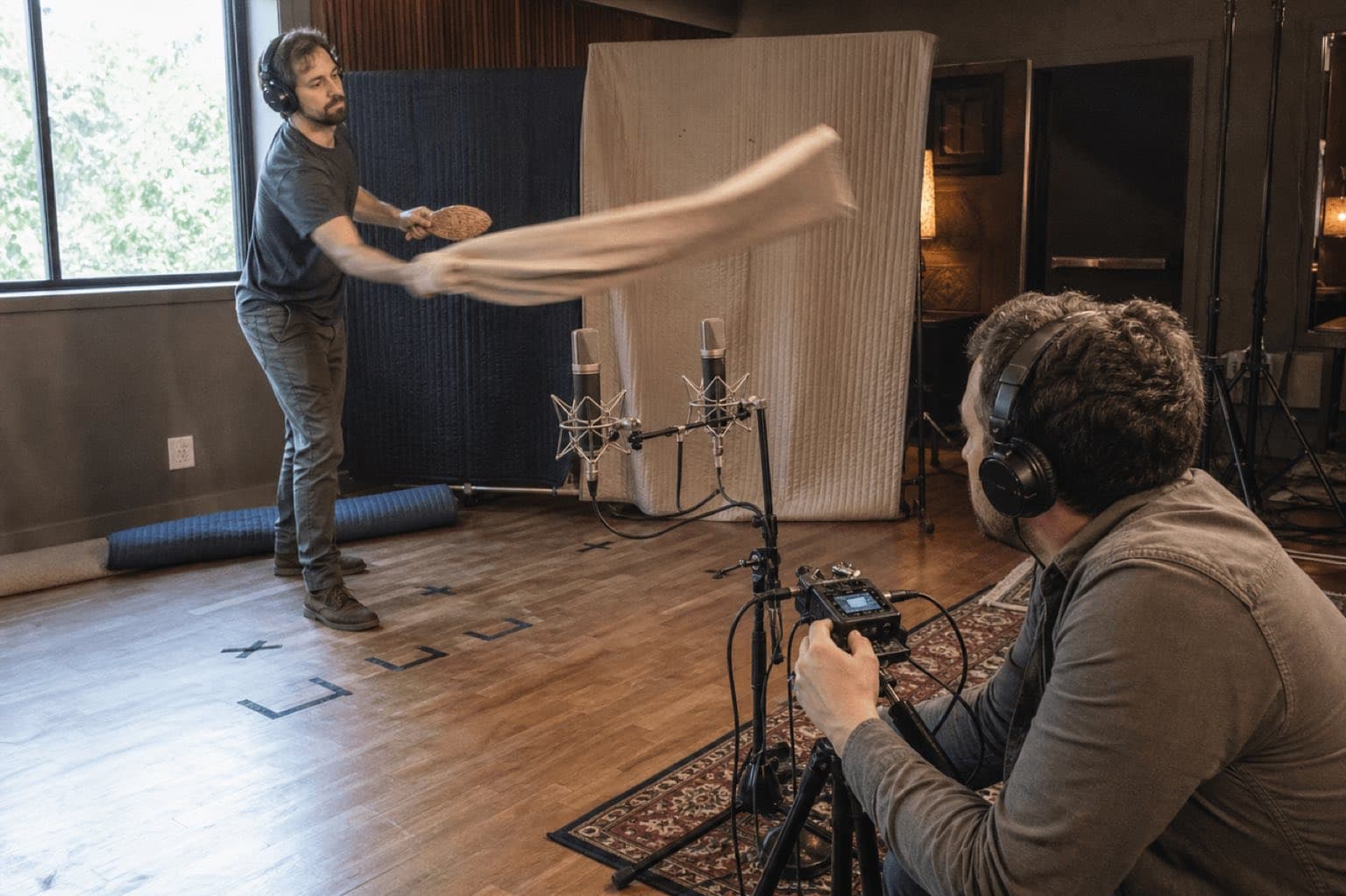
Record safe whoosh Foley
- Clear a movement zone. Mark the performer’s feet, microphone stands, cable paths, ceiling height, and a no-entry area.
- Choose compliant props. Canvas, towels, paper bundles, soft rope, brushes, lightweight woven paddles, and flexible foam boards create different air textures.
- Never swing toward a person or microphone. Rehearse slowly, keep stands outside the arc, and stop if the prop frays or the room is too small.
- Capture multiple paths. Across, past, toward-but-stopping-short, and away motions create different envelopes.
- Record speed and distance sets. Slow/medium/fast at near/medium positions provide useful controlled variations.
- Leave clean handles. Capture quiet before and after each pass plus room tone for editing.
- Log the take. Name prop, path, direction, speed, distance, microphone setup, take number, and date.
Useful source character
Heavy canvas provides a broad low-mid push; towels create soft close air; brushes add textured highs; paper gives light flutter; rope can add a narrow whip-like edge when handled conservatively; woven paddles move air with a defined center. Record the source cleanly before adding pitch, filtering, reverb, or stereo movement.
04
Shape the envelope around three moments
Prepare
The cue rises as movement begins. Keep anticipation short when the visual should feel sudden.
Cross
The loudest or brightest point follows the fastest perceived movement, closest pass, or cut center.
Release
The tail communicates distance, material, and whether the motion continues, stops, or enters a new space.
Place markers for these moments before stretching audio. Move the cross point one frame earlier and later and watch at normal speed. Time-stretching can solve duration, but extreme processing smears transients and creates metallic artifacts. Build separate short, medium, and long variants rather than forcing one file to every cut.
Pitch, filter, and pan with a reason
A rising pitch can imply acceleration or approach, while a downward shift can suggest passing away or losing energy; neither is a physical rule for every shot. Filter movement can communicate changing distance without obvious melody. Adobe’s official Premiere guidance documents time-varying pan and balance with keyframes, but spatial movement should follow picture and survive the required output channel layout. Always compare the automated version with a centered or narrower alternative.
05
Layer without turning every movement into a trailer
Air layer
Defines broad motion and duration. Keep it smooth enough to avoid sounding like broadband hiss.
Texture layer
Canvas, paper, brush, or synthetic detail suggests material and distance.
Tonal layer
Optional pitch identity can connect a brand or sequence, but may become repetitive or musical.
Landing layer
Use an impact, click, or pop only when the object visibly stops, attaches, or appears.
- Speech remains intelligible through the center of motion.
- Low-mid body survives phone playback without mud.
- High-frequency air is not piercing in headphones.
- Stereo movement collapses acceptably to mono.
- Repeated edits do not reuse an identical envelope.
- The tail clears the next line, beat, or ambience change.
- Final codec preserves the center and does not pump.
- The sequence still works with the cue muted.
Level-match variants before judging. A louder whoosh often seems “better” only because it is louder. Reserve the widest, longest, or most detailed cue for the largest movement; hierarchy makes smaller gestures feel intentional instead of under-produced.
06
Generate a whoosh sound effect with Sonilo
Use Whoosh Sound Effect for a full-bodied motion cue, Swoosh for lighter gestures, Transition when the scene change is primary, or the broader Sound Effects workspace for a coordinated set. Use Video-to-SFX when the uploaded cut should control timing.
Original 1.15-second close product whoosh moving left to right: medium canvas air body, clean soft brush detail, fastest point at 620 milliseconds, subtle low-mid weight, narrow-to-wide-to-narrow perspective, short dry release, no impact, no riser, no music, no engine, clean mono-compatible center.
Original 0.48-second lightweight title reveal: compact paper-and-air swoosh, fast rounded attack, bright but not sharp, slight forward acceleration, dry centered body with restrained stereo width, empty final 80 milliseconds for a separate impact, no tonal melody, no voice.
Generate controlled variants, level-match them, reject recognizable resemblance or movement that contradicts the shot, and save prompt, output, date, account or plan, terms, edit, and export. Review commercial-use terms for the exact release.
07
Rights, evidence, and sources
A movement is an idea; a particular recorded or produced whoosh can still be protected. The U.S. Copyright Office explains that sound-recording protection can cover the fixed series of sounds and production contribution. Use your own safely recorded Foley, an asset whose exact license covers the project, or generated output under applicable terms. Retain source URL or recording log, creator/account, license version and date, project/client/channel, edit session, and published export.
Sources
Sources
- Adobe Premiere: audio panning and balancing.
- U.S. Copyright Office: Sound Recordings.
- Sonilo official: Whoosh, Swoosh, Transition, Impact, Pop, Video-to-SFX, and Licensing.
Human review checkpoint: before publication, a named Foley artist or sound designer should repeat the prop, envelope, pan, mono, device, and export tests; a qualified rights reviewer should verify licensing and commercial-use language.
FAQ
Frequently asked questions
A whoosh is a designed movement cue whose changing loudness, spectrum, pitch, and sometimes stereo position suggest an object, camera, graphic, or transition passing through space.
Usage overlaps, but whoosh often implies more air, body, or cinematic mass, while swoosh often suggests a lighter and faster swipe. Choose from the visible motion and editorial tone rather than the spelling.
Mark the anticipation, fastest perceived movement or cut center, and release. Shape the envelope around those moments, then move the core one frame earlier and later while watching at normal speed.
Only when the picture clearly supports that direction and the playback format preserves it. Keep the essential transient and body readable in mono, because wide phase effects can disappear.
Canvas, towels, rope, brushes, lightweight woven paddles, paper, and soft foam boards can create useful air movement when used in a clear area away from people, microphones, lights, and fragile objects.
Only if the exact plan and terms cover the project. Save the prompt, output, date, account or plan, terms record, edit, and published export.
Related
Keep reading
Make motion feel intentional
Create a whoosh that follows the speed, mass, and path.
Describe the movement, generate focused variants, and sync the cross point to the edit.