Get Marketing Insights First
Subscribe to receive actionable strategies, growth tips, and industry insights delivered straight to your inbox.

Lyria 3 Pro is Google's new AI music model. Here's what it does, who it's for, and what video creators should actually know about it.
Hey creators, it’s Nico here!
If you’ve ever finished editing a video and then spent the next 45 minutes hunting for a background track that actually fits, you already know what I’m talking about.
The cut is done. The pacing is right. But the music search is still open in another tab, and you’re back to scrolling through a stock library, previewing 30-second clips that all sound like the same generic playlist.
That’s the problem Google is trying to solve with Lyria 3 Pro — their new AI music generation model that launched in late March 2026, just one month after the base Lyria 3 model debuted. I’ve been tracking what it actually does and where it fits in a real video workflow, so here’s the honest breakdown.
Lyria 3 Pro is Google’s most advanced AI music generation model. It sits inside the broader Lyria family — but the “Pro” distinction matters here.
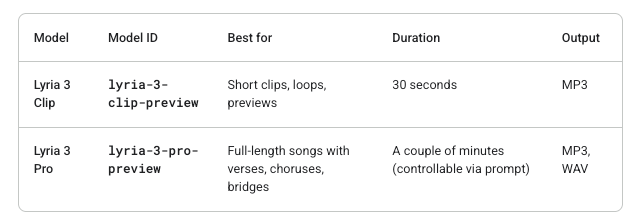
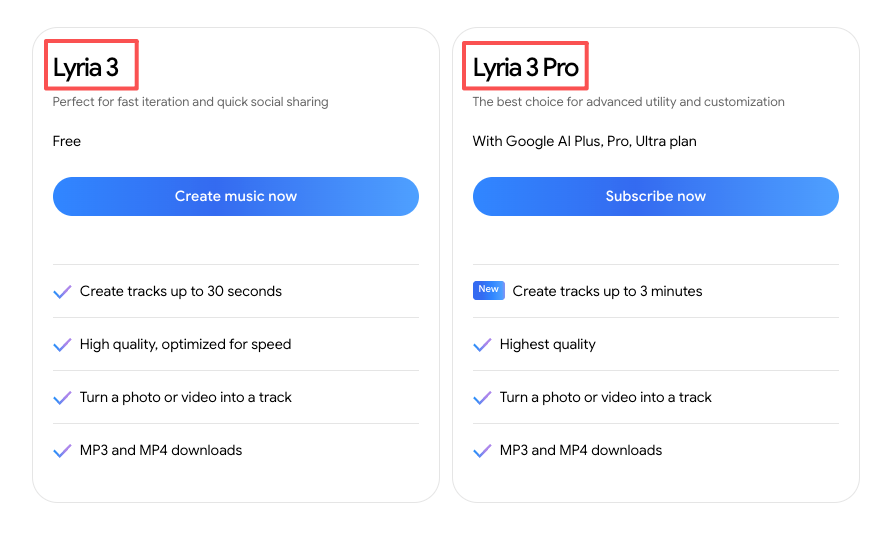
The base Lyria 3 generates 30-second clips. Fast, simple, decent for short-form content. Lyria 3 Pro generates tracks up to three minutes long, with something the base model doesn’t have: awareness of song structure. We’re talking intros, verses, choruses, bridges — the kind of arc that makes a piece of music feel built rather than generated.
That structural awareness is the actual upgrade worth paying attention to. Previous Lyria outputs were one continuous audio block. You’d get a mood, not a composition. Lyria 3 Pro lets you prompt for specific sections, so the music can evolve over time rather than staying flat.
One thing to be clear about: Lyria 3 Pro is not a standalone app. It’s a model that lives inside Google’s existing products. Right now that means Vertex AI, Google AI Studio, the Gemini API, Google Vids, the Gemini app (paid tiers), and a tool called ProducerAI.
The most straightforward way to use Lyria 3 Pro is through a text prompt. You describe what you want — tempo, mood, genre, energy level — and the model generates a track. You can also pass in an image as input, and the model will use the visual mood to influence the music. That’s useful if you have a thumbnail or still frame that captures the feel of your video.
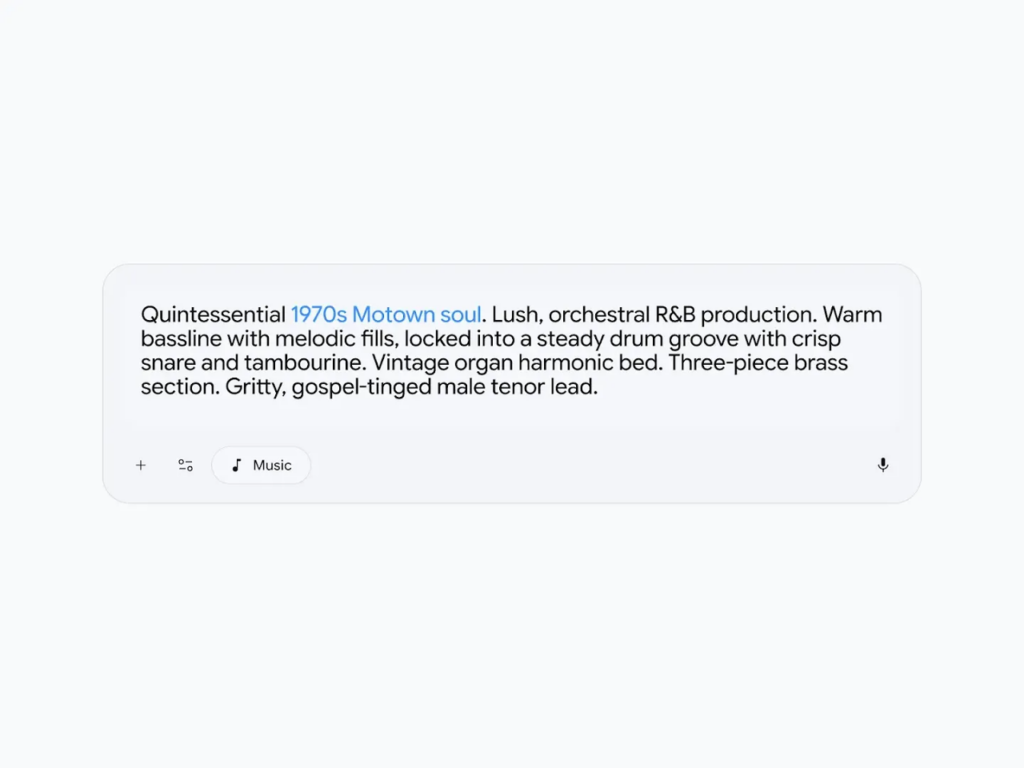
This is where Lyria 3 Pro separates from most AI music tools I’ve seen. Instead of generating a single-mood audio block, you can now define a composition arc directly in your prompt. You can specify where the intro should end, when the chorus should hit, how a bridge lands before the final section. The model takes that structural intent and builds accordingly.
For video creators, this matters. A product ad that needs a quiet open, a building mid-section, and a confident close is a different ask than a static 60-second loop. Lyria 3 Pro can, in theory, address that kind of arc.
Google demonstrated a video-background-music feature in AI Studio. Here’s how it actually works — because the description “AI understands your video” is worth unpacking precisely.
You upload a video. A Google model (Gemini Flash) analyzes the video and generates a text description of its mood, pace, and visual tone. That description is then passed to Lyria as a prompt, which generates a matching instrumental track.
So the “understanding” is real, but it’s mediated. The AI reads the video and translates it into words, then those words drive the music. It’s not direct video-to-audio generation — it’s video-to-description-to-audio. Worth knowing, because it means the output quality depends on how well the video gets described, not just how well the music gets generated.
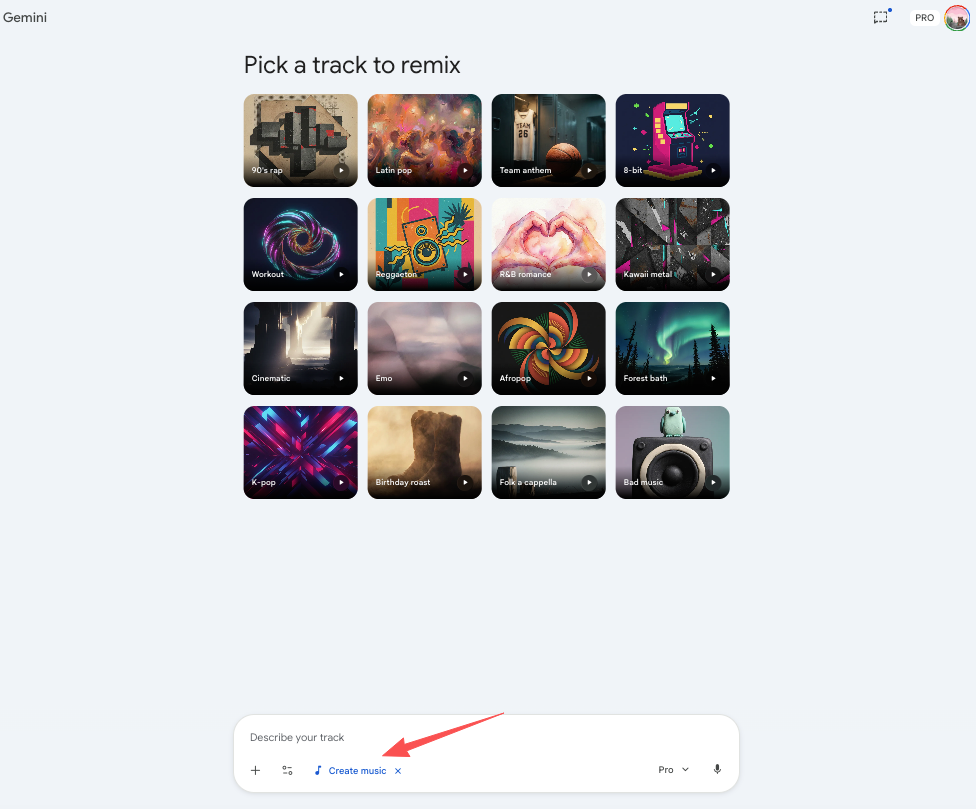
| Platform | Access |
| Gemini app | Paid subscribers (AI Plus, Pro, Ultra) — 10 to 50 tracks/day |
| Google Vids | Workspace customers + AI Pro/Ultra subscribers |
| Google AI Studio | Free testing with limits; paid API key for more |
| Gemini API / Vertex AI | Developer and enterprise access |
| ProducerAI | Free and paid; geared toward musicians iterating on full songs |
If you’re a solo creator using Premiere or CapCut to edit your videos, none of these platforms will hand you a file you can directly drag into your timeline. You generate the audio, export it, then bring it in yourself. That’s an extra step — and for creators who want the most frictionless path from video to scored output, that gap is worth acknowledging.
Lyria 3 Pro’s structural composition features make it a genuinely interesting tool for two groups:
Generating music is one thing, landing it correctly in a video workflow is another. If you’re an editor who wants to upload a clip and have a ready-to-use soundtrack appear in your timeline, Lyria 3 Pro’s current implementation isn’t that — at least not yet. Google Vids is the closest experience, but it’s tied to Google’s own video creation ecosystem, not to external editing workflows.
Who it’s probably not for right now:
The video-background-music demo in AI Studio is exactly that — a demo. There’s no published, finished product that lets you upload any video from your desktop and receive a matched soundtrack in one click. The feature exists in prototype form in AI Studio, and Google Vids offers some video-plus-music capability within its own creation environment. But if you’re editing in Premiere, Final Cut, or CapCut, you’re not getting a native integration today.
Before relying on Lyria 3 Pro for client work, be clear-eyed about where it lives: it’s still a model, not a finished creator tool.
This section matters. I want to be conservative here because the details are genuinely incomplete.
What Google has confirmed:
What Google has not confirmed:
The training-data story is meaningfully better than what Suno and Udio were doing before their lawsuits. That’s worth acknowledging. But “trained on licensed data” is not the same as “cleared for all your commercial projects.” Those are two different things.
If you’re creating monetized YouTube content or client-facing commercial work, verify the licensing terms for the specific platform you’re using before publishing. As of this writing, Google has not published a standalone commercial licensing page for Lyria 3 Pro outputs the way some dedicated music tools do.
Paying before you check the licensing terms is a mistake I’ve seen creators make too many times.
Is Lyria 3 Pro free? Free testing is available in Google AI Studio with limited generations. For regular use, you’ll need a paid Gemini subscription (AI Plus, Pro, or Ultra). API and Vertex AI access is separate and usage-based.
Is Lyria 3 Pro the same as Lyria 3? No. Lyria 3 (also called Lyria 3 Clip) generates 30-second clips, optimized for speed. Lyria 3 Pro generates tracks up to three minutes with structural awareness. They’re two distinct model variants.
Can I use Lyria 3 Pro music on YouTube? Google hasn’t published definitive guidance on commercial use for monetized YouTube content. Don’t assume “trained on licensed data” means “safe to monetize” — check the specific terms for whichever platform you’re accessing Lyria through.
Does Lyria 3 Pro actually understand my video? In the AI Studio demo: yes, with a caveat. Gemini analyzes your video and generates a text description, which Lyria then uses to compose the music. It’s not direct video-to-audio — it’s a two-step process. The quality of the match depends on how accurately the video is described.
Who should use Lyria 3 Pro right now? Developers building audio into products, creators already in the Google Workspace / Gemini ecosystem, and anyone who needs instrumental background music with some structural control and wants to avoid the copyright uncertainty that currently surrounds other AI music tools.
This time, I spent a few days carefully mapping where Lyria 3 Pro actually lives in Google’s products versus how it’s being hyped.
You can take the breakdown above as a realistic baseline before you invest time experimenting with it.
Honestly, the question I keep coming back to is this: for most video creators outside the Google ecosystem, there’s still a noticeable gap between “AI that can generate music” and “AI that actually fits seamlessly into my editing workflow.”
Generating a track that matches the mood is getting easier, but getting it cleanly into your timeline — without endless tweaks — while also feeling confident about commercial licensing? That part still takes real work.
In the short term, many editors will probably end up combining AI-generated ideas with reliable stock libraries for the most dependable results.
What about you?
What’s your current setup for sourcing music in videos? Are you still scrolling through stock libraries, previewing dozens of tracks? Or have you already switched to another AI tool?
What’s the biggest friction point for you right now? Drop your thoughts in the comments — I’d genuinely love to hear how you’re handling it.