Get Marketing Insights First
Subscribe to receive actionable strategies, growth tips, and industry insights delivered straight to your inbox.

Lyria 3 Pro, Suno v5.5, dedicated tools—here's how the AI music landscape looks for video creators in 2026 and what actually fits your workflow.
If you’ve ever spent forty minutes hunting for a track, finally settled on something “good enough,” then watched your video get muted on upload—keep reading.
Because the AI music landscape shifted pretty significantly in early 2026, and most of the coverage I’ve seen is either a press recap or a feature list. Neither tells you what you actually need to know: does this fit into a real editing workflow or not?
I’ve been tracking this space since late 2024. Here’s what the picture looks like right now.
Two things happened almost simultaneously in late March 2026.
Google released Lyria 3 Pro through Vertex AI and embedded a version of it inside Google Vids. Suno dropped v5.5 with a completely overhauled audio engine. Both arrived within days of each other.
The timing wasn’t a coincidence. The broader AI music space had been building toward a quality ceiling that suddenly got raised. What used to sound like “pretty impressive for AI” now just sounds like music—at least in controlled demos.
But here’s the part that matters for us: quality is one thing, workflow compatibility is another. A track can sound great in isolation and still be completely unusable inside Premiere at 11pm the night before a deadline.
This is how I think about the current landscape. Not by brand, but by what each category was actually built to do.
These are the tools that got famous for letting anyone create a full song from a text prompt. Suno v5.5 is the current benchmark—the audio quality is genuinely impressive, the vocal clarity is a step up from v4, and the stylistic range is wide.
But they were not built for video. Full stop.
You get a song. You take that song into your editor. You figure out the rest yourself—trimming, looping, matching the cut length, fading at the right frame. The tool does not know anything about your timeline.
For creators who want to make original music content, or who have the patience to treat audio as a raw asset, these tools are worth exploring. For anyone who just needs the soundtrack problem solved, the workflow friction is real.
This is the category that got the most press in March 2026. Lyria 3 Pro powers music generation inside Google Vids, and a version is available through Vertex AI for developers.
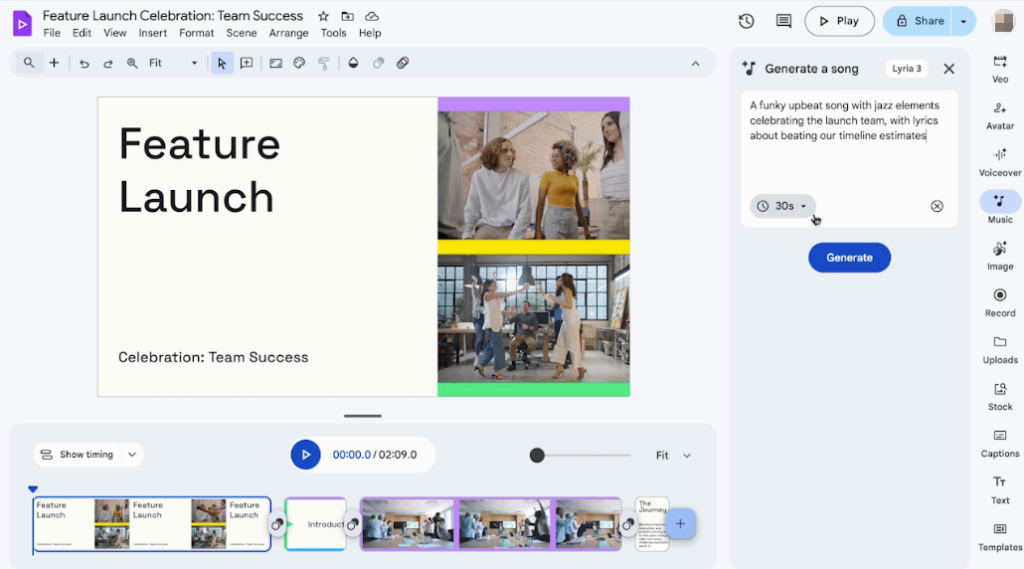
The embedded angle is genuinely interesting. If you’re already working inside Google Vids, having music generation baked into the same environment removes a lot of friction. You’re not exporting, importing, or switching apps.
The constraint is obvious: you have to be inside that ecosystem. If you’re editing in Final Cut, Premiere, or CapCut, this integration doesn’t help you directly. And Vertex AI access means API pricing territory—not a casual creator’s first stop. (Exact pricing for Lyria 3 Pro on Vertex AI hasn’t been confirmed publicly as of this writing—verify before building any cost assumptions around it.)
This is the smallest category and, honestly, the most underdeveloped one. These are tools built around the idea that you upload a video and the AI generates music for that specific video—matching its length, reading its pacing, fitting its emotional register.
The category exists. The quality varies. And the gap between what’s promised (“AI that understands your video”) and what’s actually delivered is still wide enough to matter.
This is the space I’m watching most closely, because it’s the only category that’s trying to solve the actual problem video creators have—not “generate music” but “give me a track that works with this cut right now.”
Lyria 3 Pro is a meaningful upgrade over the previous version. The generation quality is noticeably cleaner, particularly on orchestral and cinematic outputs. It handles longer duration requests better than earlier models.
The Google Vids integration is the most practical implementation for non-developers. If your team is already using Google Workspace and producing content inside Google Vids, this is worth testing. The native embedding means you can generate, preview, and adjust without leaving the editing environment.
For independent creators outside that ecosystem, Lyria 3 Pro’s relevance depends almost entirely on whether third-party tools start integrating it. That’s still early days. The Verge’s coverage offers a useful independent breakdown of what Lyria 3 Pro actually changes for non-developer users—worth reading alongside Google’s official announcement.
One thing I’d flag before anyone gets too excited: licensing terms for AI-generated music in commercial contexts are still evolving. Google has been clearer than some competitors, but “clearer” doesn’t mean “fully resolved.” If you’re producing content for clients or for monetized channels, read the current terms carefully before you rely on this for deliverables.
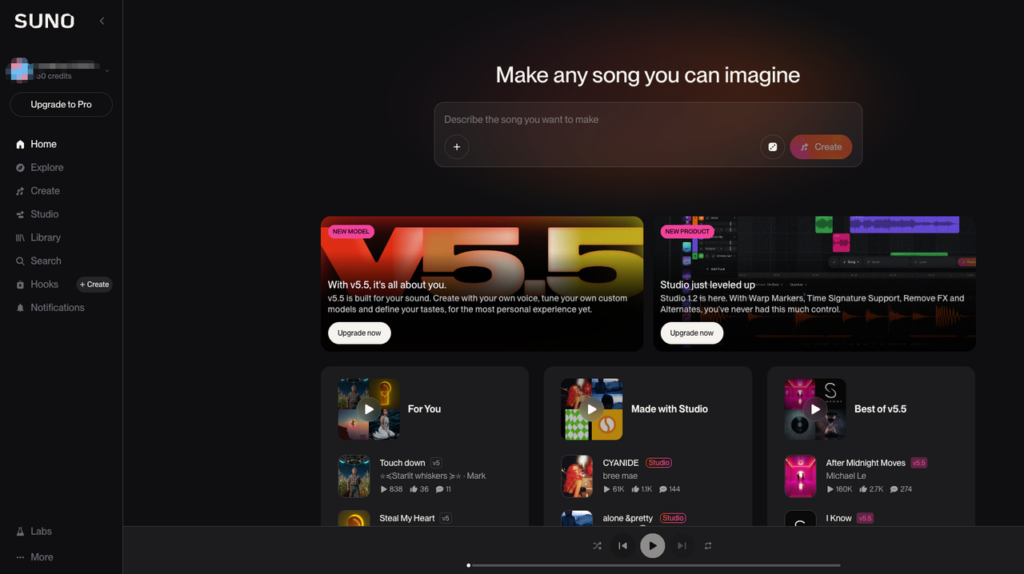
Suno v5.5 is their most polished release. The audio engine upgrade is audible—less compression artifact, better stereo imaging, more natural transitions between sections. Vocal clarity improved significantly, which matters if you’re using it to generate music with lyrics.
The plan structure stayed largely the same. Free tier gets limited generations. Pro and Premier tiers unlock commercial use and higher quality outputs.
Here’s my honest read after testing it: Suno v5.5 is the best text-to-music tool available right now if you define “best” as pure audio quality. The gap between Suno and the next competitor widened with this release.
But the workflow problem didn’t change. You’re still getting a file, not a solution. Duration matching is manual. Mood calibration happens through prompting, not through any analysis of your actual footage. If you have the time to work with it like a raw asset, the quality is there. If you need something ready for your timeline in under five minutes, you’ll hit the same friction wall as before.
I ran it across several different project types over two weeks. My conclusion: Suno v5.5 is excellent for music creation. It is not a video soundtrack tool. Those are different jobs.
I want to be direct here, because the marketing language in this space makes it easy to lose track of what’s actually being solved.
This is the one that sounds boring but matters most in practice. A 2:37 video needs a 2:37 track—or something you can loop cleanly, or fade without it feeling abrupt. Most general AI music tools give you a song. Cutting it to your exact timeline length is your problem.
Tools that genuinely auto-match to your video’s duration are rare. When they work, they save more time than almost any other single feature in this category.
This is trickier to evaluate because it’s partly subjective. But there’s a real difference between “a track in the right genre” and “a track that actually fits the emotional arc of what’s happening on screen.”
Most tools solve for genre. Fewer solve for fit. The difference shows up when you drop the music into the timeline and something still feels off even though the style is technically correct.
I’ll keep coming back to this one. Paying for a subscription does not automatically mean you can use the output for monetized content, client deliverables, or advertising. The specific terms vary by tool and by tier.
Paying before publishing is one thing. Verifying the licensing terms for your specific use case is another.
YouTube’s own documentation on copyright and music claims is clear on this point: the platform does not guarantee the safety of third-party royalty-free music claims. That responsibility sits with the creator. AI-generated music is no different. Check the current terms of whatever tool you’re using—specifically for commercial use—before you deliver anything to a client or run it in a paid campaign.
Here’s how I’d think through it depending on what you’re actually making.
If you’re a YouTuber producing long-form content: You have time to work with a tool like Suno v5.5 as a raw asset. Generate multiple options, pick the best, do manual trimming. The quality payoff is worth the extra steps if you’re not publishing at high frequency.
If you’re making short-form content at volume (Reels, Shorts, TikTok): You need speed above everything else. General generators will slow you down. Look at tools built specifically to match video duration—even if the generation quality ceiling is lower, the time savings matter more on a high-output schedule.
If you’re producing brand videos or client deliverables: Licensing clarity is not optional here. Before you use anything, confirm—via the tool’s documented terms—that your specific use case is covered. Client work, commercial distribution, paid advertising: each of these may have different requirements. Ambiguous terms are your liability, not the tool’s.
If you’re in the Google ecosystem: Test Lyria 3 Pro inside Google Vids. If it fits your existing workflow, it’s worth a real evaluation. If you’re not already in that environment, the setup cost may not be worth it yet.
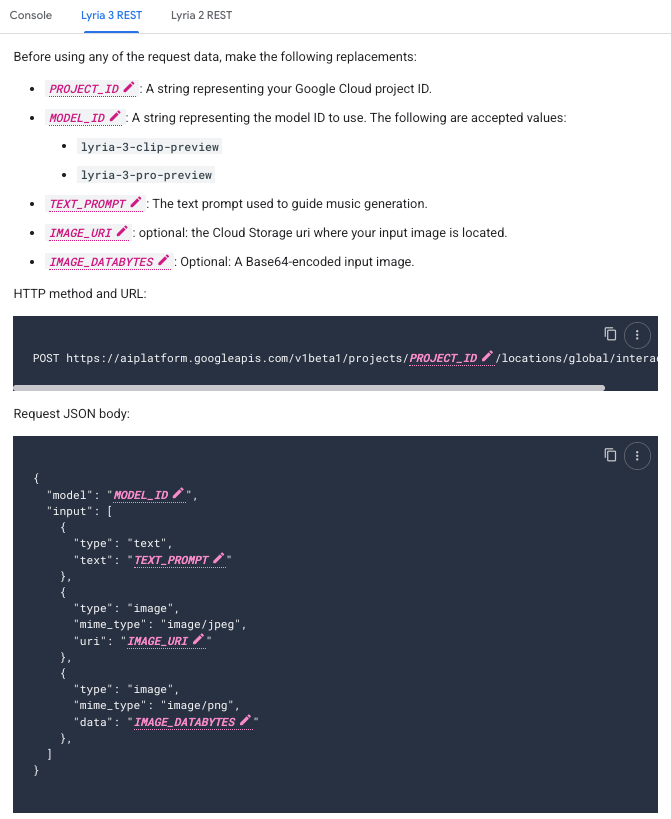
If you’re a developer or building a content pipeline:Vertex AI’s Lyria 3 Pro API documentation is worth a serious look. The API-level integration opens up possibilities that consumer tools don’t. Pricing details weren’t fully public at time of writing—check directly before planning any budget around it.
A few things I’m actively tracking heading into mid-2026.
Video-first tool development. The category is underserved relative to the actual demand. The tools that can genuinely close the gap between “generates music” and “scores this specific video” are going to have a real moment when they get the execution right. I’m expecting meaningful movement here before the year is out.
Licensing framework updates. Most AI music platforms are still operating with terms written before commercial use scaled up to where it is now. Policy updates are coming across the major platforms—not all of them will be in creators’ favor. Stay current on the terms for any tool you’re relying on professionally.
Ecosystem integrations. The more interesting story isn’t which standalone tool wins—it’s which editing environments start embedding AI music generation natively. If CapCut, Premiere, or Final Cut builds this in (or acquires a tool that does), the standalone category faces a harder road.
Is Suno v5.5 commercially licensed? The Pro and Premier tiers include commercial use rights, but the specific terms have conditions. Read the current license documentation on their site before using outputs for paid campaigns or client work—don’t rely on older summaries, as these terms get updated.
Can I use Lyria 3 Pro if I don’t have a Google Workspace account? Lyria 3 Pro is available through Vertex AI for developers and through Google Vids for Workspace users. Standalone consumer access outside those environments isn’t available in the same form as general AI music tools.
What’s the practical difference between Suno v5.5 and v4? Cleaner audio quality, better vocal clarity, more natural transitions. For pure music generation, it’s a meaningful upgrade. The workflow limitations for video use cases didn’t change.
Is AI-generated music safe from YouTube copyright claims? Not automatically. YouTube’s policies don’t distinguish AI-generated from human-generated music in terms of claim risk. What matters is whether your specific license covers the platform and use case. Check your tool’s terms and, when in doubt, go to the platform’s current policy directly.
Which tool is best for a solo creator on a budget? That depends more on your workflow than your budget. Free tiers exist for most major tools, but commercial licensing almost always requires a paid plan. If you’re producing content that gets monetized, factor the licensing tier into your actual cost comparison—not just the base subscription price.
Before you pick a tool, get clear on whether you need high-quality raw material or something that drops straight into your timeline ready to use. In 2026, those are still two different problems, and no single tool solves both equally well.
I spent the last few months tracking this space so you don’t have to do it from scratch. Use the decision map above to find the path that actually fits your workflow—not the one with the best marketing page.
What’s the part that’s slowing you down right now—the quality of what gets generated, or everything that happens after you have the file?