Get Marketing Insights First
Subscribe to receive actionable strategies, growth tips, and industry insights delivered straight to your inbox.
If you’ve ever exported a video and still weren’t sure about the background track, this one matters.
Here’s what I did last week: spent about forty minutes watching MiniMax Music 2.6 demos after it started showing up in every AI tool feed I follow. The audio quality is genuinely impressive. Some of the cover generations are hard to distinguish from studio recordings. I get why people are excited.
But then I went back to my own timeline. An 87-second brand promo, half-done, waiting for a soundtrack. And I realized — MiniMax wasn’t going to help me finish that video. Not because the model is weak. Because it’s solving a different problem.
That gap is exactly what this piece is about.
MiniMax Music 2.6 is a strong generative music model. Its clearest strengths are vocal cover generation and style-driven text-to-music output. You describe a genre, mood, and instrumentation, and it produces a track. The quality ceiling is high — noticeably higher than a lot of what was available even six months ago.
It’s also getting real attention for cover generation: upload a reference track or describe a vocal style, and the model can produce something that sounds like a produced song.
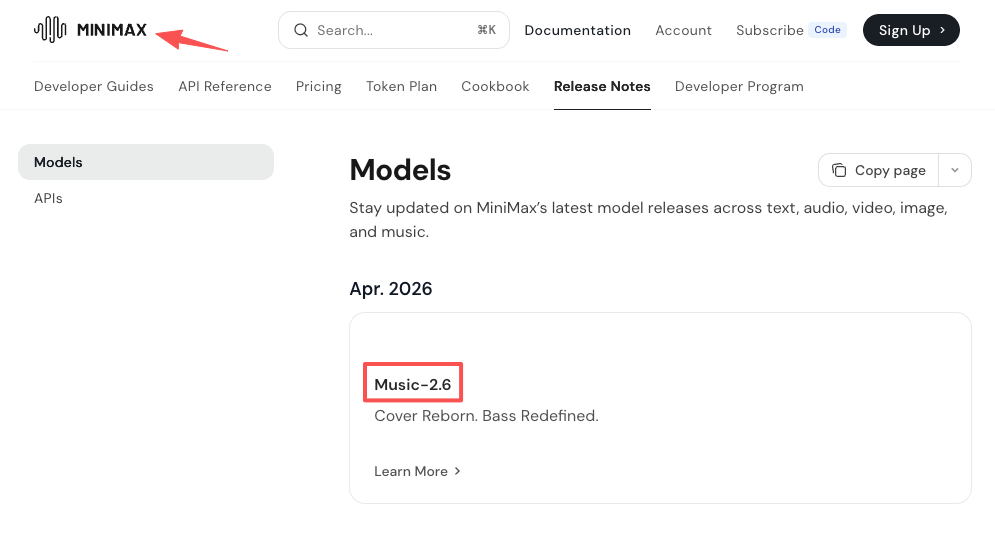
That’s a meaningful capability. For musicians, producers, or anyone who needs to prototype a full song idea, MiniMax Music 2.6 release notes show how rapidly the model has iterated — from Music 2.0 through to the current version.
If your workflow includes: creating original music content, producing podcast intros with a specific sonic identity, or experimenting with AI-assisted songwriting — MiniMax 2.6 fits that task well. The output feels intentional. It has character.
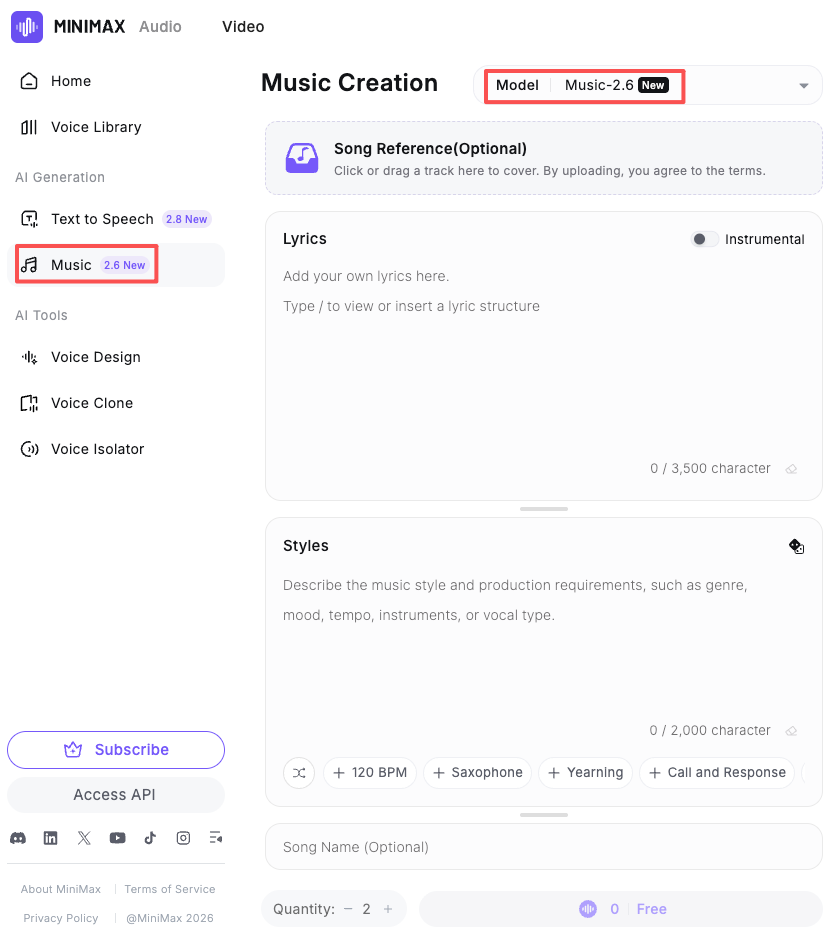
The part that doesn’t translate is the video-first workflow. There’s no mechanism that reads your timeline, matches your cut length, or accounts for the fact that your video is 2 minutes and 14 seconds long and needs the music to land at a specific beat before the final frame.
Generating a song is one thing. Getting that song to fit your video is another.
This isn’t a knock on MiniMax. It’s a workflow distinction that matters. When you’re working toward a publish deadline — a YouTube upload, a client deliverable, a social campaign — the question isn’t “is this music good?” It’s “does this music fit this specific cut, right now, without me spending another hour trimming and looping?”
Song generation tools produce outputs that work as standalone pieces. Video soundtrack tools produce outputs that work inside your timeline. The difference shows up the moment you drag that audio file into Premiere or CapCut and realize the energy peaks in the wrong place, the track ends 23 seconds too early, or the tone is slightly off from the visual mood you built.
This is where most video creators actually lose time. Not in finding a “good” track — in finding a track that’s the right length for their cut, or that can be cleanly looped, trimmed, and faded without sounding broken.
A tool that auto-matches to your video’s duration removes an entire editing step. That matters when you’re producing content regularly, not occasionally.
The clearest signal a tool is built for video is whether it takes the video as input. Not a prompt. Not a mood keyword. The actual video file. When the AI can read your footage — its pacing, visual tone, length — the output starts from a relevant reference point rather than a blank slate.
Speed isn’t just about generation time. It’s about how many rounds it takes before you have something usable. A tool that generates in five seconds but requires eight iterations to get a version that works isn’t faster than one that generates in twenty seconds and gives you three solid options in the first pass.
Reuse matters too. If you’re producing content for a client or a consistent brand channel, you want music that can be used across multiple videos without licensing friction.
Pay attention to the licensing page before anything else.
I’ve seen too many creators assume “AI-generated” means “automatically safe to post.” It doesn’t. A good license page tells you exactly what’s permitted and what isn’t — Soundraw’s music license terms are a useful benchmark for what that level of clarity actually looks like in practice: use cases are listed explicitly as OK or Not OK, with no ambiguity about commercial projects.
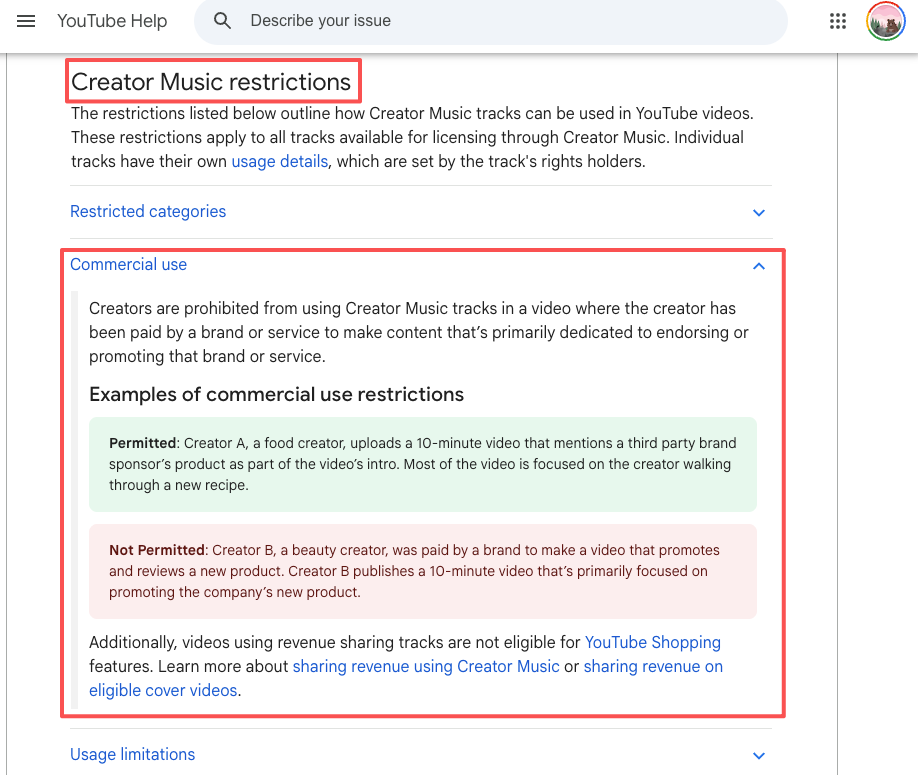
YouTube’s rules add another layer. YouTube’s Creator Music commercial use restrictions spell out exactly which video types qualify and which don’t — for instance, brand-sponsored content has specific limitations that most creators don’t read until they’re already in trouble. If a tool’s commercial use terms are buried in footnotes or use language like “for personal projects only” in the fine print, that’s a problem before you’ve even generated a single track.
Sonilo‘s core workflow is straightforward: upload a video, and the AI generates a custom soundtrack that matches the content, mood, and length. It’s not text-to-music. It’s video-to-music.
| Dimension | Assessment |
| Recommended? | Yes — for video creators who need fast, fitting soundtracks |
| Core Advantage | Video-first input; auto duration matching |
| Biggest Limitation | Less suited for standalone music creation or cover generation |
| Best For | YouTubers, short-form creators, brand video editors, ad teams |
Evidence classification:
What makes Sonilo relevant here isn’t that it beats MiniMax on audio quality benchmarks. It’s that it answers a different question. MiniMax asks: what music do you want? Sonilo asks: what does your video need?
For video creators, that second question is usually the one that actually matters at 11pm before a deadline.
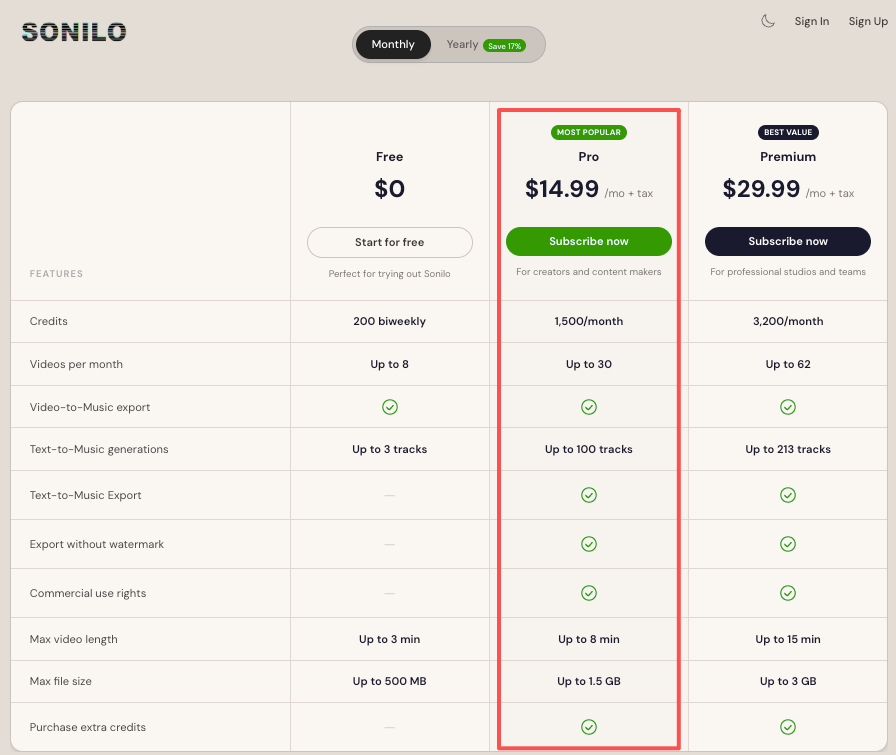
The Free plan gives you access to core generation features to test the output on your own footage. Pro ($14.99/mo) unlocks commercial licensing and removes the video length cap. If you’re producing content for clients or brand channels, the licensing clarity alone is worth knowing about before you commit to any tool. You can also read how the 2026 AI music landscape fits video workflows for a broader picture of where each tool category sits right now.
There are other tools in this space that handle different parts of the workflow:
Beatoven.ai — Supports video upload and emotion-mapped generation along a timeline. More control over the mood curve, but the workflow has more steps. Better suited for creators who want to be precise about where the energy peaks in their track.
Soundraw — Strong editor layer. You can manually adjust instrumentation per section. Doesn’t auto-match video length, so you’ll still need to trim. More appropriate for creators who have some comfort with audio editing.
Epidemic Sound / Artlist — Not AI-generated in the same way, but both have added AI matching features that pull from curated human-made libraries. The licensing infrastructure is mature and well-documented. The trade-off is that you’re selecting from existing music, not generating something specific to your footage.
| If you need this… | Consider this |
| Original songs, covers, style experiments | MiniMax Music 2.6 |
| Fast soundtrack that fits your video cut | Sonilo |
| Fine-grained control over emotional arc | Beatoven.ai |
| Strong editor + manual segment control | Soundraw |
| Proven licensing, curated human music | Epidemic Sound / Artlist |
The honest version: these tools don’t compete on the same axis. MiniMax is a music generation model. Sonilo is a video soundtrack tool. Beatoven is an emotion-mapped music editor. Choosing the wrong tool for your task doesn’t mean the tool is bad — it means the workflow doesn’t match.
Can I use MiniMax Music 2.6 for YouTube videos?
MiniMax can generate music that sounds great. Whether that music is commercially safe for YouTube monetization depends on the tool’s licensing terms, which you should read carefully before uploading. The platform doesn’t cover third-party AI-generated audio by default.
What’s the main difference between MiniMax Music 2.6 and a video soundtrack tool like Sonilo?
MiniMax takes text or audio as input and generates music as output. Sonilo takes your video as input and generates a soundtrack matched to its length and tone. If you already have a finished or near-finished video, the second workflow is usually faster and requires fewer editing steps afterward.
Do AI music generators automatically match video length?
Not all of them. This is one of the more important functional differences between tools. Auto-length matching — where the generated track is the exact duration of your video — removes the need to manually trim, loop, or fade audio in post. It’s worth checking whether a tool supports this before committing to it.
Is AI-generated music royalty-free?
“Royalty-free” is not the same as “commercially safe everywhere.” AI-generated music can have platform restrictions, commercial use limitations, or attribution requirements depending on the tool’s licensing terms. Read the actual license, not just the marketing headline.
Which AI music tool is best for short-form video ads?
For ads specifically, the key criteria are: licensing that explicitly covers commercial use, output that matches the ad’s exact length, and enough style control to match brand tone. Sonilo’s video-to-music workflow covers all three. Beatoven.ai handles the first two with more editorial control. Either is a reasonable starting point.
Selecting a tool before you know what task it’s solving is where most people waste time.
MiniMax Music 2.6 is a real achievement in AI music generation. If you’re interested in what the model can do with song creation, covers, or style-driven generation, it’s worth testing. But if your actual job is finishing a video and getting it out the door — with soundtrack music that fits the cut, covers commercial use, and doesn’t require an extra hour of audio editing — that’s a different tool category.
This time I spent the week mapping where each tool actually fits in a real video production workflow, so you can skip the comparison rabbit hole and just match the tool to the task.
What’s the last step in your video workflow that cost you the most time — finding the music, or fixing it after you found it?
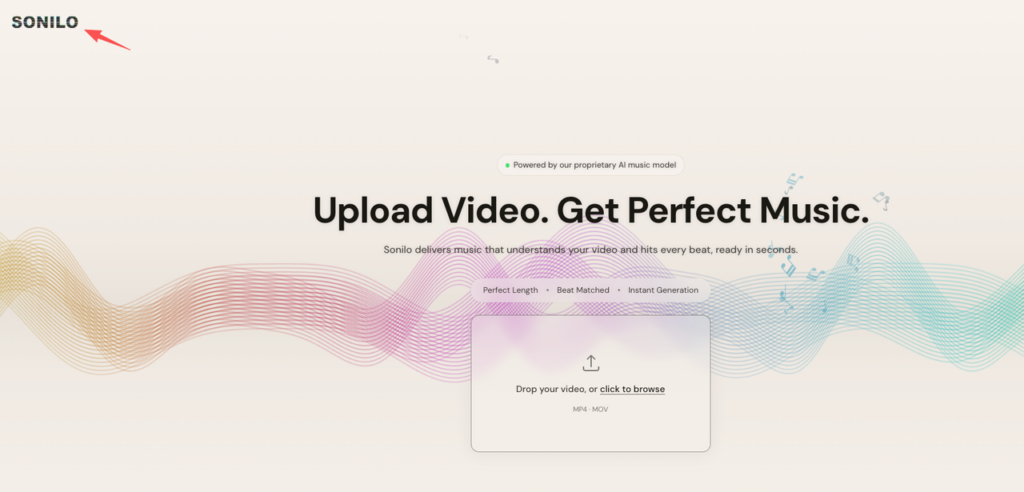
We built Sonilo for creators who want to stop manually trimming audio. Upload your first video to see how our AI automatically matches your exact cut length — it’s completely free. Get your first soundtrack right now.
Recommended Reads