Guides
Background Music for Software Demo Videos: Keep the Voiceover Clear
- Written by
- Sonilo Team
- Published
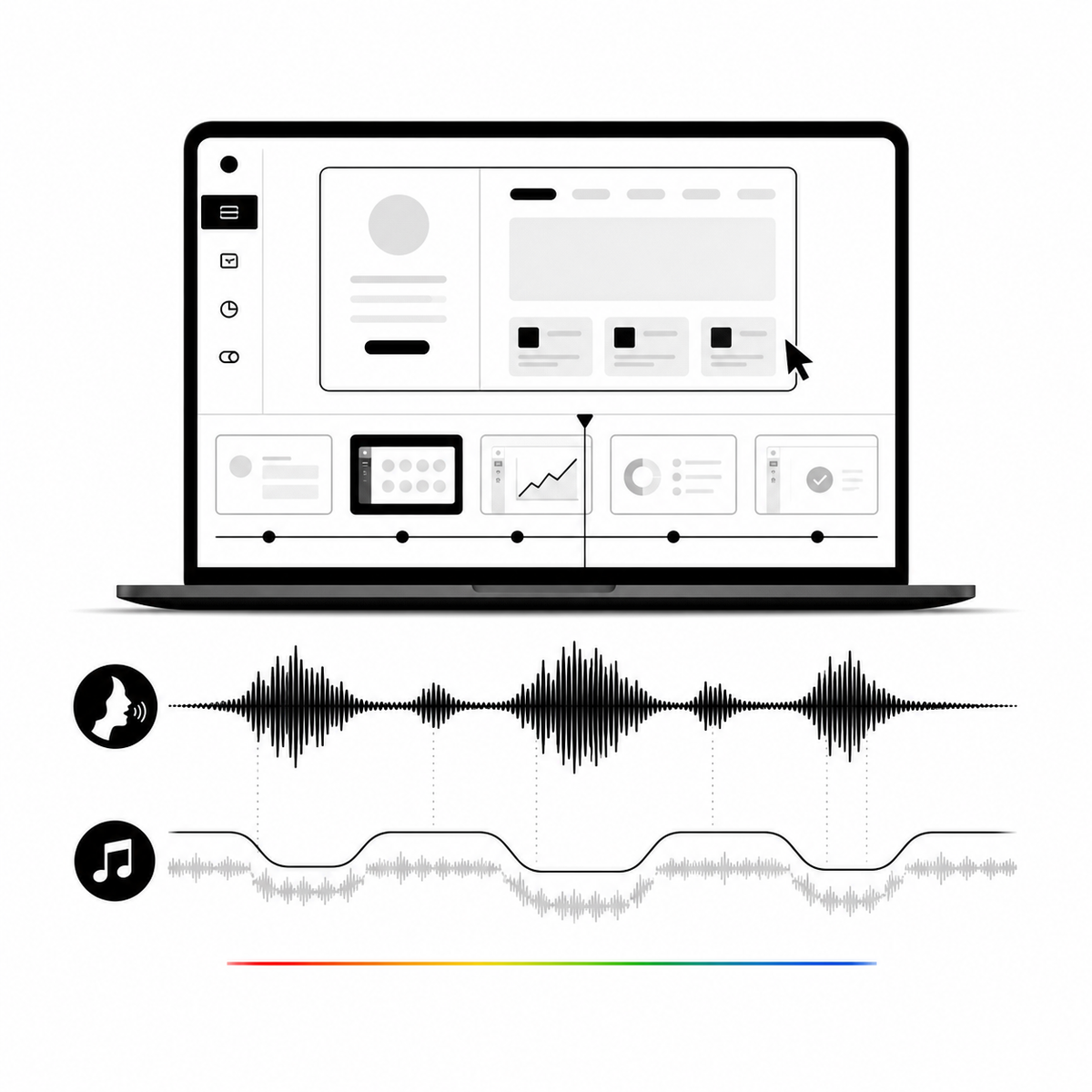
Keep the narration in front. Use a speech clearance map to decide where music stays low, where it can rise, and how to test the final export.
Background music works in a software demo when it supports the product story without competing with the voiceover. Build the soundtrack around the final narration, lower it during speech, let it rise only in deliberate gaps, and test the export on a phone before publishing.
Facts verified: August 7, 2026 By: Sonilo Team
Use a narration-first mix, not one fixed music level
Treat speech as the foreground and music as a flexible background layer. Adobe Premiere's current ducking workflow detects dialogue or voiceover and adds editable gain keyframes to the music. Its controls include sensitivity, reduction amount, fade duration, and fade position. Adobe documents each control and notes that generated keyframes can be edited manually.
Apple uses the same underlying idea in iMovie: background music is lowered while a video clip's sound is playing. Apple calls this audio ducking. These tools automate a first pass, not the editorial decision. A pause between two short phrases may be too brief for a musical rise, while a silent product reveal may deserve one.
Build a speech clearance map before adjusting volume
This reusable map turns a finished demo script into explicit mix decisions. It is designed for a 60-second software demo, but the method works at any length.
- Mark every interval containing narration.
- Add a short transition zone before and after each speech interval.
- Label intentional silent moments, such as a logo reveal or completed workflow.
- Keep music reduced across tiny pauses inside one sentence or thought.
- Raise it only where the product story benefits from a clear musical beat.
Example:
- 0:00–0:04: product hook, narration present, music reduced.
- 0:04–0:06: interface reveal, no narration, brief controlled rise.
- 0:06–0:28: workflow explanation, music reduced continuously.
- 0:28–0:31: completed action, no narration, modest rise.
- 0:31–0:53: benefit and proof, music reduced continuously.
- 0:53–1:00: call to action, keep the voice clear and end on a musical phrase.
The information-gain asset is the decision rule: merge nearby speech intervals when the gap is shorter than the fade out plus fade in. For example, if each transition takes 0.4 seconds, a 0.5-second pause should remain one reduced-music region because two complete transitions would need 0.8 seconds. This prevents the distracting pumping that can happen when automation reacts to every breath.
Set ducking from the shape of the narration
Start with your editor's automatic ducking, then listen and revise the keyframes. Adobe says faster fades suit fast speech and fast music, while slower fades are more appropriate behind voiceover. It also allows the fade to land outside, inside, or across the dialogue boundary. Those options are documented in Premiere's Essential Sound workflow.
Use the controls as questions:
- Sensitivity: which spoken phrases should trigger a reduction?
- Reduction: how far must the music move back for every word to remain easy to follow?
- Fade duration: does the transition feel smooth at this speaking pace?
- Fade position: should the music already be down before the first word?
Do not copy a universal decibel value from another project. Voice recording quality, arrangement density, and playback device all change the result. If the narration itself is noisy or uneven, repair that first. Adobe's dialogue guidance separates noise repair, dynamics, EQ, and vocal enhancement from music ducking. Adobe explains these dialogue-clarity controls here.
Choose music that leaves room for the product explanation
A mix is easier when the track already fits the job. For a voice-led demo, prefer an arrangement with a stable pulse, limited melodic competition during explanation, and a usable ending near the call to action. Dense vocals or abrupt drops can force more corrective editing.
Finish the picture and narration before generating or selecting the soundtrack. If the cut changes later, revisit the speech clearance map rather than stretching old automation across new timings. Our video-to-music guide explains how a footage-first soundtrack workflow starts from an edited timeline. For a broader rights checklist, see how to add music to a video without copyright surprises.
Check the license for the way the demo will be used
Mix quality and permission are separate checks. A clear voiceover does not make a track usable in a paid ad, monetized tutorial, sales page, or client deliverable.
YouTube says creators need the necessary rights to commercially use every visual and audio element in monetized content. It also notes that a license's scope, limitations, and commercial permissions determine whether third-party audio may be monetized. Read YouTube's monetization guidance. Check the controlling license for the channel, campaign, territory, and client use you actually plan, and save the record with the project.
This article provides an editing workflow, not legal advice. If a license is unclear, ask the provider or counsel before launch.
Run three export checks
First, listen once without watching. Every word, product name, and call to action should remain understandable. Second, play the export through a phone speaker. YouTube warns that poor mono compatibility can reduce audio quality or even mute elements when stereo audio is converted for mobile playback. Its upload troubleshooting page recommends checking phase and supported audio settings.
Third, watch at low playback volume. The music should still signal momentum, but the product explanation should survive. Also confirm that the soundtrack ends intentionally rather than being cut mid-phrase. Apple documents clip-level volume controls and fade handles in iMovie, so even a simple editor can support this final pass. See Apple's audio adjustment guide.
When not to use background music
Leave music out when the demo depends on subtle interface sounds, when the recording is already difficult to understand, or when a compliance review requires an unambiguous spoken record. Silence is also useful for dense setup instructions. Music should earn its place by improving pace or emphasis, not by filling every second.
A practical handoff checklist
- Picture and narration are final before the music pass.
- Every speech interval is marked.
- Short pauses are merged when full fades cannot fit.
- Automatic ducking keyframes are reviewed by ear.
- Product names and the call to action remain clear.
- Planned usage is covered by the music license.
- The export passes phone, mono, and low-volume checks.
- The project folder keeps the license record and final mix notes.
If you want a soundtrack shaped around the final cut, upload your product demo to Sonilo. Keep the footage in control, then review the mix against the speech clearance map before publishing.


