Guides
Adobe AI Sound Effects for a Finished Video Cut
- Written by
- Sonilo Team
- Published
For Adobe AI sound effects, start with the timeline that already holds your picture, dialogue, and music. If you edit in Premiere, generating there lets you judge a cue beside the tracks it must live with. Firefly’s browser editor provides a separate route for cuts you are working on online.
The choice matters before you write a prompt. A bottle touching a counter needs a convincing contact sound, a sensible tail, and room beneath the next sentence. Here, we’ll follow that one illustrative event through generation and revision, without treating either editor as an automatic sound designer.
Quick Fit for Video Editors
Adobe’s sound-effect generation is worth considering when you can describe a missing sound and want to audition it inside an Adobe edit. The practical advantage is hearing the candidate with the picture, rather than deciding from an isolated download.
Start in Premiere when the existing project contains your dialogue edits, music automation, and final scene timing. Start in Firefly Video Editor when the cut is already there, or a browser timeline is sufficient for the work you need to finish.
Neither choice establishes which output sounds better. For a familiar tap that a licensed library already supplies, another generation may add work without improving the shot.
Which Adobe Editing Setup Should You Start In?
Use the editor that preserves the most useful context around the event. That usually means keeping the real narration and music close while you audition, rather than rebuilding their relationship in a second project.
Firefly Video Editor
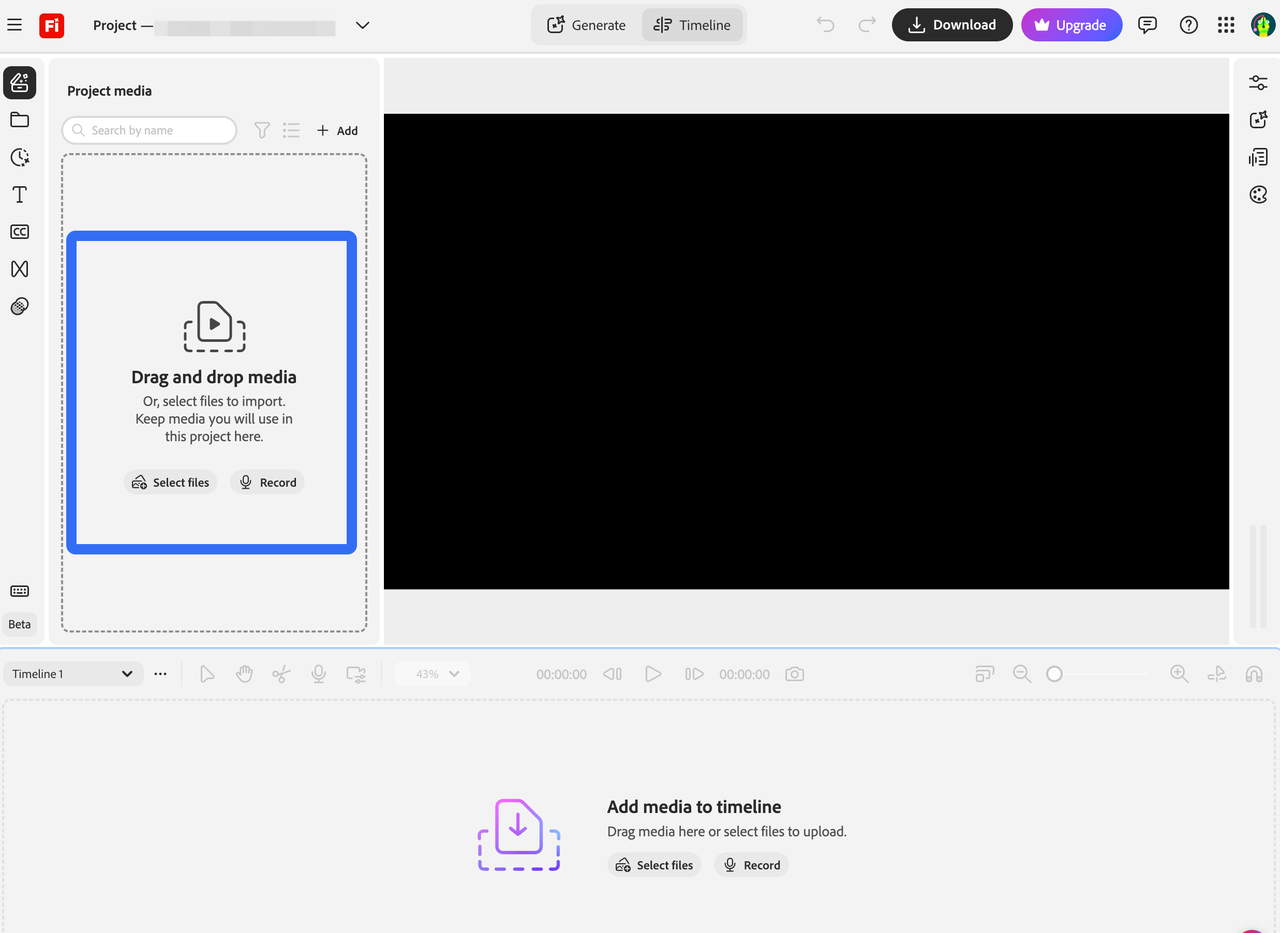
As of October 13, 2026, Adobe still labels its browser video editor beta. Its timeline sound-effects route starts at Timeline on the Firefly homepage. Open a project, add the cut, then choose Generate media beside the preview and select Sound effects.
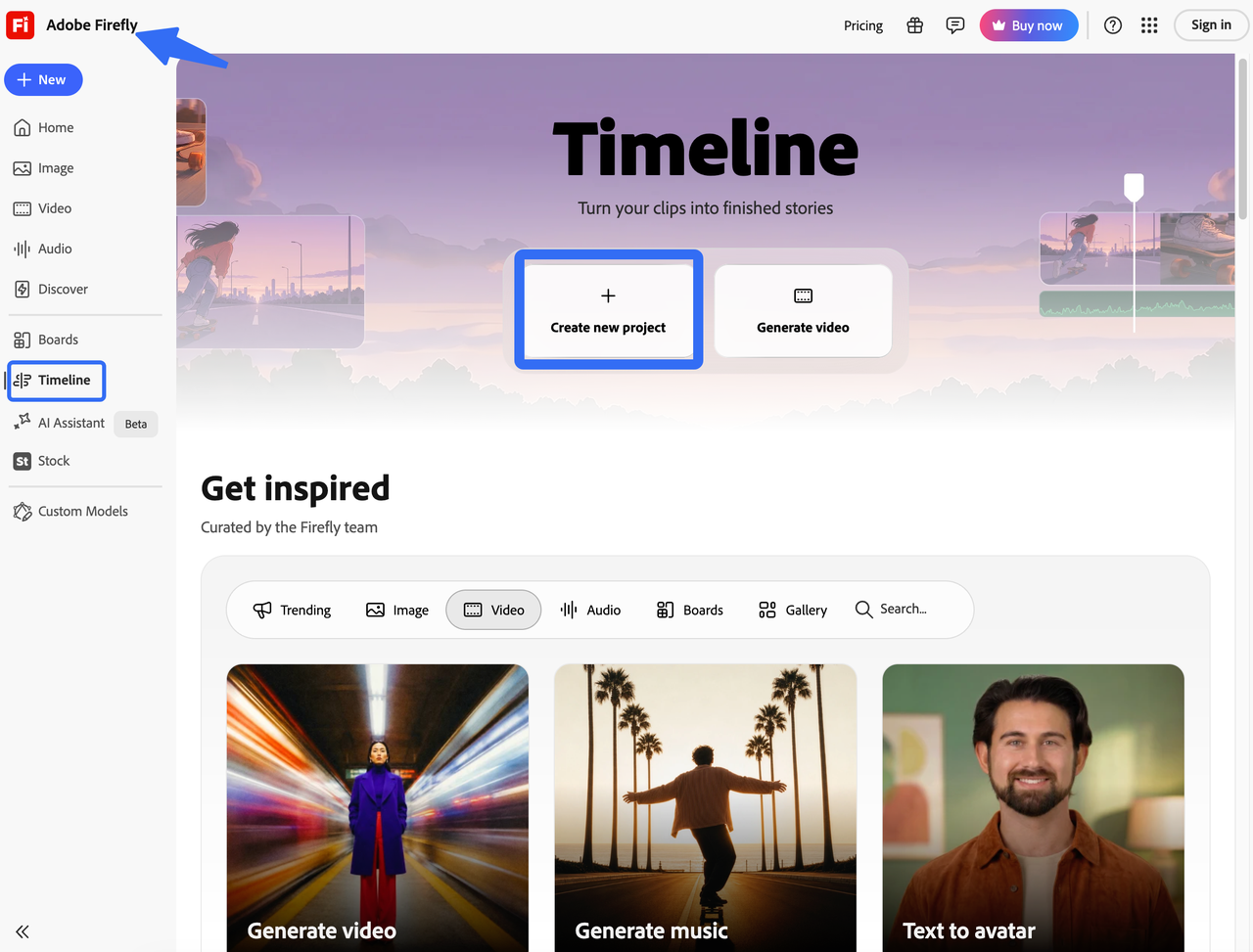
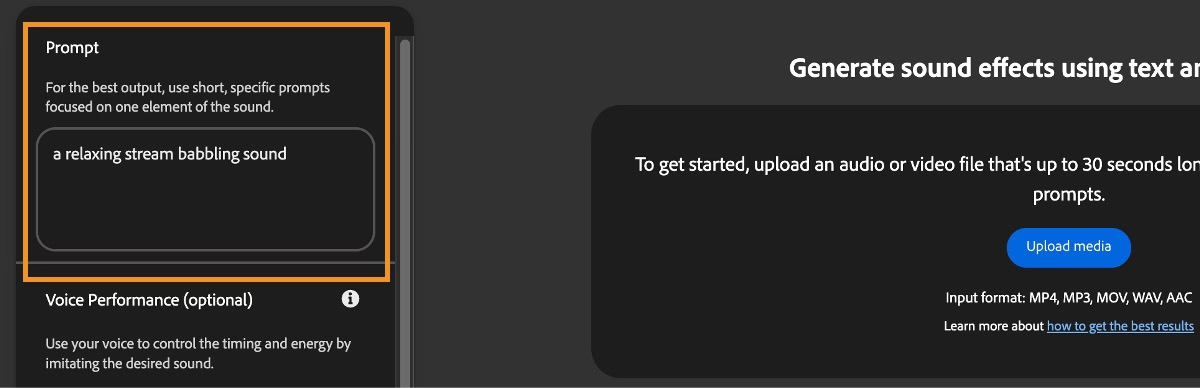
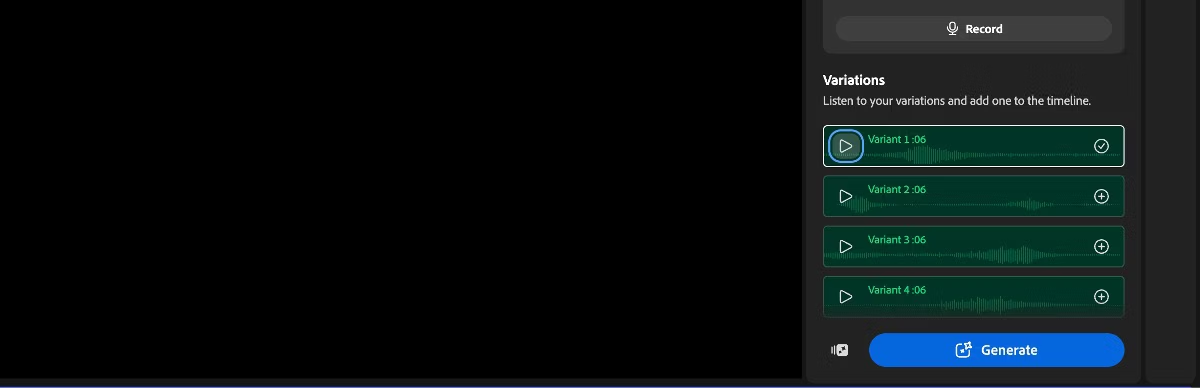
Enter a description and set Duration before generating. Preview a variation with the video, then add the selected cue to the timeline. This makes the browser useful for trying an effect against a shot without first assembling a desktop project.
Keep the original editing project if your uploaded cut is a flattened export. The browser copy does not magically recover its separate dialogue, music, and ambience tracks.
Premiere Timeline
Premiere’s Generative Media Tool generates sound effects directly in the sequence. Adobe lists it in the September 2026 release, version 26.5, so older beta tutorials are not the whole current picture.
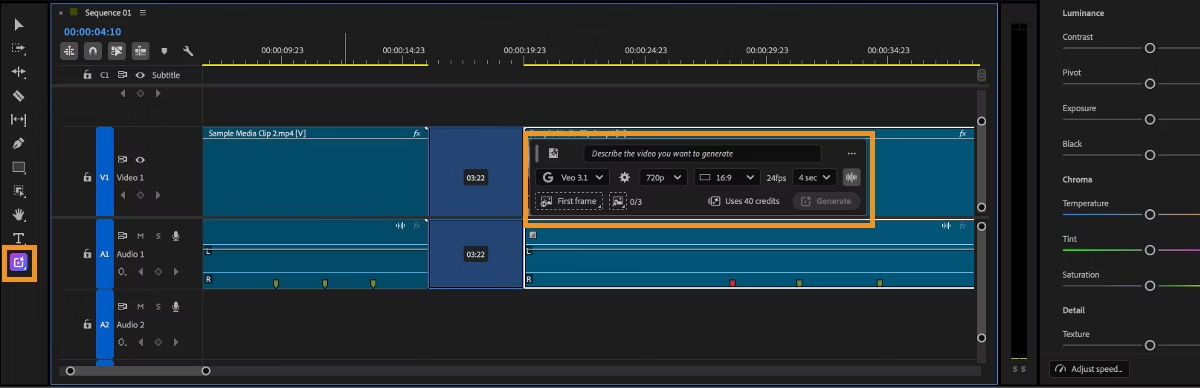
Select the tool in the Tools panel and drag across the timeline range where the cue belongs. Configure sound-effect generation in the task bar, enter the prompt, review the credit estimate, and generate. Adobe’s timeline generation steps describe that range-and-prompt process.
Choose this route if you need the bottle sound beside an existing voiceover and carefully balanced music. A range in the timeline tells you where to work; it does not prove the audible contact inside the result lands on the right frame.
Build One Sound Effect for a Finished Cut
Use the bottle placement as a single sound task. Keep the picture fixed and decide whether you are replacing unusable location sound or adding a detail the original recording lacks.
If the original contact already feels believable, a quiet addition may be enough. Replacing everything can erase small handling noises that help the bottle feel physically present.
Describe the Visual Event
A useful prompt names the object, surface, action, and listening distance. For this example, try:
One glass bottle set gently onto a dry wooden counter, close perspective, a small solid contact with brief glass resonance, quiet room, no music or voices.
This is a suggested prompt, not a reported generation. If the result misses, its details give you something specific to change. Correct the material, the force of the placement, or the length of the ring.
Avoid requesting the entire scene in one cue. A bottle contact, footsteps, a fridge hum, and a transition swell need different timing and mix decisions. Keeping them separate makes it easier to remove the one that distracts.
For client footage, confirm permission for cloud processing before adding it to Firefly. Check Adobe’s input-rights terms and privacy policy for unreleased or sensitive material. Being allowed to edit a file does not automatically mean you can upload it to another service.
Place and Audition the Cue
Find the frame where the bottle actually touches the counter. The hand’s approach is useful visual preparation, but the contact needs its own audible moment.
After adding a variation, listen for the contact within the file. Leading silence or a preliminary movement can mean that aligning the clip’s left edge still leaves the impact late. Move or trim the cue until the action reads naturally.
Play through the next spoken line, not just the impact. A bright glass ring may be pleasant alone and still occupy the same moment as an important word. Try lowering it or shortening its tail before discarding an otherwise useful contact.
Audition alternatives at comparable levels. The loudest bottle sound can make a gentle placement look like a hard knock. Keep the version whose weight fits the hand movement, then mix it into the scene.
When Does the Cue Need Another Pass?
Generate again when the sound describes the wrong physical event, or ordinary editing cannot make it fit. If the contact is convincing and only arrives late, moving it may solve the problem without spending more credits.
For the bottle, diagnose the mismatch before revising:
- Too heavy: Ask for a softer placement and lighter contact. Lowering volume alone may leave the sound of a dropped object.
- Wrong material: Refine the bottle and counter description. A metallic clang does not become glass just because it is quieter.
- Too much room: Request a drier sound or shorter resonance. A long echo can imply a space the picture does not show.
- Too much after the impact: Trim or fade a usable tail. Regenerate if removing it makes the contact unnaturally abrupt.
In Firefly Video Editor, switching within the same variation set replaces the timeline audio. A new set or changed prompt/duration creates new timeline media. Keep track of the accepted take rather than assuming every fresh generation overwrites it.
In Premiere, the AI badge reopens generation settings; generated assets are organized in Generation history. Save the take you approve with the project, especially if someone else will reopen the sequence.When the picture changes, replay both the new contact and the following line. A cue that fit the previous shot may now ring across a cut into a quieter scene.
Current Access, Credit, and Usage Checks
Check the installed Premiere version, your account’s feature access, and the generation estimate before planning repeated attempts. A Premiere subscription and a visible AI tool do not, by themselves, tell you how much premium generation your account includes.
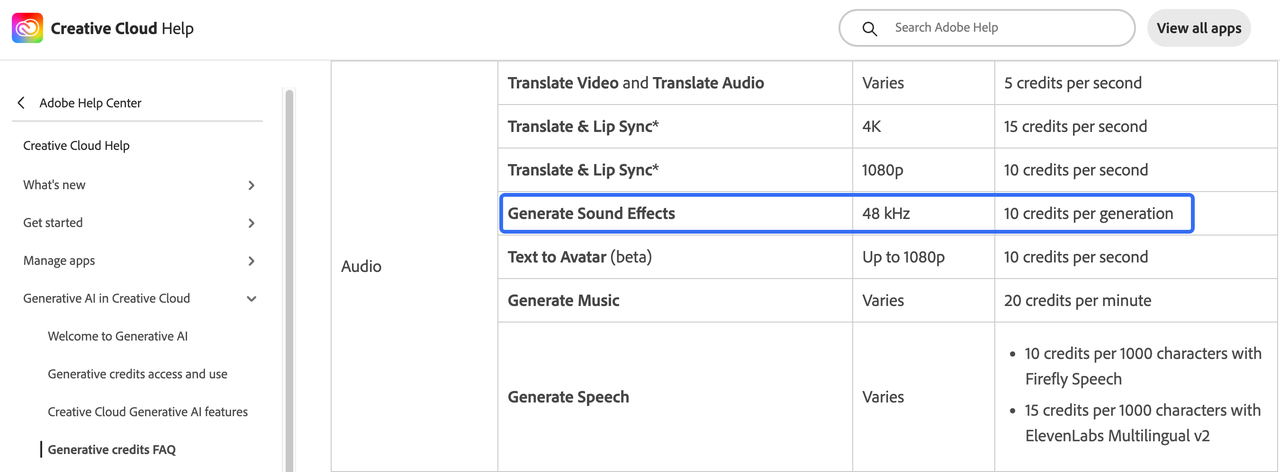
The current charge for Generate Sound Effects at 48 kHz is ten credits per generation. That is a credit rate, not a dollar price or a measured turnaround time. Confirm the estimate shown for the actual feature before running another pass.
Firefly also has country and account eligibility requirements. Its availability restrictions include Russia, Belarus, and China. Do not treat a translated website or a region selector as proof that generation is available to an account there.
For publishing, Adobe generally permits commercial use of Firefly output, including beta output unless the product explicitly says otherwise. That permission remains subject to your applicable agreement and the current Firefly usage conditions. It does not clear third-party material already in your video or guarantee that every generated sound is legally risk-free.
This article provides general information, not legal advice. Check the applicable Adobe terms and any product-specific restrictions for the intended delivery. Keep the relevant generation details with the approved audio, so the next editor knows where it came from.
Limitations and Trade-Offs
Timeline generation removes some file shuffling, but choosing the right material, weight, and acoustic space still takes judgment. The generator cannot know that your quiet product demonstration should resist an exaggerated impact unless you communicate and check that choice.
Firefly’s documented Video Editor variations are limited to thirty seconds each. That can cover a contact and its decay, but it is not a promise of a continuous sound bed for an entire longer film.
The prompt-driven SFX route also differs from other Adobe media tools. Firefly’s text-to-sound-effects feature produces effects and ambience, not speech or music. The partner video models shown elsewhere in Premiere are not evidence that the same models generate standalone SFX.
If you are choosing by input rather than by Adobe membership, the AI sound-effects tool comparison covers text-, voice-, and footage-led starting points. Sonilo publishes this article and that comparison; it is also the provider of the video-led option discussed below.
FAQ
Does Firefly currently require English prompts for sound effects?
Yes—for the Firefly Video Editor route covered here, Adobe currently specifies English-only sound-effect prompts. A localized interface or Firefly’s wider multilingual capabilities does not establish another language for this feature. Describe the event in English, preserving the material and action rather than relying on a literal translation of “cinematic sound.”
Can a nonverbal recording guide sound-effect timing in Firefly?
Yes. With voice-guided sound effects, a vocal imitation can provide timing and energy alongside the text description. The separate Voice to sound effects page accepts an uploaded recording or a new recording; Video Editor offers Voice timing recording. This guides an effect, rather than generating spoken dialogue or sung lyrics.
How many sound-effect variations does Firefly create for one prompt?
The Video Editor guide currently specifies four variations per generation. Preview them with the same picture before selecting one. If none describes the bottle contact convincingly, refine the prompt rather than assuming four options guarantee a usable take. This documented count should not be automatically assigned to every Adobe generation interface.
Can I generate an Adobe sound effect without enabling my microphone?
Yes. Text prompting works without a voice performance; microphone access is needed only when you choose live recording. You can audition a written description first and leave recording disabled. If you use an uploaded recording through the separate voice-guided page, permission to process that file is still necessary even though the microphone stays off.
Are Adobe-generated sound effects editable after they enter the timeline?
Yes. Firefly Video Editor and Premiere add generated effects as editable audio clips. Moving, trimming, and changing a clip’s level are different from changing the sound it contains. If the bottle still sounds like metal, an ordinary timeline adjustment may not fix its material. You may need to generate a different sound, even though the clip itself remains editable.
Conclusion
For one missing cue, Adobe AI sound effects make most sense in the timeline where you can hear their consequences immediately. Keep the bottle contact modest, let its ring finish naturally, and leave the next sentence easy to follow.
If describing and positioning events one by one is the slow part, Sonilo offers another route: generate sound effects from the video itself. Review those cues against the same actions and dialogue. A believable contact is enough; the shot does not need to advertise how its sound was made.
Related Posts
- Free Sound Effects for Video Editing: Libraries vs AI
- How to Add Sound Effects to DaVinci Resolve
- Foley Artist Sound Effects: How They Are Created for Video
- Best Sound Effects Apps for Video Creators in 2026
- Best Intro Drop in Sound Effects for Video

