Guides
Good Music for History Videos: Match Tone and Drama
- Written by
- Sonilo Team
- Published
Read the narration aloud before opening a music search tab. If the script is carrying dates, names, quotations, and competing interpretations, the soundtrack has to make room for all of them.
That is the practical test for good music for history videos: it should help viewers follow the story without telling them what to believe before the evidence does. The right choice depends less on whether a track sounds “historical” and more on what each scene needs to explain, reveal, or let sink in.
Let the narration lead the soundtrack
In most history videos, the voiceover carries the argument. Music can shape attention, emotional momentum, and how viewers interpret a scene. In a peer-reviewed study, changing the soundtrack altered viewers’ impressions of the same ambiguous visual scene, including its character, atmosphere, and possible narrative direction. The study was not specific to history videos, but it supports treating music as part of the editorial framing. How Soundtracks Shape What We See
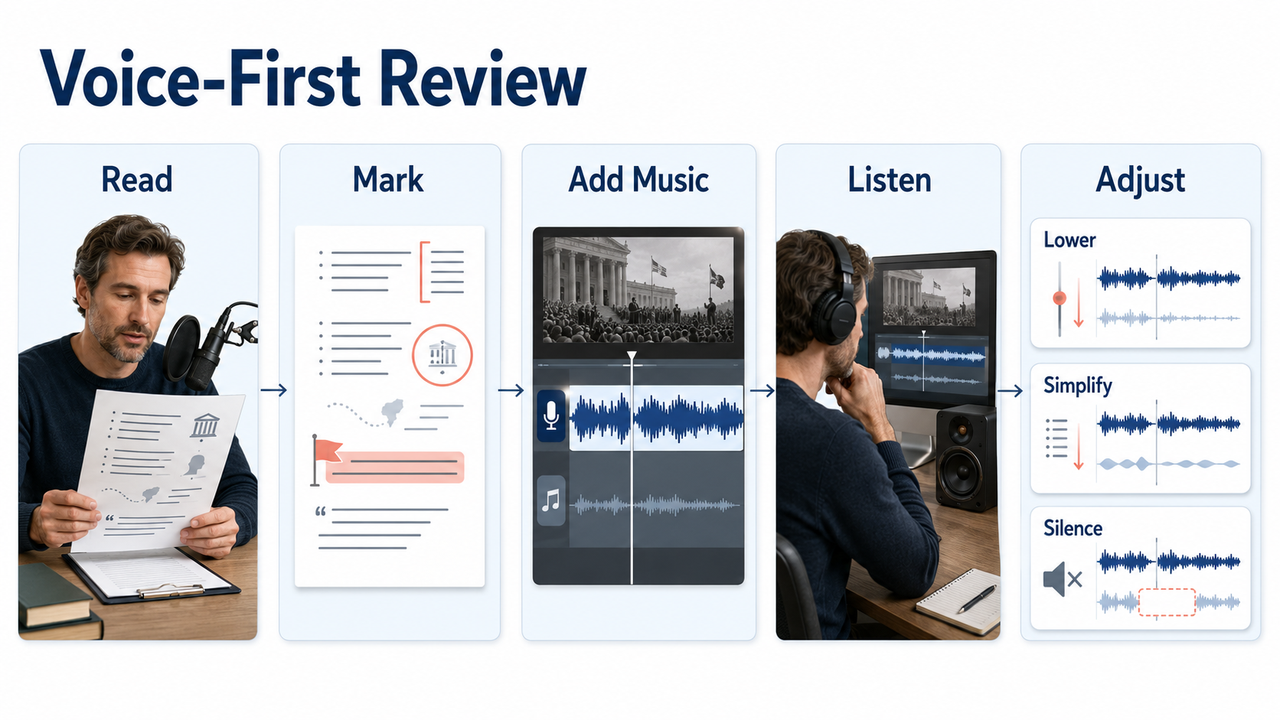
Start by marking the narration before choosing a track. Note where the script introduces unfamiliar names, moves between locations, quotes a source, or explains a chain of events.
Then listen for the narrator's natural rhythm. A pause after a consequential statement may work better without music at all. Choosing narration background music this way keeps the soundtrack tied to comprehension rather than to a vague mood.
Do a voice-first review after the first music pass. Play the sequence on ordinary speakers, look away from the screen, and ask whether every important word remains easy to follow. A peer-reviewed broadcast-audio study found that reducing background level consistently reduced listening effort. If the track attracts attention whenever the script becomes dense, simplify or lower it before changing the narration. Dialogue Enhancement and Listening Effort
Choose tone by story function
A single history video may need curiosity, tension, distance, grief, or reflection. Treat those as scene functions, not as instructions to find one genre for the entire edit.
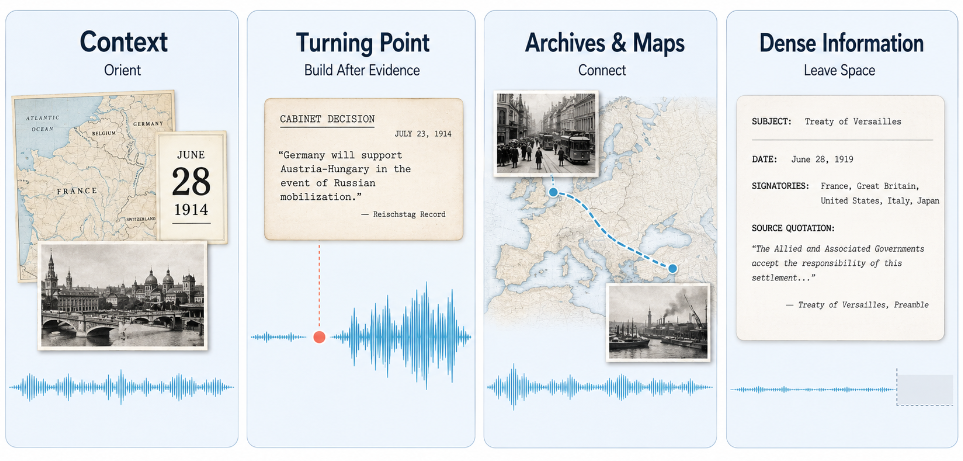
Useful history video background music changes its role as the story changes. It can orient the viewer during setup, tighten the pace around a turning point, or connect a sequence of still materials. The important question is what the scene is doing at that moment.
Context-setting sections
An opening section often has to establish time, place, and the central question at once. The music should give the sequence forward motion without crowding that frame of reference.
Avoid making the introduction sound more conclusive than the script is. If the narration is presenting uncertainty, competing accounts, or conditions that will matter later, a heavily resolved cue can imply that the answer is already settled. A restrained texture or simple pulse may support orientation without announcing a verdict.
Watch how the cue interacts with titles, establishing images, and the first map or date card. One clear musical idea is easier to read than several rapid changes competing with new information.
Conflict or turning-point scenes
Turning points can support more intensity, but the increase should follow the evidence on screen. Let the narration identify the decision, confrontation, discovery, or consequence before the soundtrack reaches its strongest moment.
This is where dramatic music for videos can easily overstate the scene. A rising cue may frame hesitation as certainty, disagreement as villainy, or a setback as inevitable tragedy. That does not mean avoiding drama; it means earning it through the edit.
Build intensity with more than volume. Increasing rhythmic activity or introducing a new layer creates momentum while preserving control over how strongly the scene is framed.
Archival photos and map sequences
Still images and maps often need musical continuity because they do not supply much motion of their own. The soundtrack can create progression across pans, labels, routes, and changes in scale.
Do not accent every zoom, pin, or image change. That can make source material feel like a slideshow template. Save musical changes for informational transitions: a move to a new location, a shift in the timeline, or the moment an image gains new meaning through the narration.
The same principle applies to music for educational videos. Movement should clarify the lesson, not manufacture urgency. If viewers are reading a caption or comparing two positions on a map, a stable musical passage may serve the scene better than a succession of hits.
Check the rights in archival material
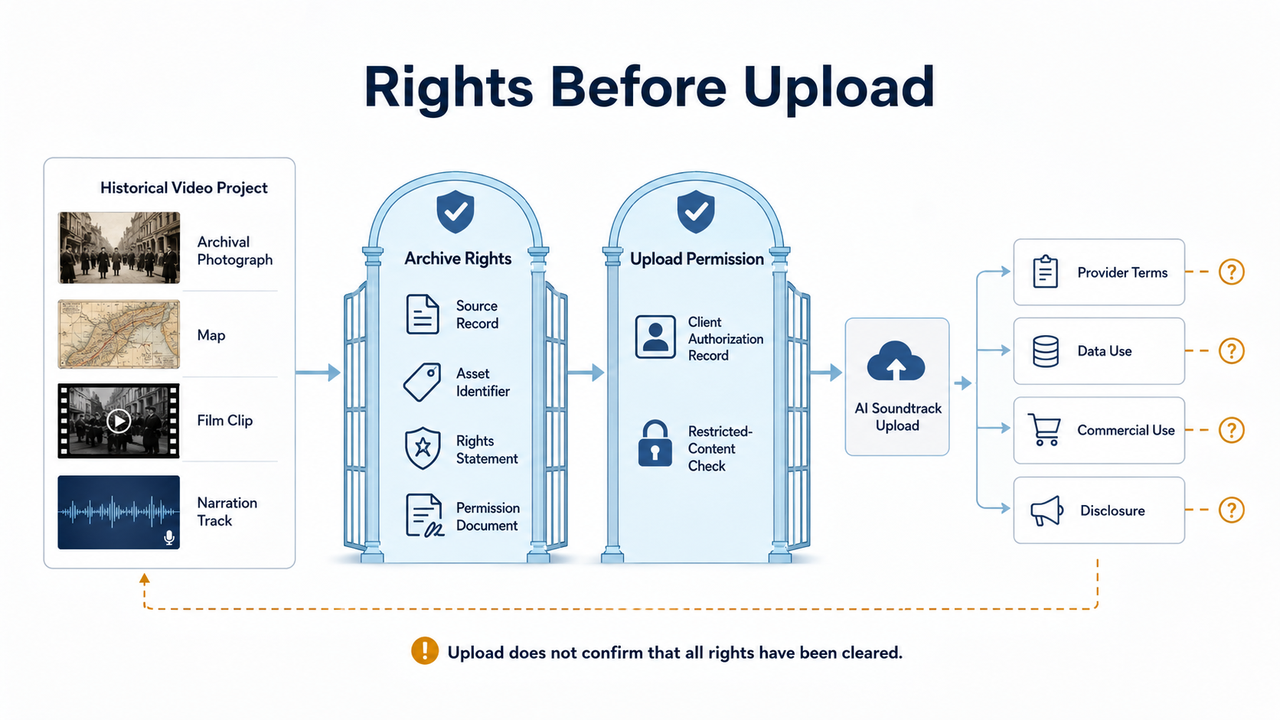
Historical subject matter does not automatically make every photograph, map, film clip, or recording public domain. The U.S. National Archives warns that not all records in its holdings are in the public domain and that copyright, donor restrictions, contracts, privacy, and publicity rights may still apply.
Check the rights statement for each item, record the source and identifier, and keep any required permission or license with the project. Access to an archive or permission to download a file is not necessarily permission to publish it commercially.
Archival music requires an additional check. The U.S. Copyright Office treats a musical composition and its sound recording as separate works, so an old composition may be public domain while a particular modern recording remains protected. This is a practical checklist, not legal advice; rules vary by jurisdiction.
Add drama without distorting the facts
Music is not editorially neutral. Even without lyrics, it can suggest danger, innocence, triumph, nostalgia, or inevitability. Research showing that different soundtracks can change the interpretation of the same scene is one reason to review those implications carefully.
Pay particular attention to scenes involving disputed motives, incomplete records, or interpretations rather than directly documented actions. Watch the scene with the full cue, in silence, and with a less forceful version. If the perceived meaning changes, decide which implication the available evidence can actually support.
Drama can also come from structure. Holding back a new layer until the turning point, ending a phrase before a quotation, or allowing a short gap after a consequence can create weight without making every moment sound monumental. Good documentary background music helps shape that arc while leaving the evidence in charge.
Use silence and low music during dense information
The more a viewer has to process, the less the soundtrack should demand. Lists of names, compressed timelines, source quotations, and explanations of cause and effect are all good places to reduce musical activity.
“Low” is not one fixed volume. A soft but busy pattern can interfere with speech more than a fuller sound that changes slowly. Listen for collisions with consonants, changes that pull attention away from a key phrase, and musical peaks that arrive in the middle of an important sentence.
Silence can separate two stages of an argument, give a quotation its own space, or let archival sound carry the moment. When music returns, the contrast can create more emphasis than continuous underscoring.
Use these gaps deliberately rather than treating them as unfinished sections. A quiet timeline can still have pace when the narration, edit, and on-screen information are doing the work.
Avoid modern trailer tropes unless the edit supports them
Risers, heavy impacts, ticking pulses, and oversized drops are not automatically wrong for a history video. They become a problem when they impose a trailer structure on material that is explanatory, uncertain, or reflective.
Before using one, ask what the device is marking. Does an impact land on a genuine change in the story, or merely on a cut? Does a rise prepare viewers for evidence, or create suspense that the facts do not contain? The edit should justify the gesture.
Modern production can work with historical material when it matches the video's editorial language. An older-sounding cue does not guarantee authenticity, just as a contemporary sound does not automatically make the story careless. Judge the relationship among narration, visuals, and tone rather than relying on period associations.
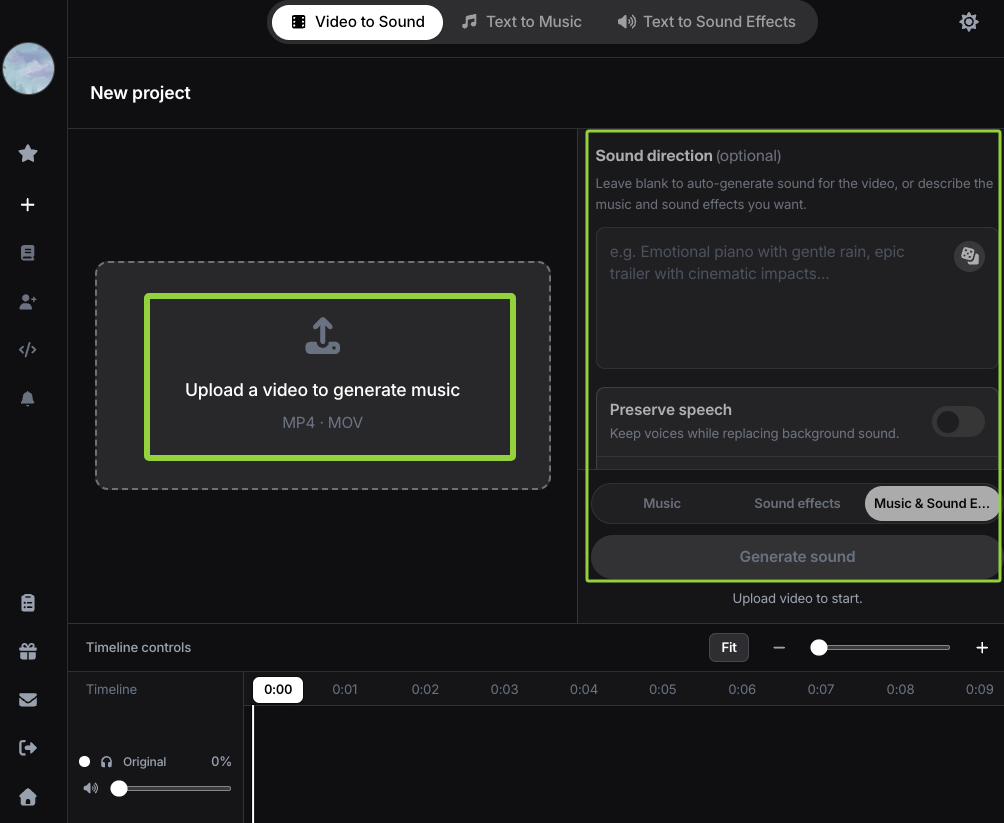
If a stock cue keeps forcing the sequence into its prebuilt arc, a video-first soundtrack may be worth testing. According to Sonilo’s current product page, its workflow is designed to generate music from an uploaded edit and align it with cuts, pacing, and scene changes. Its current Privacy Policy states that the audio track in an uploaded video is not analyzed, so narration clearance still requires a separate listening test. Review every result for speech space, factual restraint, and the emotional implications of each scene.
Before uploading historical footage or a client edit, make sure you have the necessary rights and permissions for every included asset. Sonilo’s current Terms of Service require users to hold those rights and grant Sonilo a broad, irrevocable, non-exclusive, worldwide, perpetual, royalty-free license to process and use uploaded content.
Its Privacy Policy currently states that uploaded videos and related data may be used for model training and improvement by default across free and paid tiers, with no separate opt-out. Do not upload confidential, embargoed, restricted, or unreleased archival material unless you are authorized to do so and accept those terms.
Commercial-use permission and platform disclosure are separate checks. YouTube’s current AI disclosure guidance specifically lists AI-generated music as content creators need to disclose.
FAQ
Should history video music sound cinematic?
It can, but “cinematic” should not mean constant scale or intensity. A cinematic approach is useful when it gives the story a clear arc, supports visual transitions, and leaves room for the narration. If every section sounds like a climax, important differences between context, conflict, and consequence become harder to feel.
Can modern music work in history videos?
Yes. Modern music can work when it fits the video's editing language and does not pretend to be evidence of a period. Test whether it supports the narrator's perspective, the pace of the visuals, and the seriousness of the subject. Do not assume that either contemporary or older-sounding production is inherently more accurate.
How do I avoid making scenes too dramatic?
Compare the scene with music, in silence, and with a less dense version of the cue. Check whether the music introduces certainty, menace, heroism, or tragedy that the script has not established. Move major rises until after the relevant evidence, reduce competing layers, and reserve the strongest change for a genuine narrative turn.
What if my video is mostly still images?
Use music to connect changes in information rather than to simulate nonstop action. Let phrases carry across related photos, then change the musical direction when the timeline, location, or interpretation shifts. Maps, captions, and slow image moves can create their own pace, so leave viewers enough space to read and understand them.


