Guides
How to Add Music to My Video by Video Type
- Written by
- Sonilo Team
- Published
Last spring I reused a track I loved. It had carried a travel vlog beautifully — warm, a little wandering, the kind of thing you stop noticing until it's gone. Two days later I sat down to figure out how to add music to my video for a product demo, dropped that same track underneath, and called it done. It was wrong in about four seconds.
The music kept pulling focus from the one thing I was supposed to be selling. Good track. Wrong job.
So here's what I want to save you: a way to pick music by what the video is for — vlog, demo, ad, tutorial, short — instead of by what sounds nice on its own. Most guides on how to add music to a video stop at "drag the track in." This one starts one step earlier. If you've ever asked how can I add music to my video and have it actually fit, the honest answer starts before you open any editor.
Quick workflow: how to add music to my video without making it feel pasted on
If you only need the short version, here’s the workflow I’d use before worrying about genre:
| Step | What to do | Why it matters |
|---|---|---|
| 1. Upload or import the video | Bring your finished or near-finished cut into your editor or soundtrack tool. | Music choices make more sense when you can hear them against the actual edit. |
| 2. Decide where the music comes from | Use stock music, a platform library, your own track, or AI-generated music. | Each path changes how much control, speed, and license checking you need. |
| 3. Choose or generate music by video goal | Match the track to the job: retention, clarity, emotion, product trust, or CTA. | A good track for one format can quietly hurt another. |
| 4. Fit the timing | Trim, loop, fade, or generate an exact-length soundtrack. | This is where most “almost right” music starts feeling awkward. |
| 5. Mix the audio | Lower the music under speech, check the first three seconds, and make sure the ending resolves. | Viewers should feel the music, not fight it. |
| 6. Export and check usage rights | Export the finished video, then confirm the music terms for your platform or client use. | Copyright and licensing are part of the workflow, not a detail to clean up later. |
That’s the whole shape: upload, choose or generate, adjust, export, and check the license. The rest of this guide is about making those choices fit the type of video you’re actually making.
Why video type should guide music choice
If you edit your own videos and handle your own music, you've probably hit this wall: a track that felt perfect in one project feels off in the next, and you can't quite say why.
The same track can work in one format and fail in another
A song doesn't carry meaning by itself. It carries meaning against the picture. The same mid-tempo, slightly emotional track that makes a vlog feel intimate will make a product demo feel like a perfume commercial — and not in a good way.
That's what trips people up: they treat music as a finishing sticker, when it's a layer that changes how the whole video reads.
Start with the job the video needs to do
Before I pick anything now, I ask one question: what is this video supposed to make someone do or feel? Watch longer? Trust a product? Click a link? Follow a step?
Which is exactly the part that matters — not whether the track sounds good in your headphones, but whether it pushes the viewer toward the video's actual job. Once you name the job, the music choice gets a lot less mysterious.
Music for Vlogs and Creator Videos
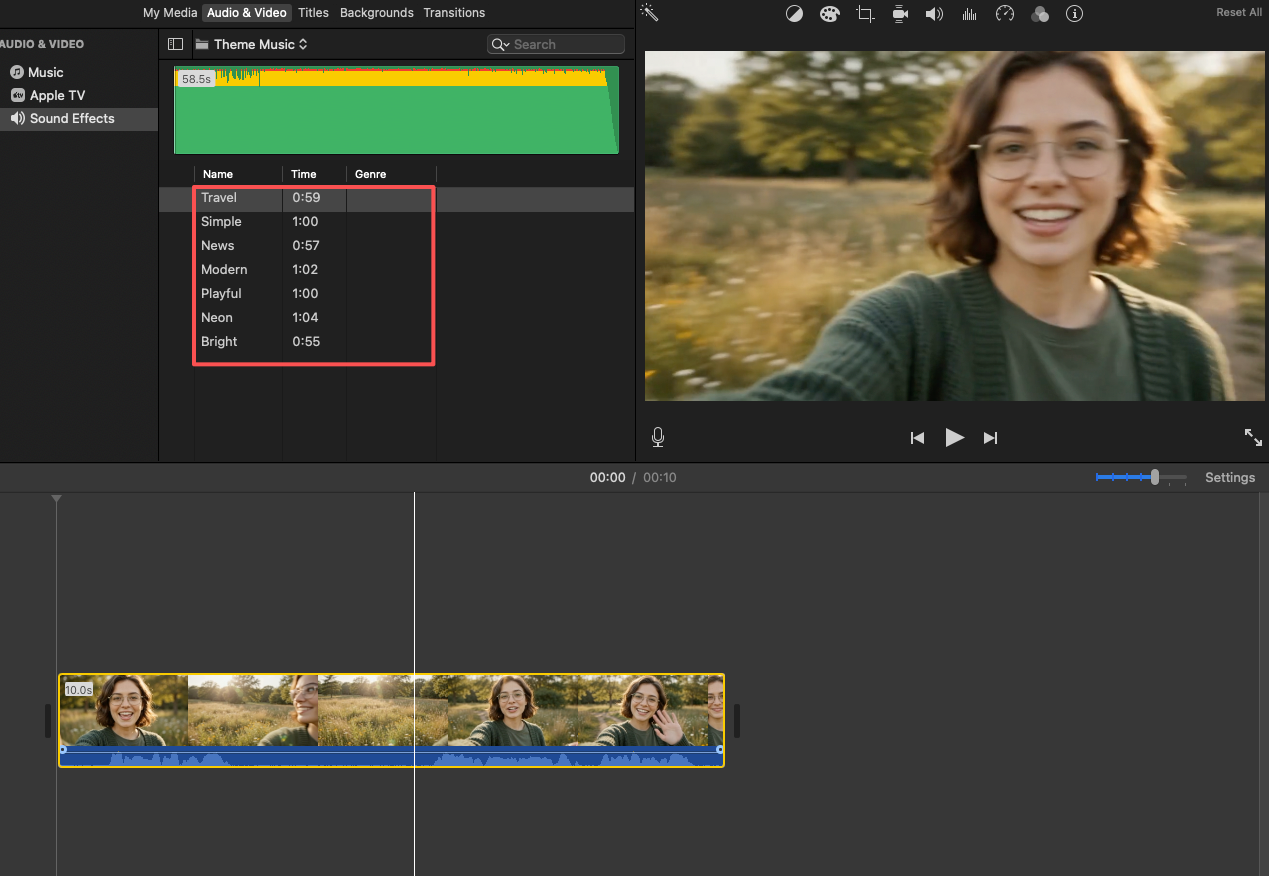
Vlogs are forgiving in some ways and brutal in others. You have room to breathe, but the music has to live under you for minutes at a time without wearing out its welcome.
Keep the track supportive, not distracting
The fastest way to ruin a vlog is music that competes with your voice. If a viewer has to lean in to catch what you're saying, the track is too loud or too busy — usually both.
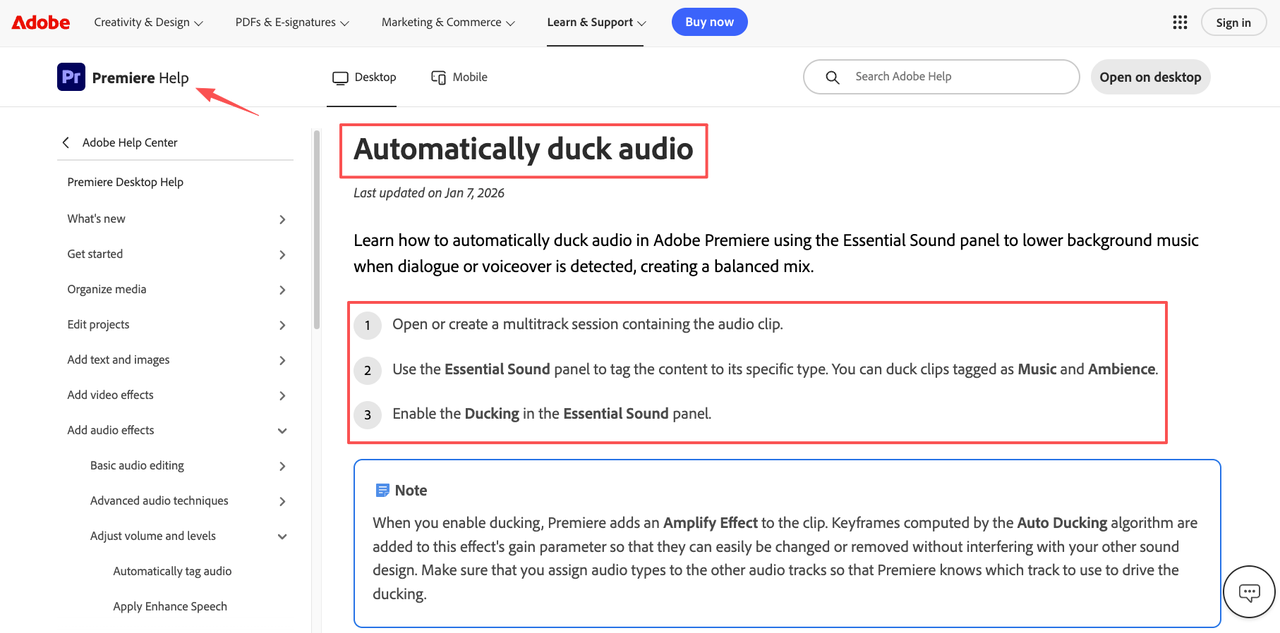
When I add music in a video like this, I set the music low enough that it feels like weather, not like a second person talking. In a desktop editor you can automatically duck the music under your voice track in Premiere Pro so the level drops whenever you speak and breathes back up in the gaps.
Match the energy of the story arc
Here's the thing nobody mentions — a vlog isn't one mood. It has a shape. The morning-coffee opening shouldn't sound like the big reveal at minute eight.
I try to let the music shift with the arc, even subtly. One calmer bed for the setup, something a little brighter when the story lifts. You don't need three songs. You need music that doesn't flatline across a video that doesn't.
Music for Product Videos and Demos
Product videos have one enemy: anything that makes the product feel less clear. Music included.
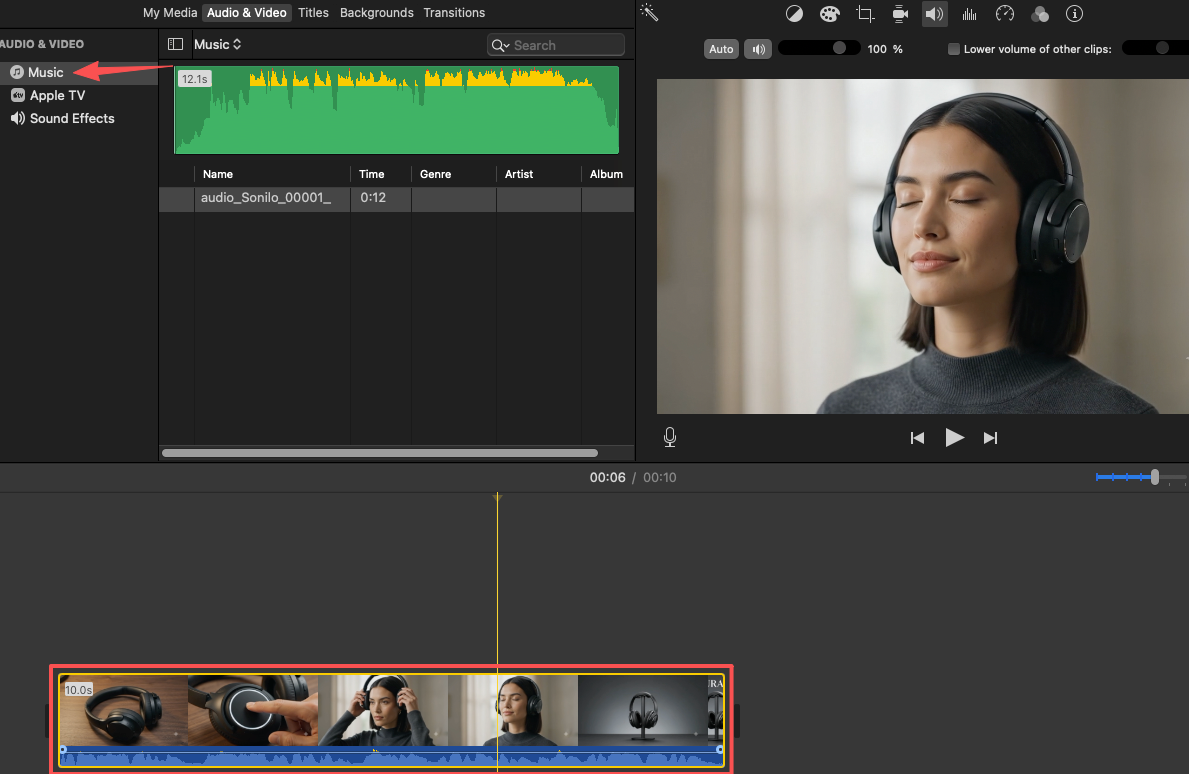
Make the product feel clear and credible
A demo is a trust exercise — the viewer is deciding whether to believe you. Music that's too dramatic reads as trying too hard and quietly costs you credibility.
I keep demo music clean and confident — steady rhythm, not a lot of melodic drama, nothing that begs for attention. The goal is to make the product look like it knows what it's doing.
Avoid music that competes with explanation
If there's a voiceover walking through features, the music's only job is to keep the silence from feeling empty — not to carry the scene.
For precise control over where a track sits relative to a spoken walkthrough, an editor that lets you add music and sound in Final Cut Pro on a separate audio lane makes it easy to duck the music under each explanation and bring it back between points. The real question is whether the music supports the explanation or fights it — and for demos, support wins every time.
Music for Ads and Promo Videos
Ads are where music does the most work in the least time. You've got seconds, a message, and a moment you need the viewer to act.
Support the offer, pacing, and call-to-action moment
A promo track has to build toward something. If your ad has a clear call-to-action — a click, a sign-up, an offer — the music should arrive somewhere right as that moment lands, not meander past it.
I look for a track with a sense of motion and a payoff. When the CTA hits, the music should feel like it agreed with you.
Match intensity to the brand and audience
This is where reusing a generic "epic" track backfires. A calm wellness brand scored like a sports drink ad just feels dishonest — viewers feel it even if they can't name it.
I'd rather have music that's slightly too understated than a track that oversells. Understated reads as confident. Oversold reads as desperate. Match the intensity to who's actually watching.
Music for Tutorials and Educational Videos
Tutorials are the one format where I'm most tempted to skip music entirely — and sometimes that's the right call.
Keep voice and steps easy to follow
In a tutorial, the voice is the product. Every choice should protect intelligibility. If music makes a single instruction harder to catch, it's hurting more than it's helping.
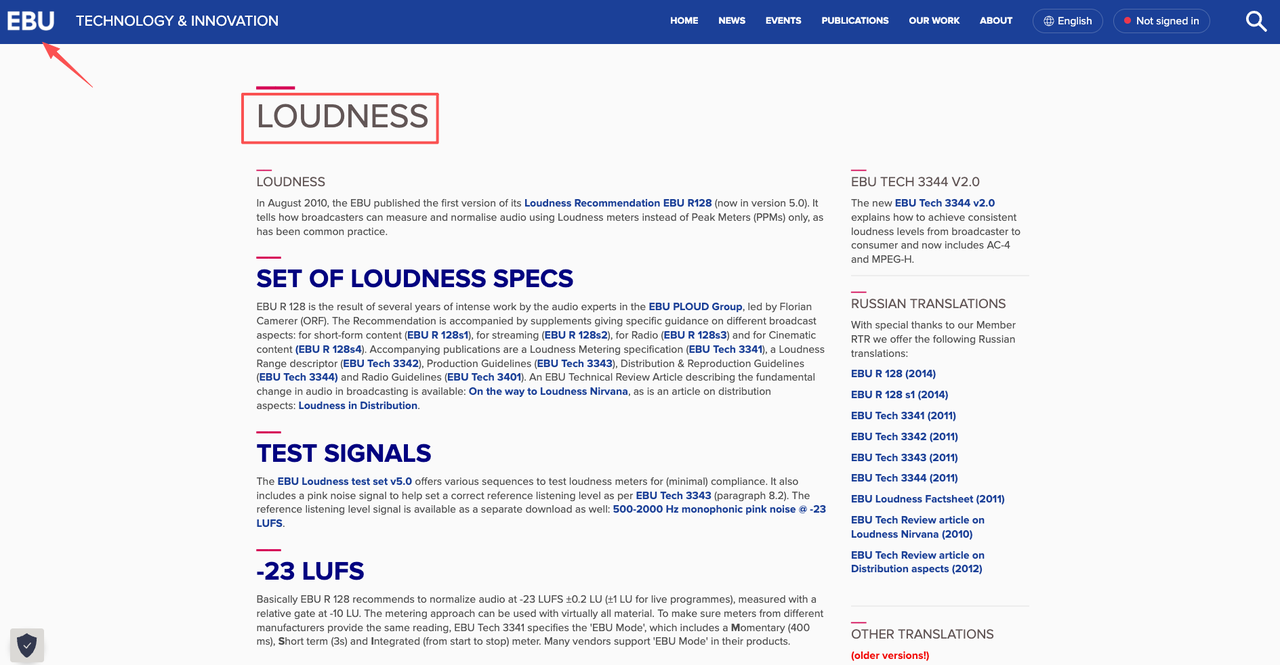
When I do use a bed under a tutorial, I keep it quiet and featureless. Broadcasters spend a lot of effort keeping dialogue clear against background sound — the principles behind the EBU's loudness recommendation exist precisely so spoken words stay readable over a mix. You don't need broadcast gear to borrow the idea: voice first, music a distant second.
Use music only where it helps retention
Here's where I've changed my mind. I used to put a bed under the entire tutorial. Now I mostly save music for the intro and outro, and let the actual teaching run cleaner.
That said, I'm not certain this is universal — some creators swear a steady low bed keeps casual viewers from dropping off during slow steps. Test it on your own content. The point is to use music deliberately, not by default.
Music for Short-Form Social Clips
Short-form is its own animal. The track often is the hook, and the first second decides whether anyone stays.
Match quick edits without making the video feel rushed
Fast cuts plus frantic music can tip a clip from energetic into exhausting. I try to let the music feel quick but grounded — momentum without panic.
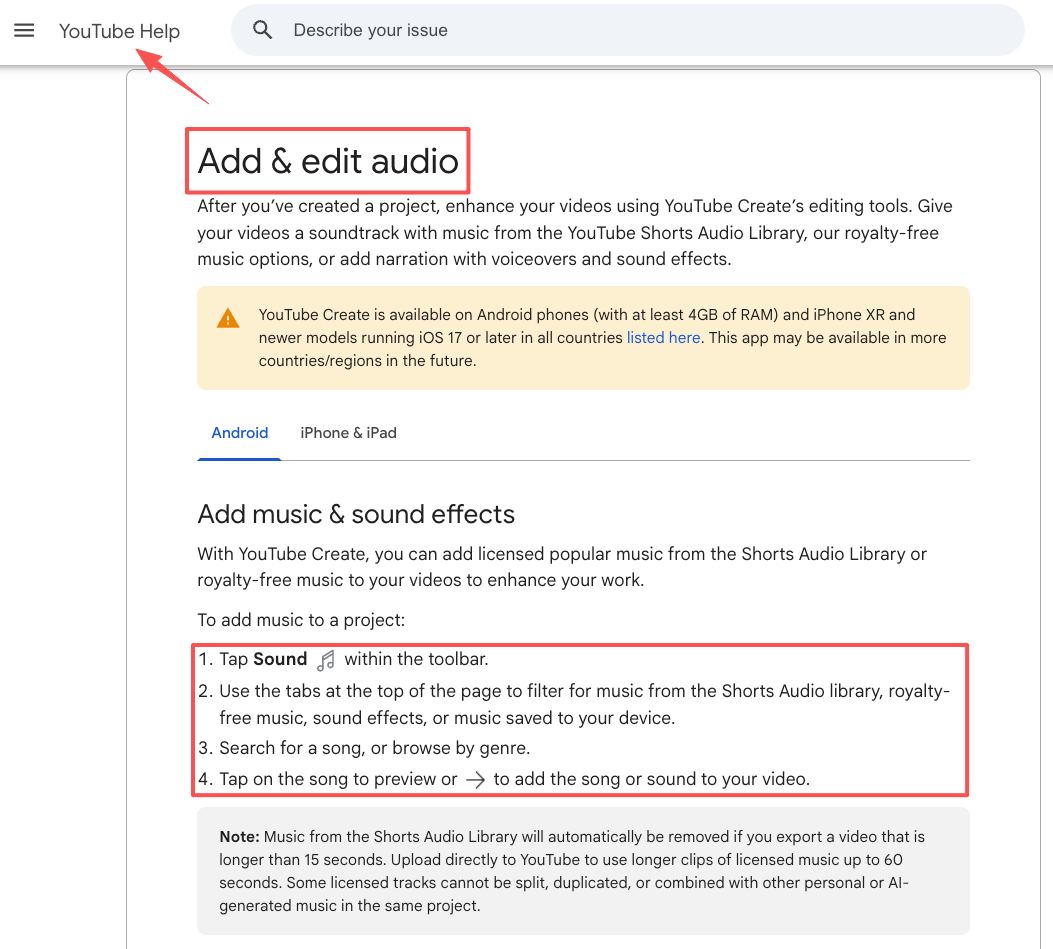
A lot of this happens right inside the app. You can add music with YouTube's built-in Shorts audio tools and preview how a track lands against your cuts before you commit. Just know that platform music libraries come with their own usage rules per format and length, so check the latest official documentation for whatever platform you're publishing to.
Make the ending feel complete
The thing that ruins more short clips than anything: the music just stops, mid-phrase, because the video ended first. It feels like tripping on the last stair.
Whether you trim to a clean musical phrase or use music built to resolve on time, give the ending a real finish. A clip that lands its last beat feels intentional, even when everything before it was chaos.
How to Choose a Complete Video Music Workflow
Once you know the kind of music a video wants, the next question is where that music should come from.
There is no single right path here. There is the path that fits your deadline, your platform, your license needs, and how much control you want over the final soundtrack.
Stock music, platform libraries, manual editing, and AI soundtracks
Roughly, you have four routes:
| Approach | Best for | The catch |
|---|---|---|
| Stock libraries | Big selection, specific genres, repeatable brand style | Searching, testing, trimming, and license checks take time |
| Platform libraries | Fast social publishing inside YouTube, TikTok, Instagram, or Shorts | Usage rules can change by platform, format, and region |
| Manual editing | Maximum control over cuts, fades, loops, and exact cue points | Slowest path; you do every timing fix yourself |
| AI soundtracks | Faster fit, especially when length and pacing matter | You still need to review the result and check usage terms |
If you want the broader tool-by-tool version of how to add music to a video, I’d use that as the practical companion page. This page is the decision layer: what kind of music your video needs, and which workflow gives you the least friction.
When AI music for video makes more sense
Here’s the thing nobody mentions — finding a track is not always the slowest part.
Sometimes the slow part is fitting it.
Your cut is 63 seconds, the track is 47, and now you’re looping, fading, and pretending the ending doesn’t sound chopped. Or the track is 90 seconds, but the only clean ending lands after your CTA disappears.
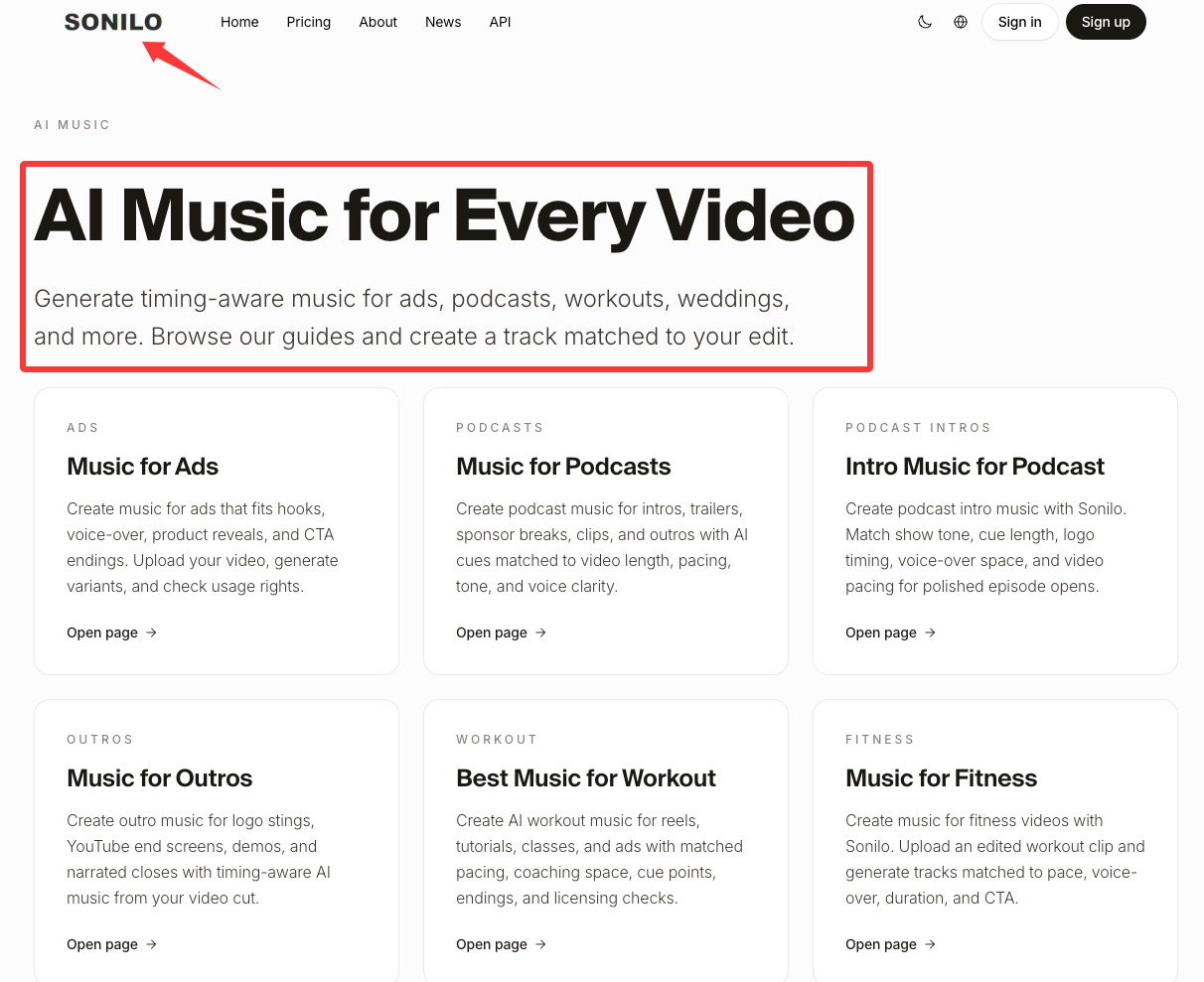
That is where AI music for video can help. Instead of starting with a finished song and forcing it onto your timeline, you start with the video and generate music around the cut.
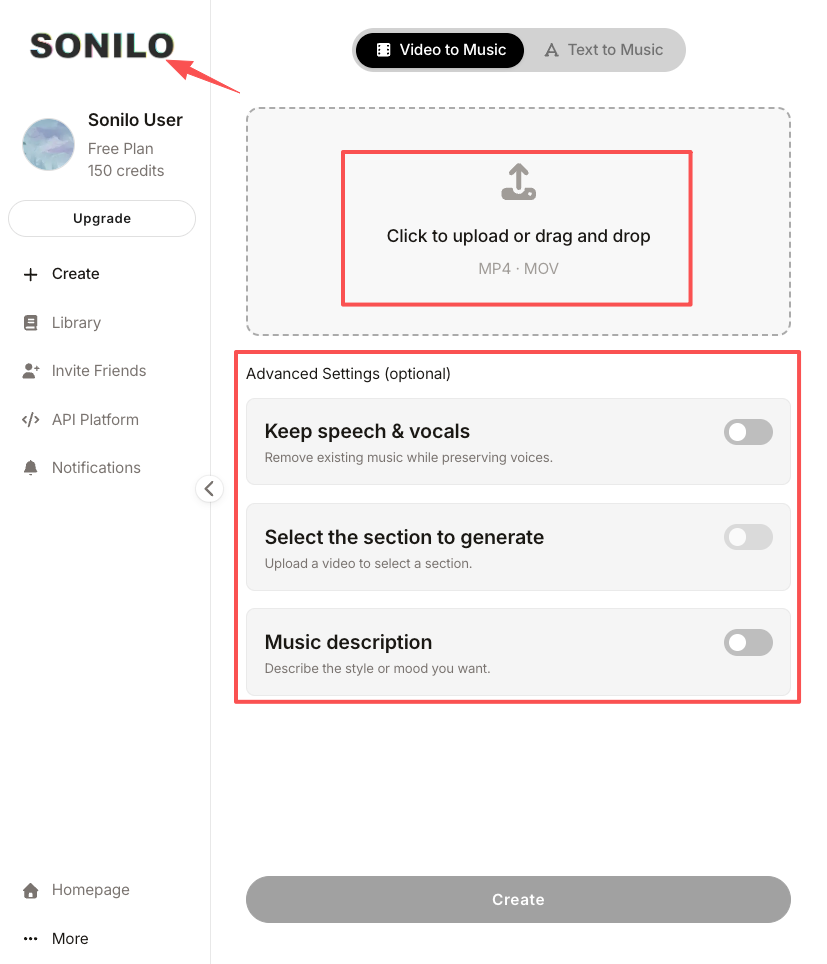
For me, that matters most when:
- the video has a fixed ending
- the CTA needs to land on a musical beat
- the edit has quick pacing changes
- the voiceover needs space
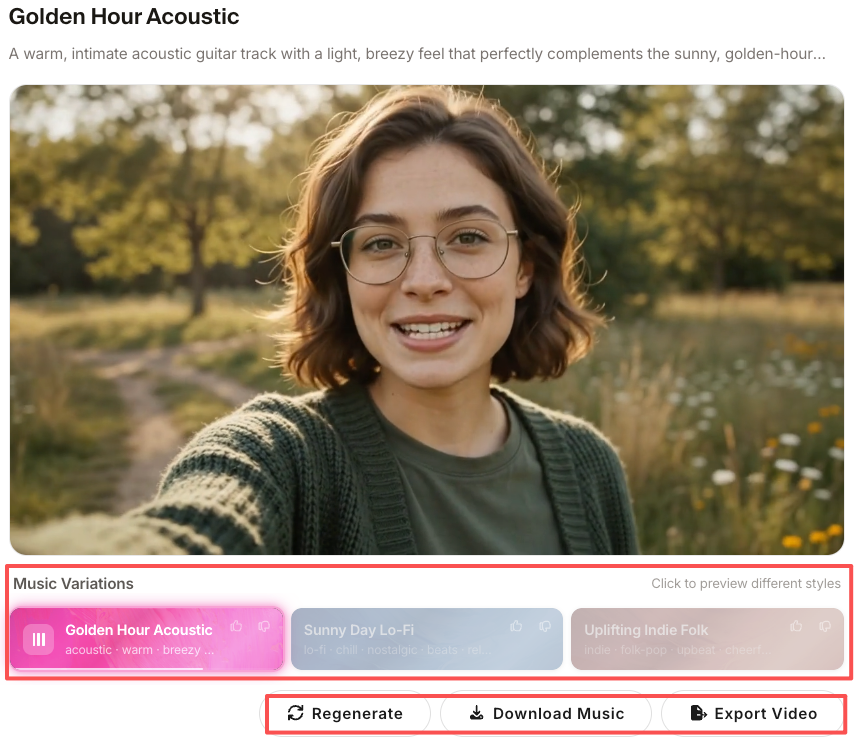
- I need several mood options without digging through a library for an hour
That does not mean stock music is bad. I still use it when I already know the genre, mood, and licensing path. But when the timing is the problem, a soundtrack generated around the edit can save a surprising amount of cleanup.
Adjust the timing before you trust the track
A track can sound right in the first ten seconds and still fail the video.
Before I export, I check three places:
- the opening second
- any voiceover or product explanation
- the final beat
If the opening feels late, the viewer feels the lag before they know why. If the music fights the voice, the video becomes harder to follow. If the ending cuts off mid-phrase, the whole piece feels unfinished.
This is why I don’t treat “add music” as one step. The real workflow is add, listen, trim, fade, duck, export, and listen again somewhere less forgiving than your editing headphones.
Export, then check the license before publishing
Worth knowing before you commit — export is not the end of the workflow.If the video is for a client, ad, product demo, YouTube channel, paid campaign, or brand account, check the music usage terms before you publish. Platform libraries, stock sites, and AI music tools can all have different rules.I’m not a licensing expert, so I won’t pretend to interpret the terms for you. I just don’t skip that check anymore, especially when the video is leaving my own channel and going into someone else’s commercial work.
Related ways to create music for videos
If your video still does not have the right soundtrack, there are a few different ways to solve it. The best one depends on whether your bottleneck is mood, timing, control, or licensing.
Start from the finished video
Use this when the edit already exists and the music needs to follow the cut.This is usually the cleanest path for short-form clips, ads, product demos, reels, and YouTube videos with a fixed ending. Upload the video, generate options, compare them against the timeline, and pick the version that supports the edit without pulling attention away from it.
Start from a music idea
Use this when you already know the genre, instruments, or emotional direction before the edit is locked.This can work well for brand campaigns, recurring content series, or intros where the music identity matters as much as the specific video. The risk is that you may still need to trim or reshape the track later.
Start from a stock library
Use this when you need a familiar genre fast and have time to search.Stock libraries are still useful, especially when you know exactly what you want. The part I’d watch is the ending. A track that sounds great in preview can still take twenty minutes to make fit a 34-second edit.
Start inside the platform
Use this when you are publishing straight to Shorts, Reels, TikTok, or a native social format.Platform libraries are convenient because the music is already inside the publishing flow. Just check the current rules for your account type, region, format, and whether the video is commercial or personal.
Start with a custom soundtrack
Use this when the video needs to feel more specific than a library track can manage.That might mean working with a composer, editing stems by hand, or using an AI soundtrack workflow to create music around the cut. This is the route I’d consider when the soundtrack has to match timing, mood, and ending more closely than a generic track can.
FAQ
What is the full workflow for adding music to my video?
The full workflow is: upload or import the video, choose where the music comes from, pick or generate a track, adjust the timing, mix the volume, export the video, and check usage rights. The mistake is treating music as one drag-and-drop step. The fit usually comes from the adjustments after the track is added.
Should I choose music before or after editing the video?
If the music drives the whole piece, choose it early. That works for dance clips, montages, trailers, and rhythm-heavy social edits. If the video already has a clear structure, choose music after the rough cut. For demos, tutorials, and ads, I usually want the edit first so the soundtrack supports the message instead of steering it.
What kind of music works best for different video types?
There's no universal answer, which is the whole point. Vlogs want supportive beds, demos want clean and credible, ads want motion toward a payoff, tutorials want near-silence under the voice, and short-form wants a strong hook that resolves on time. Pick by job, not by genre.
How does video type affect music choice in vlogs, ads, or tutorials?
It changes the music's role entirely. In a vlog the music sets atmosphere; in an ad it drives toward a call-to-action; in a tutorial it mostly stays out of the way so the steps stay clear. Same library, completely different selection criteria.
How do I choose music based on the goal of my video?
Start with the goal, then work backward to the track. When people ask how do I add music to my video and have it land, the missing step is usually this one: name what you want the viewer to feel or do, and only then audition music against that. A track either serves the goal or it doesn't.
What should I avoid when using the same music style for every video?
Avoid treating one "safe" track as a default across formats. The track that flatters a vlog can flatten a product demo or oversell a calm brand. Reusing without re-checking against the new video's job is the single most common mistake I see — and the one I made.
When should creators use stock music, platform libraries, or custom soundtracks?
Use platform libraries when speed and in-app publishing matter most, stock libraries when you need a very specific genre and have time to dig, and custom or AI soundtracks when exact length and fit are the bottleneck. For commercial or client work, confirm the usage terms against the latest official documentation before you publish — policies change, and I'm not the right person to interpret them for you.
So that's how I think about how to add music to your video now: by the job first, the workflow second. I broke it down by type so you can skip the part where you reuse one track everywhere and quietly wonder why half your videos feel slightly off.
One question before you go — what's the part that actually slows you down most right now: finding the right mood, fitting the length, or knowing whether you're even allowed to use the track?