Product
Sonilo Sound Effects 1.0 launches on fal.ai: realistic sound effects from video and text
- Written by
- Sonilo Team
- Published
The new model generates realistic sound effects from video or text, with automatic synchronization, optional prompt control, and support for video inputs up to three minutes.
AI-generated video can look finished and still feel unfinished the moment you press play. Often, the missing piece is not another visual pass. It is sound that arrives with the action, fills the environment, and makes the edit feel complete.
Sonilo and fal.ai are launching Sonilo Sound Effects 1.0, a new video-native sound model built for creators and developers who want to turn footage into finished sound without placing every sound effect by hand. That same video-native approach is useful for platform experiences: a focused Roblox-ready AI audio generation workflow keeps cues and effects aligned with the experience’s visual timing.
All music and sound effects featured in the demo were generated automatically by Sonilo.
The question is no longer simply whether AI can generate convincing audio. It is whether that audio can understand the footage, arrive at the right moment, and remove meaningful work from a real editing timeline.
What you see drives what you hear.
Sound Effects 1.0 brings sound into the video-native workflow
Most sound-effect workflows begin outside the video. Editors search a library, preview several options, drag files into the timeline, align each effect to the right frame, adjust levels, and repeat.
One footstep is manageable. A scene full of movement, transitions, impacts, and ambience is not.
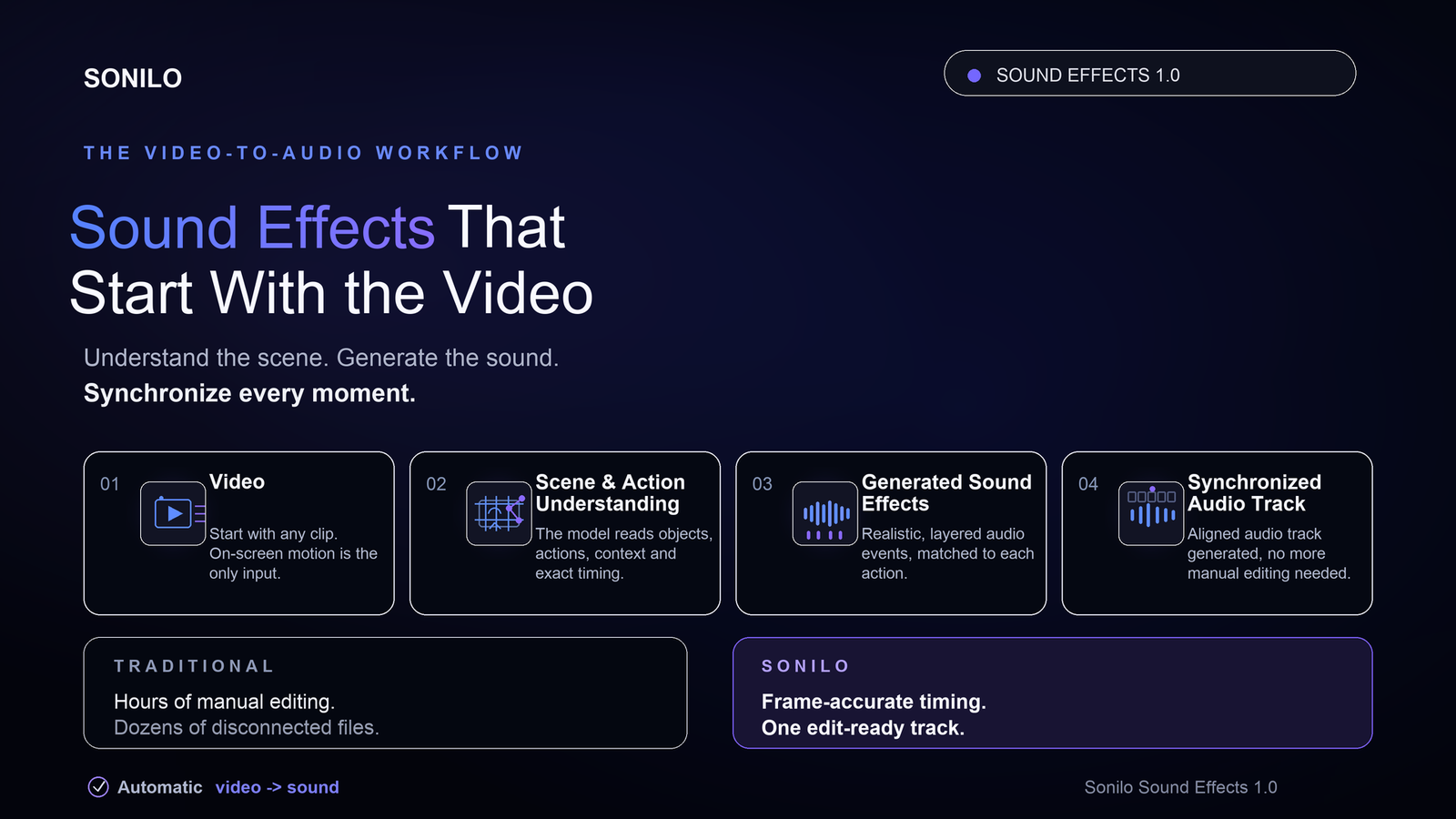
Sound Effects 1.0 starts with the video.
The model analyzes on-screen actions, scene context, and timing before generating sound effects that follow what is happening on screen.
Instead of returning a folder of disconnected sounds that still require timeline work, Sonilo produces a synchronized audio track that is ready to review, refine, and add to the edit.
The sound has to feel like it belongs in the scene.
Two ways to generate sound, with the video still in control
Sound Effects 1.0 supports two generation workflows:
- Video-to-Sound Effects analyzes uploaded footage and generates sound effects matched to its actions, environments, and timing.
- Text-to-Sound Effects generates specific sound effects from text prompts, giving creators and developers direct control over the sound they need.
In the video workflow, prompts are optional. Creators can let the model interpret the footage automatically or add a prompt to request or refine a particular sound.
The prompt shapes what the model generates, while the video continues to determine when the sound should occur.
This gives creators two practical working modes: automatic generation when speed matters, and prompt-guided generation when a scene needs more specific creative direction.
Video-to-Sound-Effects supports video inputs up to three minutes, making the model useful for short-form content, advertisements, gaming clips, and longer narrative scenes.
From silent footage to a complete soundtrack
Sound effects are one layer of a finished video. Music is another. Sonilo now connects both within the same video-first workflow.
Using the same source video, creators can generate synchronized sound effects and add music designed around the footage’s pacing, cuts, mood, and timing. For a full comparison of the best AI-generated music video tools, see the dedicated guide.
Sonilo Music v1.1 already generates music based on a video’s pacing, emotional movement, scene changes, and existing speech. With Sound Effects 1.0, the workflow expands from scoring the edit to sounding the actions inside it.
The workflow is straightforward:
- Upload a video.
- Let Sonilo interpret the footage automatically, or add an optional prompt for more direction.
- Generate and synchronize the sound effects.
- Generate music from the same footage when the scene needs a score.
- Export the synchronized audio output.
One source video provides the timing across the workflow, reducing manual placement and unnecessary tool-switching.
Where video-native sound can save real timeline work
AI-video creators
Generated clips often arrive with strong visuals but little or no usable sound. Sound Effects 1.0 can add action cues, transitions, impacts, and environmental details that keep the result from feeling silent or disconnected.
High-volume creators and gaming channels
Short-form and gaming content can require dense sound design: swishes, hits, interface sounds, room tone, movement, and transitions.
Automatically synchronized sound effects reduce repetitive timeline work between a completed edit and publication.
Filmmakers and short-form drama teams
A scene may need footsteps, doors, impacts, ambience, and music before it feels complete.
Teams can generate sound effects from the footage and then build the musical layer from the same upload, rather than treating every audio element as a separate task.
Brands and advertising teams
Product shots and campaign edits depend on precise moments: a package opening, an object touching a surface, a camera transition, or a final reveal.
Sound that lands on those actions can make even a short edit feel more deliberate and immersive.
Game developers
Gameplay references, cinematics, and action sequences can be turned into generated sound effects. Text-to-Sound Effects remains available when a team needs a specific standalone sound or tighter creative direction.
API and platform partners
Products with an existing video-creation workflow can add video-conditioned sound generation without asking users to leave the product and assemble audio elsewhere.
What the Sound Effects 1.0 benchmarks show
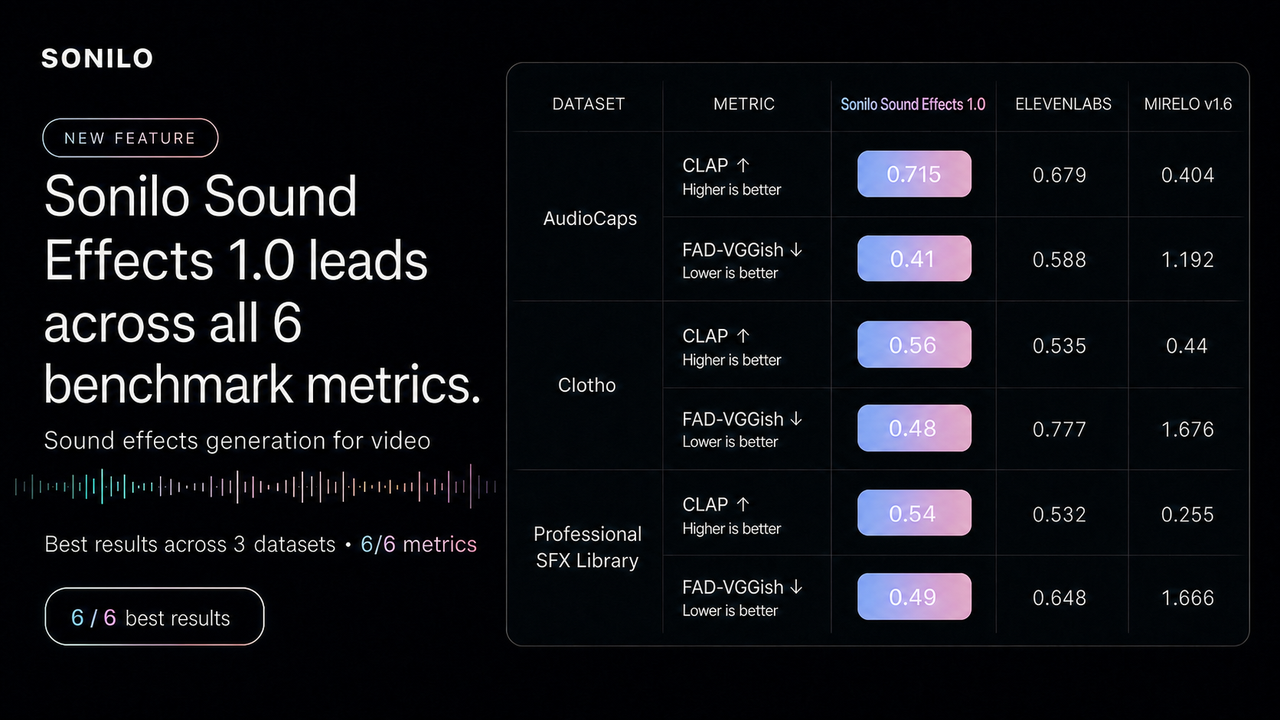
The launch evaluation measures semantic alignment and audio distribution quality for text-conditioned sound generation.
For CLAP, higher is better. For FAD-VGGish, lower is better.
Across AudioCaps, Clotho, and a professional sound-effects library dataset, Sound Effects 1.0 achieved the strongest reported result among the models included in the evaluation across all six CLAP and FAD-VGGish comparisons.
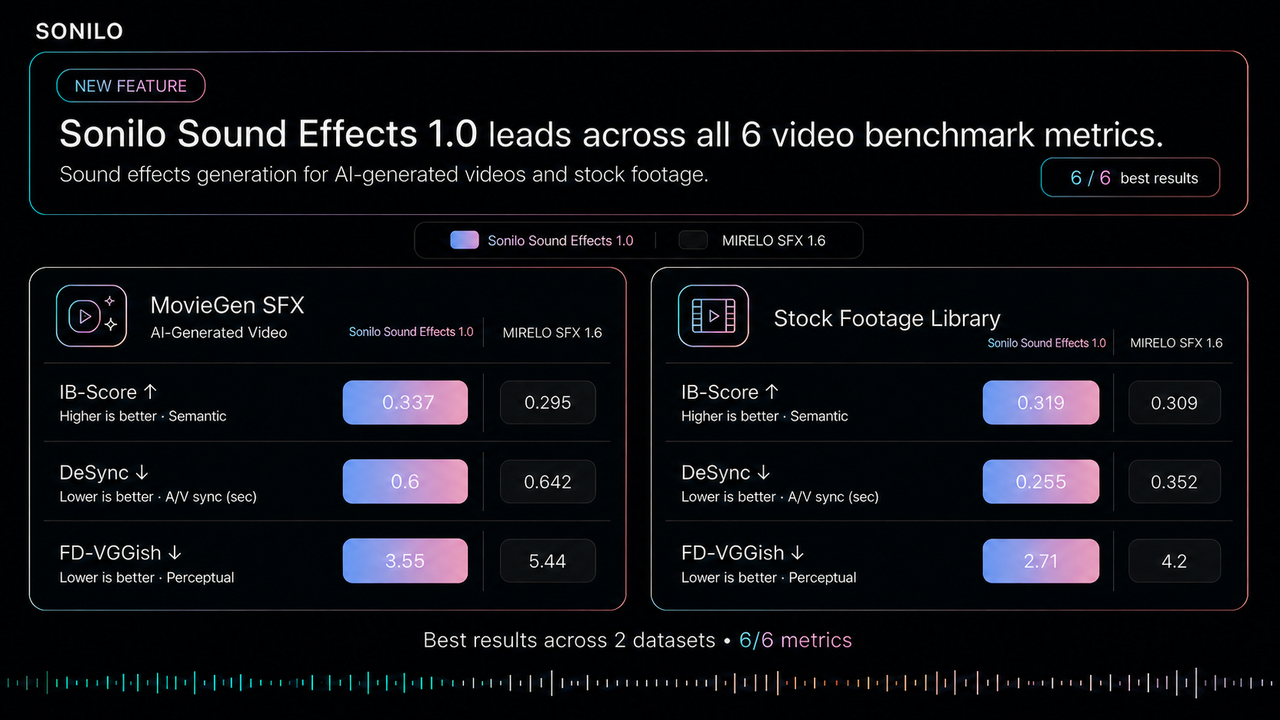
A separate video-focused evaluation compared Sound Effects 1.0 with Mirelo 1.6 across MovieGen SFX and a stock-footage library.
The evaluation covered three aspects of video-conditioned audio generation:
- IB-Score, measuring semantic alignment between the video and generated audio;
- DeSync, measuring temporal misalignment between the video and audio; and
- FD-VGGish, measuring the distance between generated and reference audio distributions.
Sound Effects 1.0 achieved the stronger reported result across all six metric-and-dataset combinations included in the comparison.
Benchmarks are not a substitute for hearing a model on your own footage. They provide a consistent signal across semantic fit, audiovisual synchronization, and perceptual quality.
The practical test remains simple: does the sound feel real, and does it land when the action happens?
Why launch with fal.ai
Sound Effects 1.0 is built to be used, not only watched in a demo.
fal.ai will serve as the exclusive API launch partner for the model during its initial launch period. Developers will be able to test the model and integrate its sound-generation capabilities directly into their products through fal.ai.
fal.ai provides the production infrastructure developers need to move from an initial model test into a working product, including model APIs, queue-based inference, webhooks, file handling, and other tools for generative-media applications.
The co-launch also expands an existing relationship between Sonilo and fal.ai. Sonilo Music v1.1 is already available through fal.ai, giving developers access to both Text-to-Music and Video-to-Music generation.
With Sound Effects 1.0, the integration expands from generated music into video-conditioned, highly realistic sound effects.
For API teams, this creates opportunities to build:
- Sound generation directly inside an AI-video editor;
- Automatically synchronized sound effects for short-form creation;
- Audio completion for game prototypes and cinematics;
- Video-to-sound capabilities inside creator platforms; and
- A complete music-and-sound workflow built around a single video upload.
For creators, Sound Effects 1.0 turns silent footage into a more complete and immersive experience. For developers, it brings sound generation directly into the video-creation pipeline, rather than leaving it as manual cleanup at the end.
Sonilo Sound Effects 1.0 is available beginning today through fal.ai’s playground and API.
Availability
Sonilo Sound Effects 1.0 is available beginning today through fal’s playground and API.
Developers can access the model at:
- Video-to-Sound Effects: fal.ai/models/sonilo/v1.1/video-to-sound-effects
- Text-to-Sound Effects: fal.ai/models/sonilo/v1.1/text-to-sound-effects