Comparisons
Best AI Music Generators for Short-Form Creators 2026
- Written by
- Sonilo Team
- Published
Short-form creators rarely need a full song. They need music that supports the opening, leaves space for voiceover, and ends cleanly with the last frame. Creators scoring interactive or game-inspired sequences can also study the standout video game soundtrack examples.
The problem is that most tools start with a prompt, not the edit. A track can match mood and length yet place its biggest moment after the reveal.
So the best AI music generators for creators 2026 depend on how finished the video is. Mubert, Loudly, SOUNDRAW, and Beatoven.ai suit creators still exploring a musical direction. Sonilo makes more sense once the cut is nearly locked and the video should guide the soundtrack.
This guide compares those approaches for Reels, Shorts, and TikTok-style videos—and shows what to check before posting.
Why short-form creators need a different music workflow
Short videos compress an entire musical job into a few seconds. The opening must contribute immediately. The middle may need to follow several visual changes. The arrangement has to leave room for speech, and the ending cannot sound like someone pulled the cable.
The first useful question is not “Which tool has the biggest catalog?” It is “What information can I give the generator?” A prompt-first tool receives words such as warm, minimal, or energetic. A parameter-driven tool may also receive a target length, tempo, or instrument mix. A video-first tool can receive the cut itself.
These current products illustrate those different starting points. Their linked input and control descriptions were checked on September 1, 2026; availability and plan access may change.
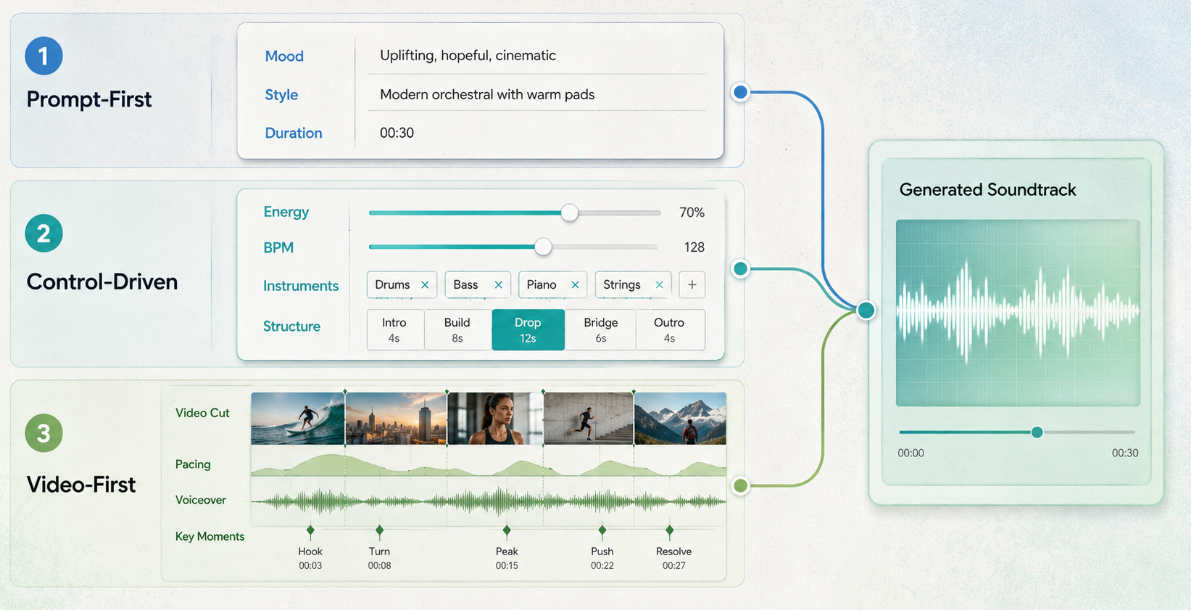
| Generator | Starting input | Most useful when | Short-form check |
|---|---|---|---|
| Mubert Render | Mood, style, and duration | The visual sequence is still flexible | Does the musical change arrive near the actual reveal? |
| Loudly | Prompt plus controls such as energy, BPM, structure, instruments, and duration | You want to shape a compact music bed manually | Can you simplify a busy section beneath speech? |
| SOUNDRAW | Genre, mood, length, instrument, and intensity controls | The edit needs several variations from one direction | Does the revised arrangement improve the last five seconds? |
| Beatoven.ai | Text description for background music | You need quick instrumental directions to audition | Does the opening become useful before the first spoken line? |
| Sonilo | Uploaded video with an optional prompt | The cut is nearly locked and timing is the main problem | Do the hook, reveal, voiceover, and final frame receive distinct treatment? |
Official pages confirm these input methods and controls. They do not prove that one product will produce better music than another for your footage. The only meaningful verdict comes after the track is placed beneath the real edit.
Editorial disclosure: Sonilo publishes this guide. Its inclusion reflects its current video-input workflow; this article does not claim an independent output-quality test.
What music has to do in short videos
An effective short-form video soundtrack has four jobs. Treating them separately makes it easier to hear why a promising generation fails.
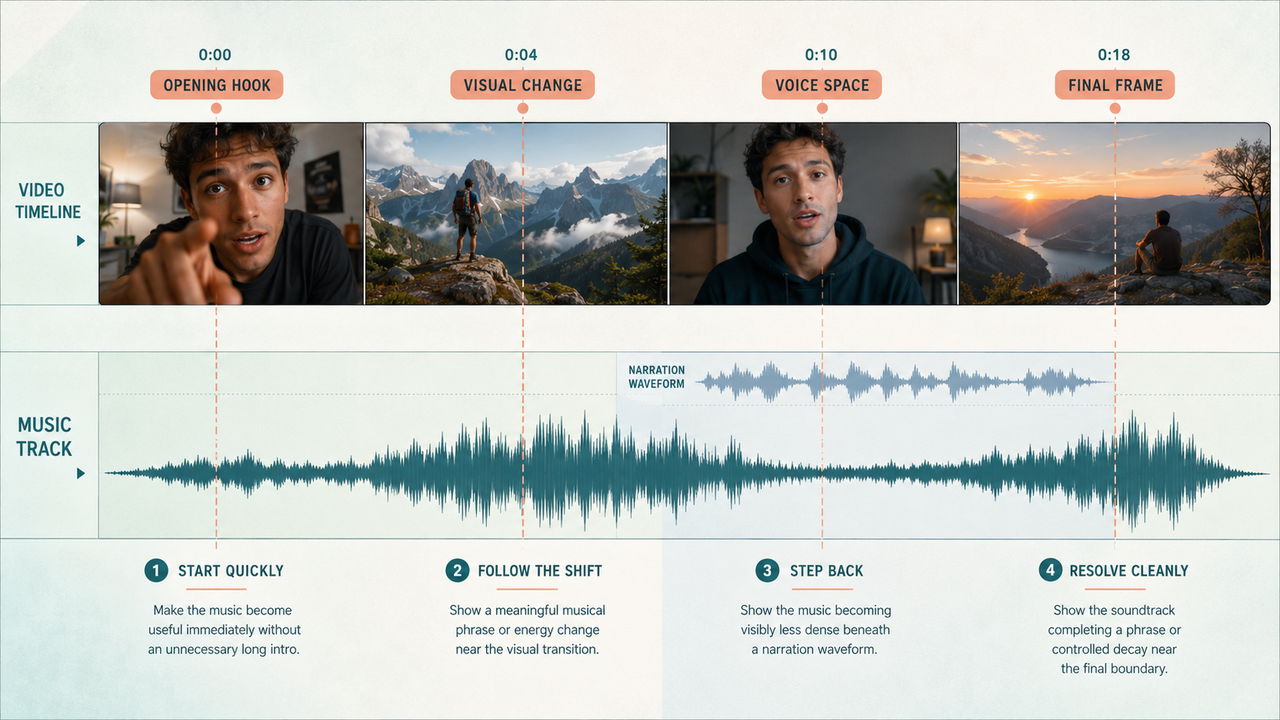
Support the opening hook
The music should become useful in the first moments, but “useful” does not always mean loud. A tutorial may need a small pulse that gives the first cut momentum. A reaction clip may work better with a brief pocket of silence before the response. A product reveal may need tension rather than an immediate payoff.
Reject long introductions unless the visuals deliberately build with them. If the first strong musical idea arrives after the viewer already understands the premise, trimming the intro may help. Regenerating with a more direct opening may be cleaner.
Follow fast visual cuts
Syncing every cut to a beat often makes a short feel mechanical. Listen for groups of shots instead. Three quick details might form one phrase, while the reveal deserves the next musical change.
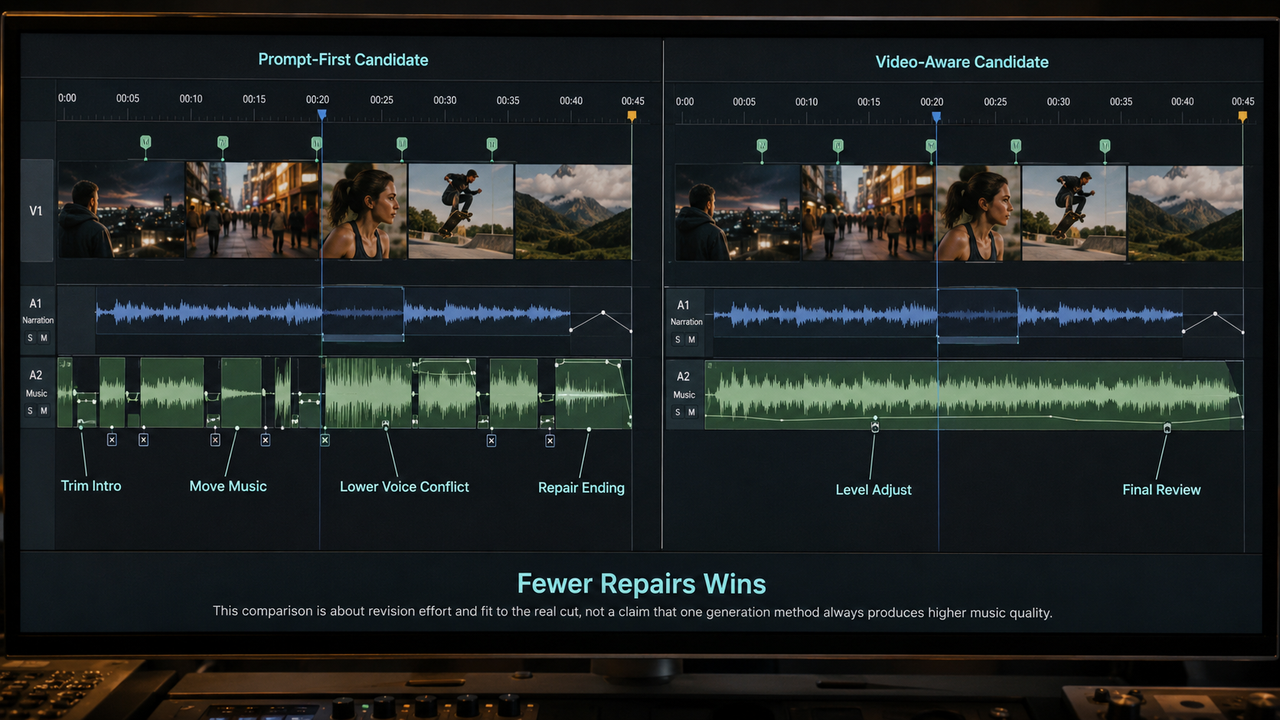
Prompt-first tools can work well when the editor is still willing to move clips. Once the cut is locked, duration controls alone may not be enough. A 20-second track can be exactly 20 seconds long and still put its biggest transition in the wrong place.
Stay clear under narration
Voice clarity is an arrangement issue before it is a volume issue. Bright percussion, vocal fragments, busy lead lines, and frequent fills can compete with speech even at a low level.
Play the complete mix through an ordinary phone speaker with captions hidden. If a key word disappears, try a sparser generation or reduce activity during that sentence. Lowering the whole track may protect the words but also remove the energy the edit needs elsewhere.
This is where controllable instruments, intensity, or structure can be more valuable than a large choice of styles. The best result is not the fullest mix. It is the one that knows when to step back.
Resolve cleanly at the end
File length and musical ending are different things. A generator can return the requested duration yet begin a fresh phrase one second before the final frame.
Decide what the last image needs. A hard stop can support a joke or sharp reveal. A short decay may suit a logo card. A resolved phrase often feels better for a miniature story. If a fade is hiding an awkward crop rather than completing the thought, request another version or change where the music begins.
Where generic music generators fall short
Generic generators are not poor choices by default. They are often fast and useful when the soundtrack establishes a mood and the montage can bend around it. The problem appears when creators expect a text prompt to contain timing information they never wrote down.
“Upbeat music for a 30-second travel Reel” does not tell a model where the destination appears. It also omits the dense narration and the final shot's breathing room. The result may fit the topic and still miss the edit.
There is also a temptation to keep generating instead of diagnosing. If five tracks all feel wrong, name the fault before making five more. Is the opening too slow? Is the instrumentation masking speech? Is the payoff early? A specific correction gives the next generation a better chance than another broad mood word.
For flexible montages, mood-and-duration generation may be enough. For narration-heavy or tightly timed shorts, expect more trimming, level changes, or regeneration unless the tool can use the video itself.
When video-to-music is worth testing
Video-to-music becomes worth testing when the picture is nearly locked and the soundtrack must react to visible events. It is especially relevant when a short has a distinct hook, a spoken middle, a reveal, and a final frame that cannot move.
Sonilo's current product page says its upload workflow reads cuts, pacing, voiceover, and key moments from MP4 or MOV files. That makes it a relevant video-first option to test, not proof that every output will fit. Compare one video-aware result with a prompt-first result on the same cut. Keep whichever needs fewer repairs while preserving the intended mood.
Before uploading client or unreleased footage, confirm that you have permission to provide it and review the service's current privacy and data-use terms. Before publishing, check the plan attached to the generated file and the latest rules for each destination.
Platform music access is not identical across accounts or uses. Instagram's current Help Center says its licensed music library is intended for personal, non-commercial use and that access can vary. TikTok's Commercial Music Library guidance distinguishes account types, regions, and placements. YouTube requires monetizing creators to hold the necessary commercial rights to their audio. Its altered-content guidance currently includes synthetically generated music among its examples. Recheck these official pages at publication time because interfaces and policies can change.
These reminders are general information, not legal advice. A successful upload on one platform does not establish permission for another platform, paid campaign, client deliverable, or later reuse.
FAQ
Who should approve soundtrack changes after edit lock?
The person who approved the locked cut should hear any material music change. In a solo project, that is usually the editor. In client work, it may be the creative lead or client contact. A new cue can change the timing of a joke, the weight of a reveal, or the tone of the final image even when no frame moves.
How should creators label audio test exports?
Use a name that still makes sense a week later: project, cut length, music source, version, and date. For example, launch-short-24s-sonilo-v03-2026-09-01 is clearer than final-new-2. Keep the matching video and audio together so nobody auditions a track against the wrong cut.
What should be documented before cross-posting?
Save the exact audio file, its source, the generation or download date, the account or plan used, and a link to the terms reviewed. Then check whether each post is organic, monetized, sponsored, or used as an ad. Do not assume that a track cleared for one account or placement automatically covers the others.
When should a team keep the older soundtrack version?
Keep it when the previous cut was approved, the new edit changes narration or caption timing, or the replacement cue weakens the hook. An older mix is also useful when a platform question appears close to publication. Archive the matching video with it; an isolated audio file is difficult to restore accurately.