Comparisons
MiniMax Music 3 vs MiniMax H3 (2026)
- Written by
- Sonilo Team
- Published
MiniMax Music 3.0 and MiniMax H3 can both produce audio-related output, but they belong to different model categories.
Music 3.0 is a dedicated music model built around prompts, optional lyrics, song structure, and instrumental generation. H3 is a general-purpose multimodal generation model that MiniMax says can understand context spanning text, images, video, and audio, then generate short video with native stereo sound. Creators comparing prompt-first generators should treat a MusicGPT alternative for text-to-music as one option among several, then judge by export format, revision cost, and license fit for the intended use.
The practical choice is therefore not about which model is universally better. It is whether the creator needs music as a separate asset or a short audio-video result generated as one multimodal output.
Quick Verdict: Music Model or Multimodal Video Model?
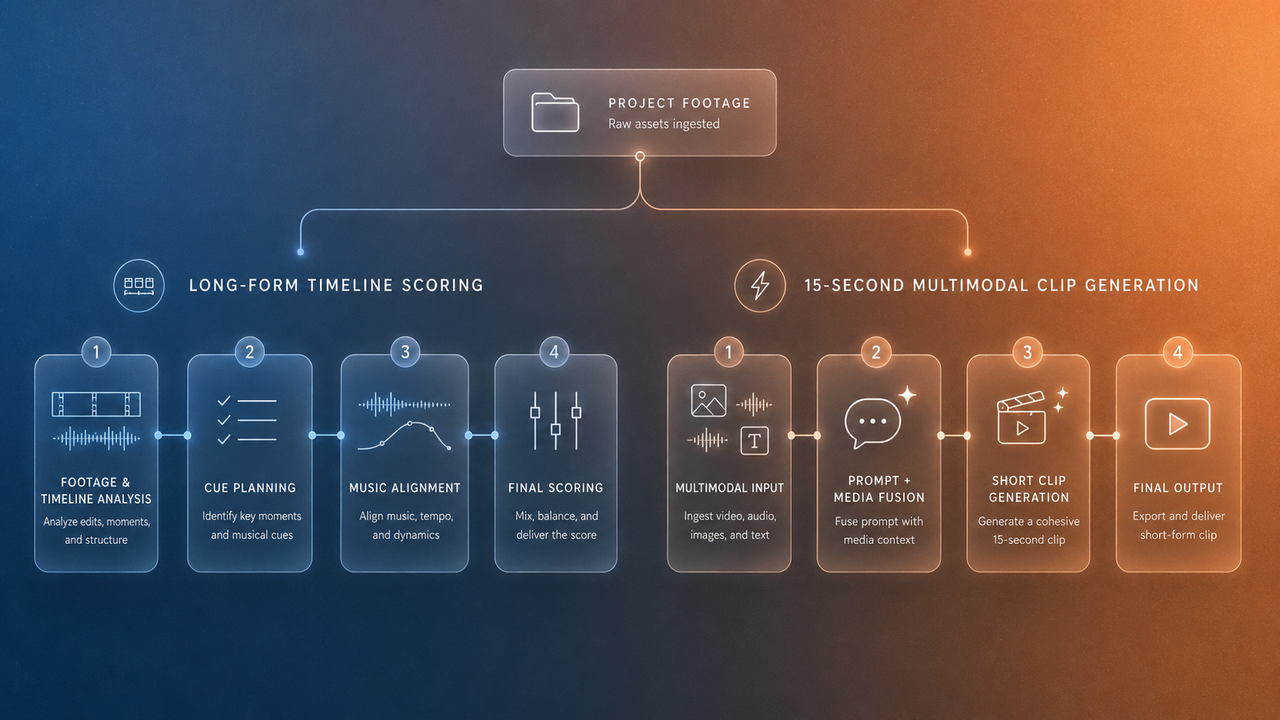
Choose MiniMax Music 3.0 when the main deliverable is music. It is the more appropriate starting point for complete songs, instrumental tracks, recurring themes, and music that will be imported into an existing video-editing timeline.
Choose MiniMax H3 when the main deliverable is a short generated or edited video clip that includes sound. MiniMax’s official launch page positions H3 as a general-purpose multimodal generation model capable of using context across text, images, video, and audio.
The distinction can be summarized as follows:
| Decision point | MiniMax Music 3.0 | MiniMax H3 |
|---|---|---|
| Primary model category | Dedicated music generation | Multimodal video generation |
| Main output | Music or a complete song | Short video with native stereo audio |
| Music direction | Prompt, lyrics, song structure, and instrumental mode | Part of a broader multimodal instruction |
| Visual context | Not documented as a Music 3.0 input | Text, image, video, and audio context supported |
| Published maximum duration | Not specified in the cited Music 3.0 documentation | Up to 15 seconds for the announced audio-video output |
| Best fit | Separate soundtrack asset | Short integrated audio-video clip |
These categories are adjacent, but they are not interchangeable.
What MiniMax Music 3 Creates
MiniMax’s Music Generation documentation describes Music 3.0 as a model that uses a prompt to define musical style, mood, and scenario. Lyrics can be supplied as vocal content, and the API can arrange, perform, and output a complete song.
The documentation also supports instrumental-only generation through the is_instrumental parameter. That makes Music 3.0 relevant to video creators who need background music without vocals as well as creators producing a song-led video.
Its core controls are music-oriented:
- Style and mood descriptions
- Instrument and performance direction
- Optional lyrics
- Structured song sections
- Vocal or instrumental generation
- Audio output settings
The documented lyrics structure includes labels such as [Intro], [Verse], [Chorus], [Bridge], [Hook], [Solo], and [Outro]. If a user does not supply lyrics, the API also documents a lyrics_optimizer option that can generate lyrics from the prompt when enabled.
Music 3.0 does not document video frames, scene changes, cut markers, or timeline cue points as generation inputs. A creator can describe music intended for a video, but the model is not presented as watching that video or automatically fitting the result to a locked edit.
The generated music should therefore be treated as a separate production asset. An editor must still place it under the video, decide which section to use, leave room for speech, and shape its ending.
What MiniMax H3 Creates
MiniMax announced H3 on July 31, 2026 as a general-purpose multimodal generation model. According to the official MiniMax H3 launch page, it can jointly understand context that includes text, images, video, and audio.

The same announcement says H3 generates video with native stereo audio at up to 2K resolution and up to 15 seconds in length. These are MiniMax’s published product specifications and claims, not an independent assessment of output quality or reliability.
H3 is not simply a music model with additional inputs. Its purpose is broader: it can use multiple reference modalities to generate or edit an audio-video result. MiniMax demonstrates this with an example combining camera movement from one video, a character from an image, and a vocal reference from an audio file.
The H3 release also describes jointly modeled voice, sound effects, and music rather than treating each as a completely separate generation domain. That does not make H3 a documented replacement for a dedicated long-form music model. Its announced creator-facing output remains a short video clip with integrated sound.
Compare Inputs and Outputs
Prompt, Lyrics, and Instrumental Music
Music 3.0 begins with musical intent. A creator can describe the desired genre, emotional direction, instrumentation, vocal treatment, or scenario. Lyrics can be supplied directly, generated through the documented lyrics workflow, or omitted for instrumental output.
The result is audio that can move between applications. It can be reviewed independently, imported into an editing system, placed under different picture versions, or handed to another team member for audio work.
This separation is valuable when the music must continue beyond a single shot or function across a longer sequence. It also allows the editor to preserve the same music while replacing visuals.
However, Music 3.0 does not automatically know where a title appears, when a camera move ends, or when narration begins. Those relationships have to be established during editing.
The cited Music 3.0 documentation does not specify a maximum generated-song duration. A duration field returned with an individual generation describes that result; it should not be interpreted as a published maximum for the model.
Text, Image, Video, and Audio Context
H3 starts from a wider context. Its official release describes inputs and references across text, images, video, and audio, with natural-language instructions explaining how those materials relate to the desired result.
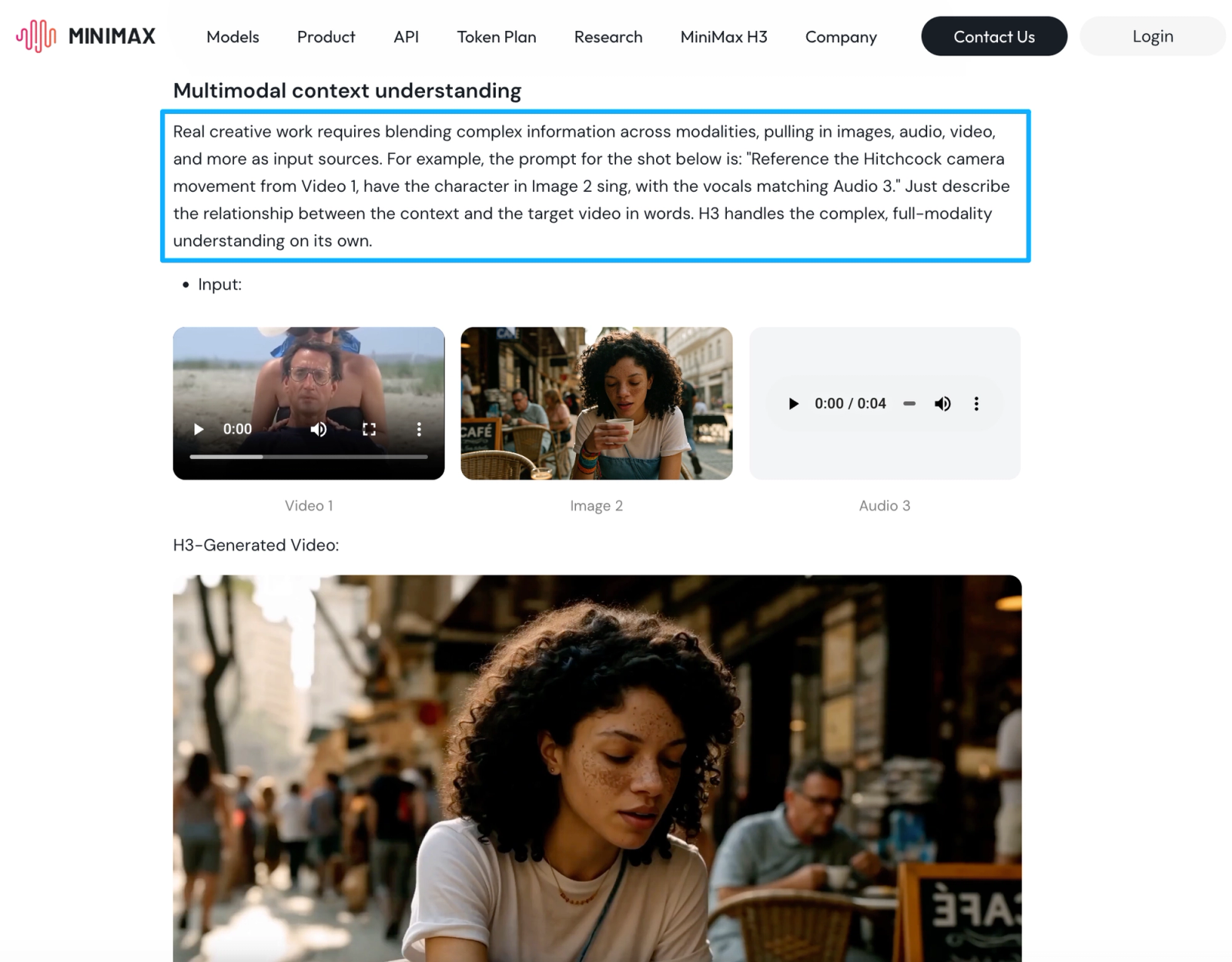
That makes H3 relevant when visual generation and audio generation are part of the same creative task. For example, a creator may want a character, camera movement, visual environment, voice, and surrounding sound to be generated as one short clip.
The corresponding output is also different. Music 3.0 returns music, while H3’s headline capability returns audio and video together.
The H3 launch article does not establish that every audible element is available as an independently exported track or stem. Creators should verify the current product interface and documentation before assuming that music, dialogue, ambience, and effects can be separated after generation.
Compare Creator Workflows
Scoring an Existing Video
Music 3.0 can provide music for an existing video, but it does not document a video-aware scoring workflow. The editor generates music from musical instructions and then tests the result against the cut.
This can work well when:
- The video needs a complete instrumental bed
- Music will continue across several scenes
- The visuals can be adjusted to the selected track
- A recurring theme is needed across multiple videos
- The soundtrack must remain available as a separate file
H3 can accept video context, but that does not automatically make it the better tool for scoring a finished long-form edit. Its published audio-video output is limited to clips of up to 15 seconds.
For a longer video, using H3 as the only soundtrack source could require several generated sections and additional editorial work. Transitions, musical continuity, tonal consistency, and reusable themes would still need review.
H3 is therefore better classified as a short multimodal generation model than as a dedicated long-form scoring system.
Generating Short Audio-Video Clips
H3 is the clearer fit when the target is a short clip in which picture and sound should be created together.
Potential scenarios include:
- A brief branded visual with integrated sound
- A short character performance using visual and audio references
- A generated title or transition clip
- A compact social-media scene
- A visual concept in which motion, voice, music, and effects are interdependent
Music 3.0 would address only the musical part of those tasks. The visual clip would need to be produced separately and combined with the generated music afterward.
That separation is not necessarily a disadvantage. A team may prefer independent control over picture and soundtrack, especially when the music needs revisions without regenerating the image.
Limits and Trade-Offs
Music 3.0 provides specialized music controls, but it does not document the multimodal visual understanding described for H3. It also does not automatically synchronize a generated track to an existing video timeline.
H3 accepts broader context and generates native audio-video output, but its published 15-second limit makes it unsuitable to describe as a general long-form soundtrack model. The official launch page also acknowledges areas for improvement, including multimodal understanding and visual detail.
The two models should not be ranked by audio quality without controlled testing. They solve different tasks, produce different deliverables, and expose different kinds of creative control.
Other trade-offs include:
- A Music 3.0 track requires a separate video-editing pass.
- An H3 clip may require regeneration when either picture or sound needs changing.
- Music 3.0 offers music-specific structure but no documented visual context.
- H3 offers multimodal context but is not documented as a detailed song-production environment.
- Neither model removes the need for final audio review.
Availability, output settings, pricing, usage limits, and product controls may change. Verify the current MiniMax interfaces, documentation, and applicable terms before building a production workflow around either model.
Which Model Fits Which Project?
Use Music 3.0 for a YouTube background track, instrumental bed, recurring channel theme, complete song, montage cue, or music asset that must remain separate from the video.
Use H3 for a short generated clip in which visuals and native sound should be produced together from multimodal references.
Use both when a project needs a short H3-generated scene and a longer Music 3.0 soundtrack around it. The editor can place the H3 clip inside a larger sequence and use separate music before, beneath, or after that section.
Consider a composer, sound designer, or conventional post-production workflow when the project requires detailed cue-by-cue scoring, isolated stems, long-form musical continuity, exclusivity, extensive revisions, or precise control over every sound layer.
FAQ
Can one project use Music 3 and H3 outputs together?
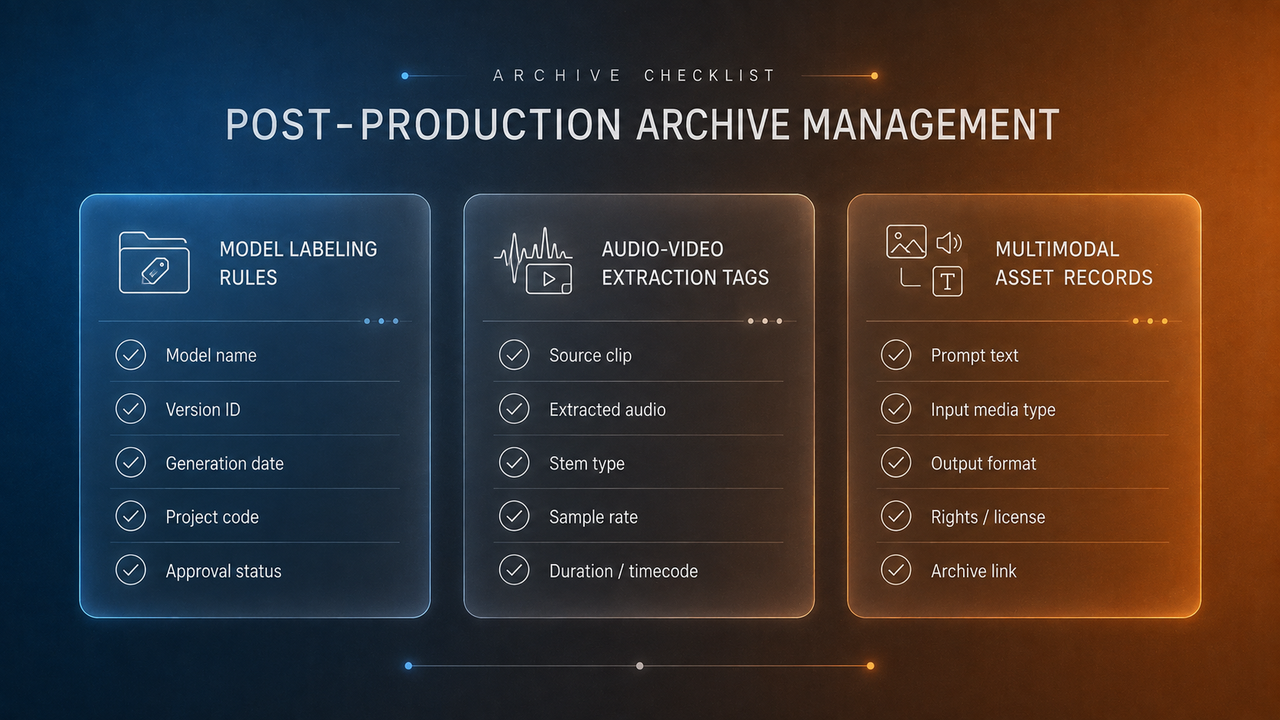
Yes. Treat them as separate production assets and record which model produced each one. Check the transition between H3’s embedded sound and any separate Music 3.0 track.
How should teams label audio generated inside an H3 clip?
Include the model, generation date, project, source clip, version, and whether the audio remains embedded or has been extracted for review. Do not label it simply as a Music 3.0 output.
Who should approve a model switch during production?
The person responsible for the project’s creative scope, schedule, and delivery requirements should approve it after consulting the editor and audio owner. A model switch can alter both the asset type and the amount of post-production required.
What should be archived when a multimodal draft is rejected?
Keep the instruction, reference assets, generated draft, review notes, rejection reason, model version, and applicable rights records. This prevents the same unsuitable direction from being repeated later.
When is a separate audio post-production pass still useful?
It remains useful whenever speech clarity, transitions, loudness, noise, synchronization, or consistency across multiple clips needs attention. Native audio generation does not make the finished mix self-approving.