Inspiration
What Is MiniMax Music 3 for Video Creators?
- Written by
- Sonilo Team
- Published
MiniMax Music 3 is commonly used as a search term, but the official model name is Music 3.0, with the API identifier music-3.0. MiniMax released the model on July 16, 2026, according to its current model release notes. For a step-by-step path from idea to finished track structure, follow how to make a song with AI tools.
For video creators, the important classification is straightforward: Music 3.0 is a prompt-driven song and instrumental music model. It can create music from a style description and, when relevant, lyrics. It is not documented as a video-understanding or automatic scoring system.
What MiniMax Music 3 Is

MiniMax describes Music 3.0 as its recommended text-to-music model. Its Music Generation documentation explains that users can define a style, mood, and scenario through a prompt and provide lyrics for vocal content.
The resulting audio can be considered as a candidate theme, song, or background cue for a video project. The editor must still decide whether it fits the footage, narration, pacing, and final duration.
The reviewed documentation does not say that Music 3.0 watches an uploaded video, interprets scenes, or composes directly against an edit. Video creators should therefore treat it as a music-generation step that occurs beside the editing workflow.
How the Model Creates Music
At the API level, a request identifies the music-3.0 model and supplies a music prompt, lyrics when required, and audio-output settings.
The official Music Generation API reference describes the prompt as a statement of musical style, mood, and scenario. A useful prompt can identify genre, emotional direction, instrumentation, vocal treatment, and production character.
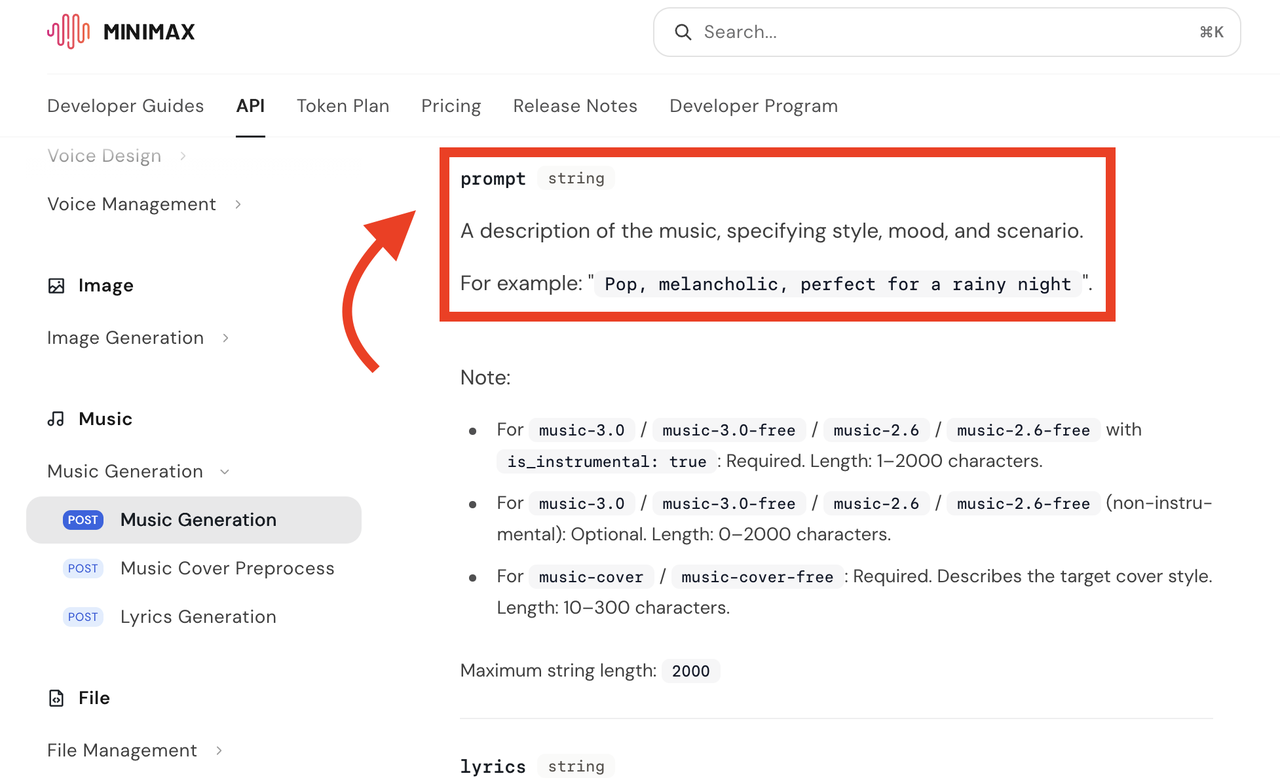
That prompt is creative guidance rather than a timeline map. It does not contain information about individual shots unless the user manually translates those needs into musical language.
Prompts, Lyrics, and Song Structure
For vocal music, users can provide their own lyrics or use MiniMax’s optional lyrics-generation workflow. The documentation supports structural labels such as [Intro], [Verse], [Chorus], [Bridge], [Hook], and [Outro].
These labels can help describe song organization, but they do not automatically connect sections to video timecodes. If a chorus needs to begin on a product reveal or an outro must meet an end card, the editor still has to test and adjust the generated track in the timeline.
The API also includes a lyrics_optimizer option. MiniMax says that when this option is enabled and the lyrics field is empty, the system can generate lyrics from the prompt.
Teams should review generated lyrics for accuracy, tone, pronunciation, brand suitability, and third-party references before approving them.
Instrumental-Only Generation
Music 3.0 supports instrumental generation through the is_instrumental parameter. When that setting is enabled, lyrics are not required, but a prompt describing the intended music is required.
The official MiniMax music console presents the same distinction through a dedicated instrumental mode. It asks for a style description and permits optional lyrics to help define structure.
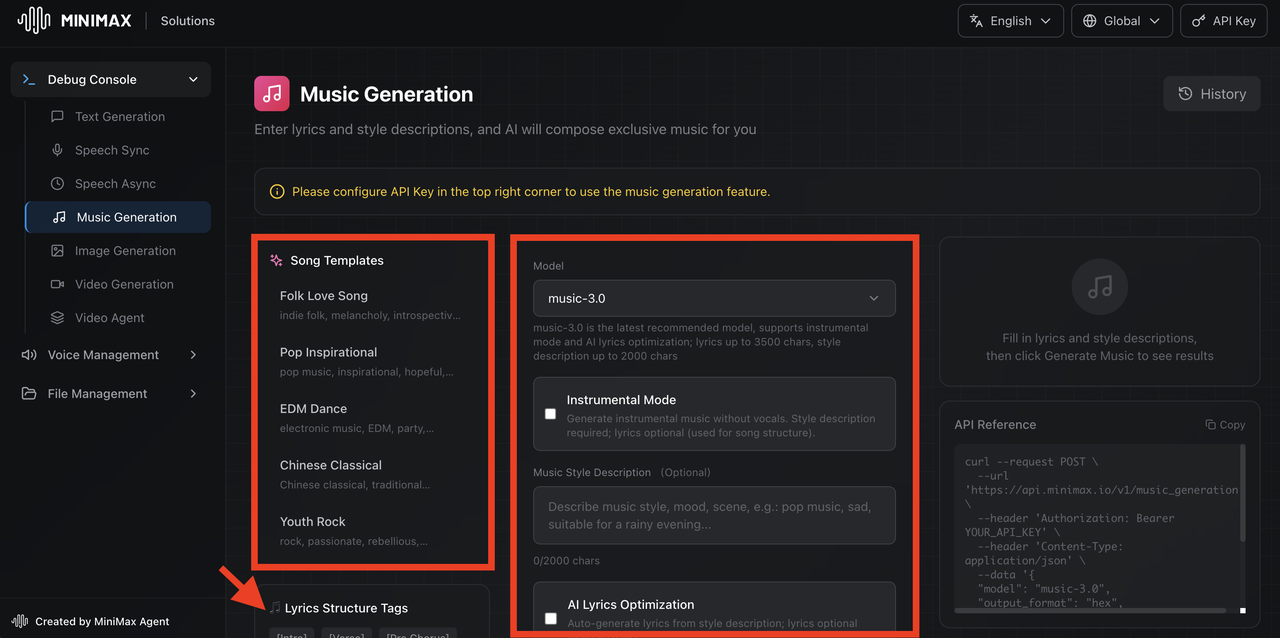
Instrumental output may be more practical beneath dialogue or narration because it avoids an additional vocal layer. That does not guarantee a clean mix: melody, percussion, and frequency density can still compete with speech.
What Changed in Music 3.0
MiniMax positions Music 3.0 as an upgrade in instruction following, sound quality, and vocal generation. These are company claims from the official product documentation, not independent performance findings.
Creative-Intent Understanding
MiniMax says the upgraded semantic model provides better creative-intent understanding and reduces drift from the requested direction.
For creators, this suggests that more detailed prompts may offer stronger guidance over mood, scenario, instrumentation, and performance style. The result should still be reviewed rather than assumed to follow every part of a complex prompt consistently.
No statement in the reviewed documentation establishes that “creative intent” includes understanding a video timeline or responding to individual visual edits.
Sound and Vocal Controls
MiniMax also claims improved mix clarity, support for specified instruments and playing techniques, and more natural vocal synthesis. Its documentation mentions control over areas including melody, pronunciation, breathing, and layered harmonies.
These descriptions concern music and vocal generation. They do not establish that the model exports isolated stems, produces a dialogue-ready video mix, or supplies separate instrument tracks.
Editors who need a more flexible post-production workflow should verify the actual delivered file and available controls before planning around those capabilities.
Where It Fits in Video Production
Music 3.0 can fit into the early soundtrack search and development stage. A creator can generate several instrumental or vocal directions, compare them against an edit, and select one for further work.
A practical workflow is:
- Define the video’s tone and the role of the music.
- Write a prompt describing the musical direction.
- Generate and review several outputs.
- Import a selected output into the video editor.
- Test it against dialogue, scene changes, and the ending.
- Trim, reposition, replace, or mix it as necessary.
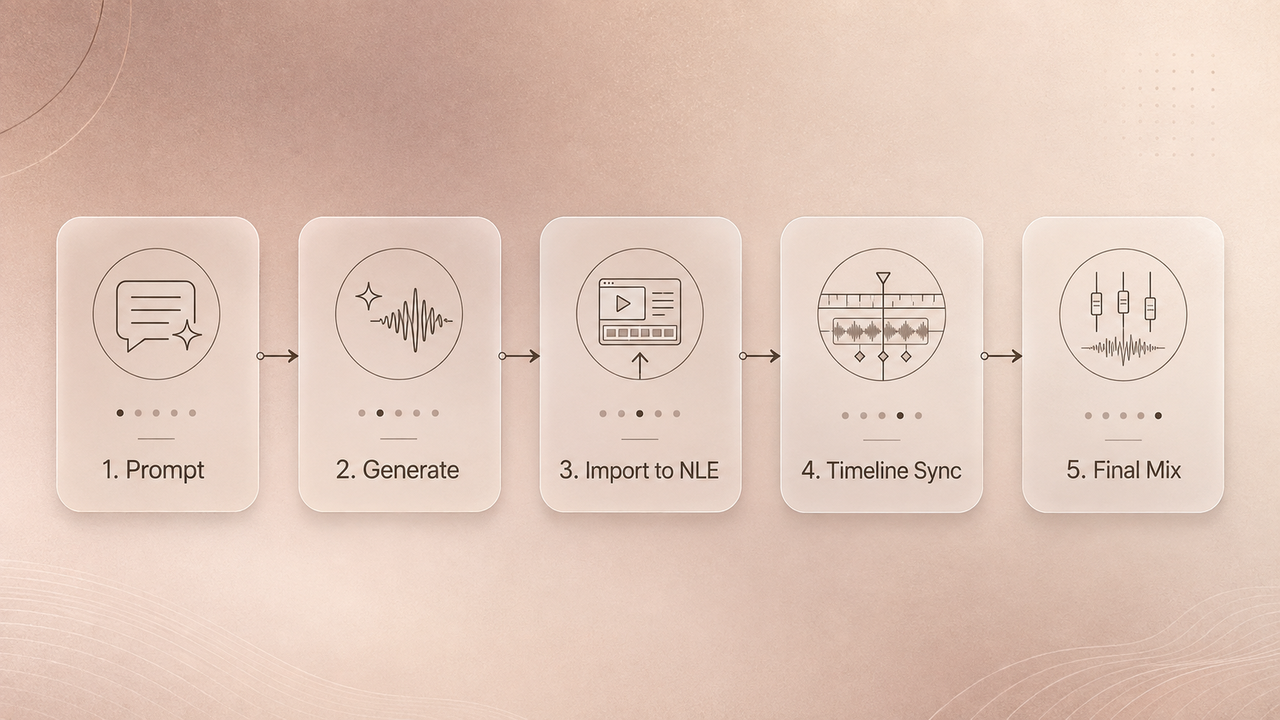
This makes Music 3.0 closer to a dedicated music generator than a video-first soundtrack engine. Its usefulness depends on whether the generated composition can be adapted to the project’s visual structure.
What It Does Not Automate for Video Editors
As of August 14, 2026, the reviewed MiniMax Music Generation documentation and console do not document support for:
- Uploading a video to Music 3.0 for visual analysis
- Detecting cuts, actions, dialogue, or scene changes
- Automatically placing musical accents on visual events
- Matching an exact final video duration
- Rebuilding music after picture changes
- Exporting separate instrumental stems
This does not prove that such capabilities could never appear elsewhere or in a future update. It means they should not be presented as current Music 3.0 features without new official evidence.
Video editors remain responsible for synchronization, duration changes, dialogue balance, transitions, and final quality control.
Availability, Access, and Terms to Check
The API reference currently lists music-3.0 for Token Plan and paid users and music-3.0-free as a free-tier version available through an API key. The MiniMax console also requires an API key for music generation. Access, limits, pricing, and model availability may change, so check the current interface and documentation before production use.

MiniMax’s current Music Creation Terms of Use, effective June 19, 2025, require users to hold the necessary rights or permissions for submitted material, including lyrics, music, audio, video, and voices. The terms also discuss output notices, lawful use, and limitations on warranties.
Those terms should be read together with any applicable service agreements and notices shown during export. Do not assume that generation alone establishes every right needed for advertising, client work, distribution, or monetization. This is general information, not legal advice.
FAQ
Can collaborators reuse one prompt across different video projects?
Yes, teams can retain a prompt as a creative starting point. However, the resulting track should be reviewed separately for each project’s tone, structure, and rights requirements.
How should teams label drafts from different MiniMax music versions?
Include the model, prompt revision, generation date, output number, and project version. For example:music-3.0_prompt-v4_output-02_2026-08-14
Can a generated track be handed off to an external mixer?
The documented API produces an audio output that can be downloaded and handed off. Before relying on a particular format or editable component, verify what the current output actually contains. Do not assume stems are included.
What project records help when a soundtrack is revised later?
Keep the prompt, lyrics, model identifier, generation date, original output, edited version, project timeline, applicable terms, and approval notes.
Who should approve a generated track in a shared workflow?
Assign a named creative owner, such as the editor, director, producer, or client representative. Rights-sensitive releases may also require review by the person responsible for licensing or legal clearance.