Guides
How Can I Make a Photo Video with Music That Fits?
- Written by
- Sonilo Team
- Published
If you are asking how can I make a photo video with music, the editing software is rarely the difficult part. The harder job is making a set of still images feel like one story instead of a folder being played in sequence.
Hi, I’m Nico, and I treat each photo as a shot. Some need time to breathe, some work as quick details, and one or two should carry the emotional peak. Once that visual rhythm exists, the music has something meaningful to support.
This guide focuses on photo order, subtle motion, musical phrasing, the final image, and crops for different screens.
Photo Video vs Slideshow: What Changes?
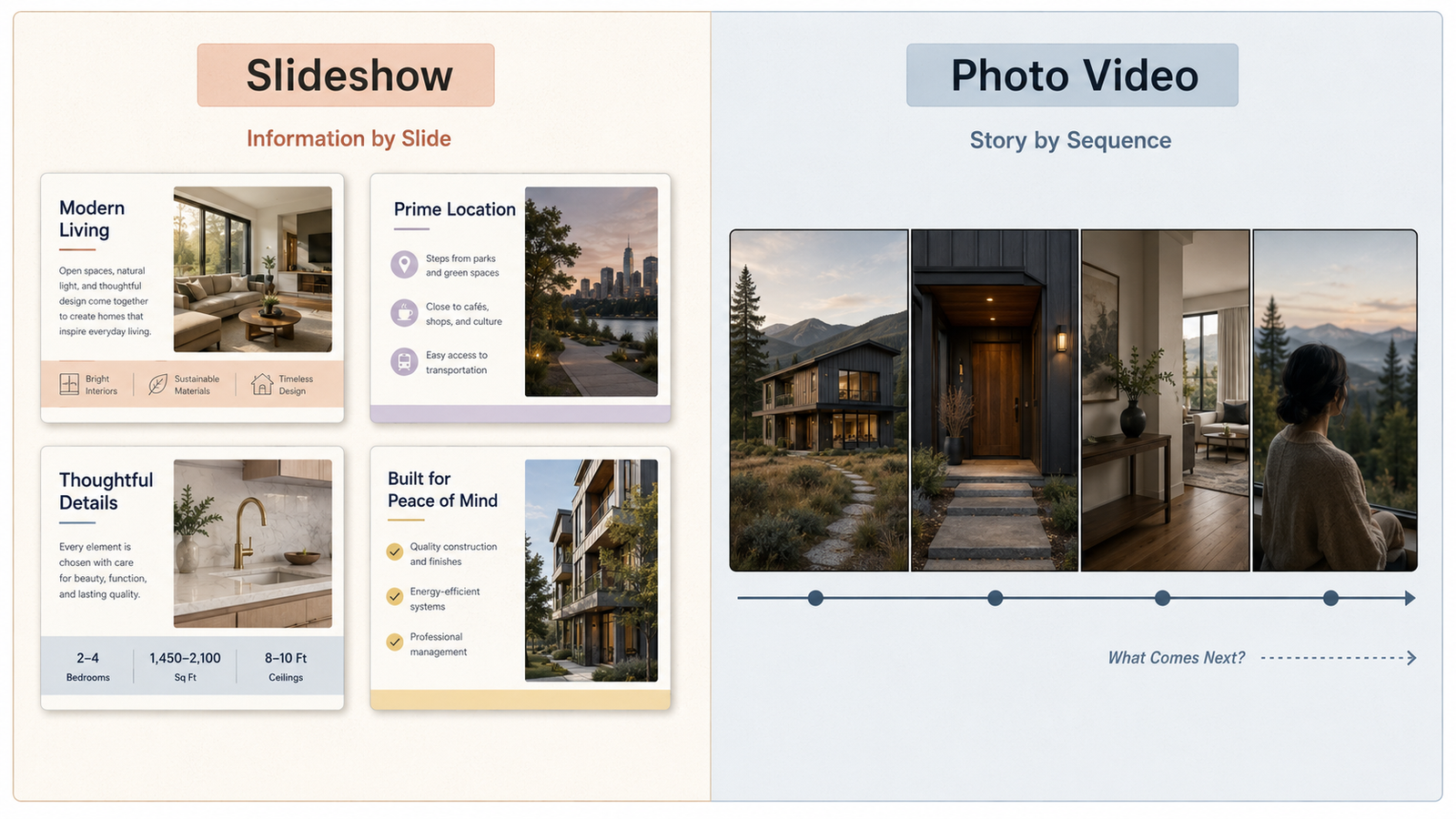
A slideshow usually presents information one slide at a time. It may include titles, layouts, charts, or several visual elements on the same screen. A photo video is closer to a short film built from still frames: the photos are the footage, and their order creates the narrative.
That distinction changes the edit. Instead of asking which transition belongs between every image, ask what the viewer should notice next. A hard cut can connect related details; a dissolve can mark a change in time; a brief hold can make one expression feel important.
The soundtrack also takes on a larger role because there may be no dialogue or natural production sound. Music supplies continuity, but it should not force every image into the same emotional register. The goal is not constant intensity. It is a clear visual and musical progression.
Group Photos into Story Beats
Do not start by dragging every photo onto a timeline in file-name order. First, reduce the collection to a sequence with a beginning, development, and ending. Even a 30-second photo story video benefits from that shape.
I usually make four groups:
- Opening context: an image that establishes the person, place, event, or question.
- Development: wider views, supporting moments, and details that move the story forward.
- Emotional peak: the strongest expression, reveal, achievement, or visual contrast.
- Resolution: a final image that feels like an arrival rather than an accidental last file.
Within each group, look for visual relationships. A wide exterior can lead to a doorway, then a close-up inside. A portrait can be followed by an associated gesture or object. These connections create flow without decorative transitions.
Remove near-duplicates unless repetition serves a purpose. Two similar photos can create a useful before-and-after comparison, but six versions of the same pose usually flatten the pace. Keep the image that contributes the clearest expression, composition, or story information.
Choose a Soundtrack with the Right Emotional Arc
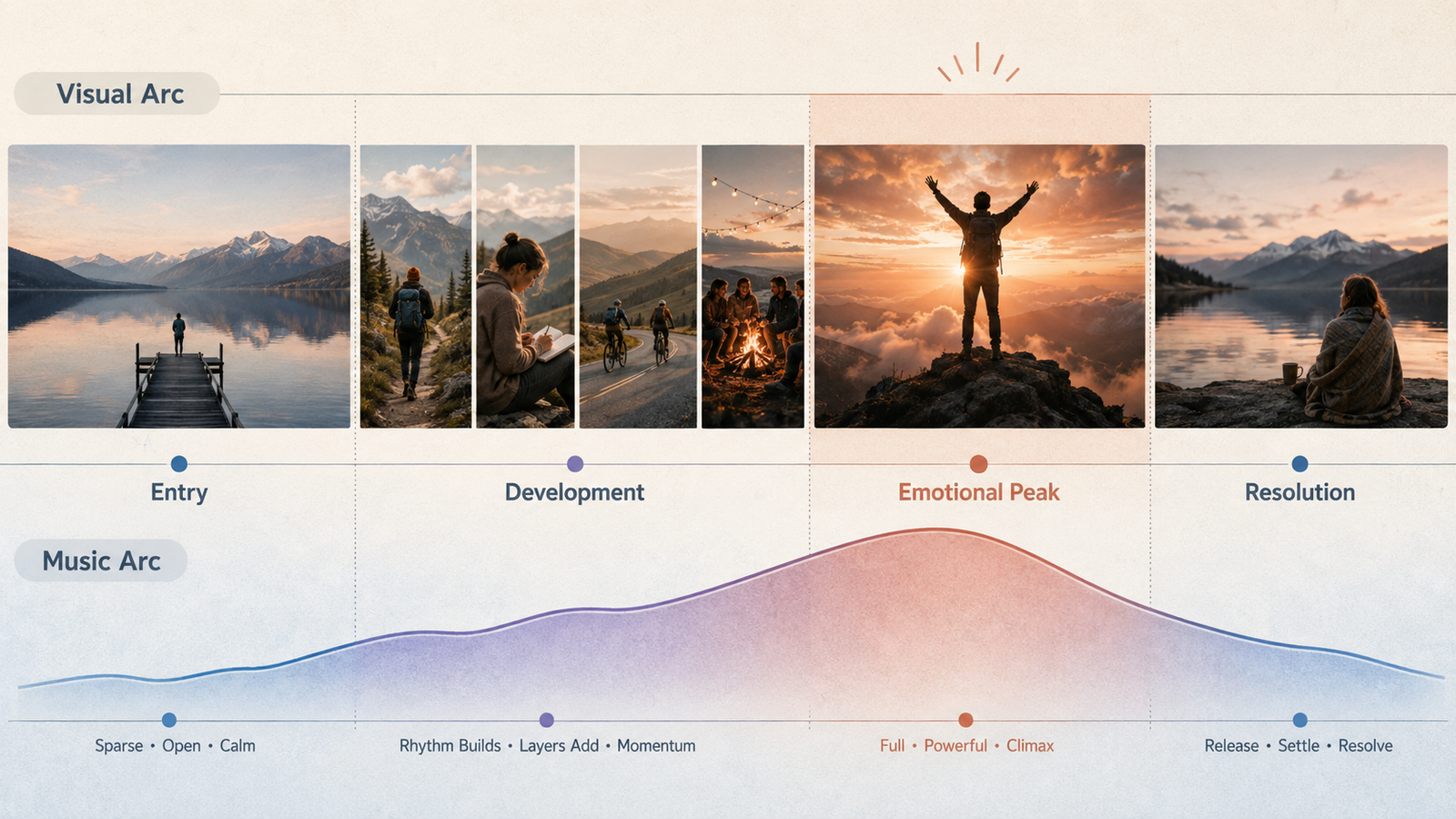
Good music for a photo video should develop in the same direction as the image sequence. That does not mean the track must imitate every emotion. It means its sections should leave room for the story to open, build, peak, and settle.
Listen for structure before focusing on genre. A useful track might begin with a sparse texture, add rhythm as the images become more active, reach its fullest section near the strongest photo, and then give the ending room to resolve. A beautiful track with no useful change may leave the whole montage feeling emotionally flat.
Check three things while auditioning music:
- Entry: Does the opening give the first photo enough space, or does it arrive at full energy immediately?
- Development: Is there a phrase, layer, or rhythmic change that can support the middle of the story?
- Resolution: Does the music provide a clean final cadence, tail, or fade that fits the last image?
Avoid choosing solely from a label such as “happy,” “nostalgic,” or “cinematic.” One track may stay soft while another builds toward a climax, which only works if the images earn it.
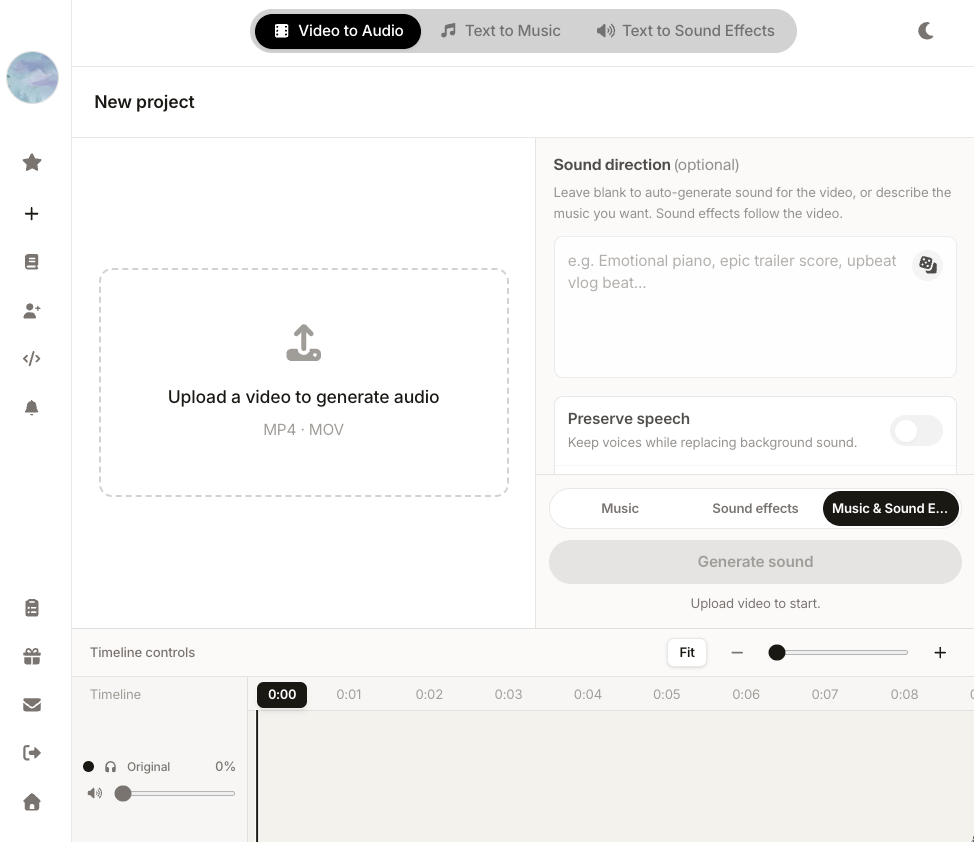
If the photo edit is already locked, a video-first soundtrack workflow is another option. According to Sonilo’s current product page, its workflow is designed to generate a soundtrack from an uploaded edit and align the music with cuts, pacing, reveals, and scene changes. This is Sonilo’s official product positioning rather than an independent performance assessment, so treat each result as a candidate and check its story fit and ending against the actual edit.
Before uploading personal or client material, confirm that you have the necessary rights and permissions. Sonilo’s current Terms of Service require users to hold the rights needed for submitted inputs, while its Privacy Policy says uploaded videos may be used for model training and improvement. Avoid uploading sensitive or confidential material unless authorized, and check the plan-specific usage rights before publishing.
Match Image Changes to Musical Phrases
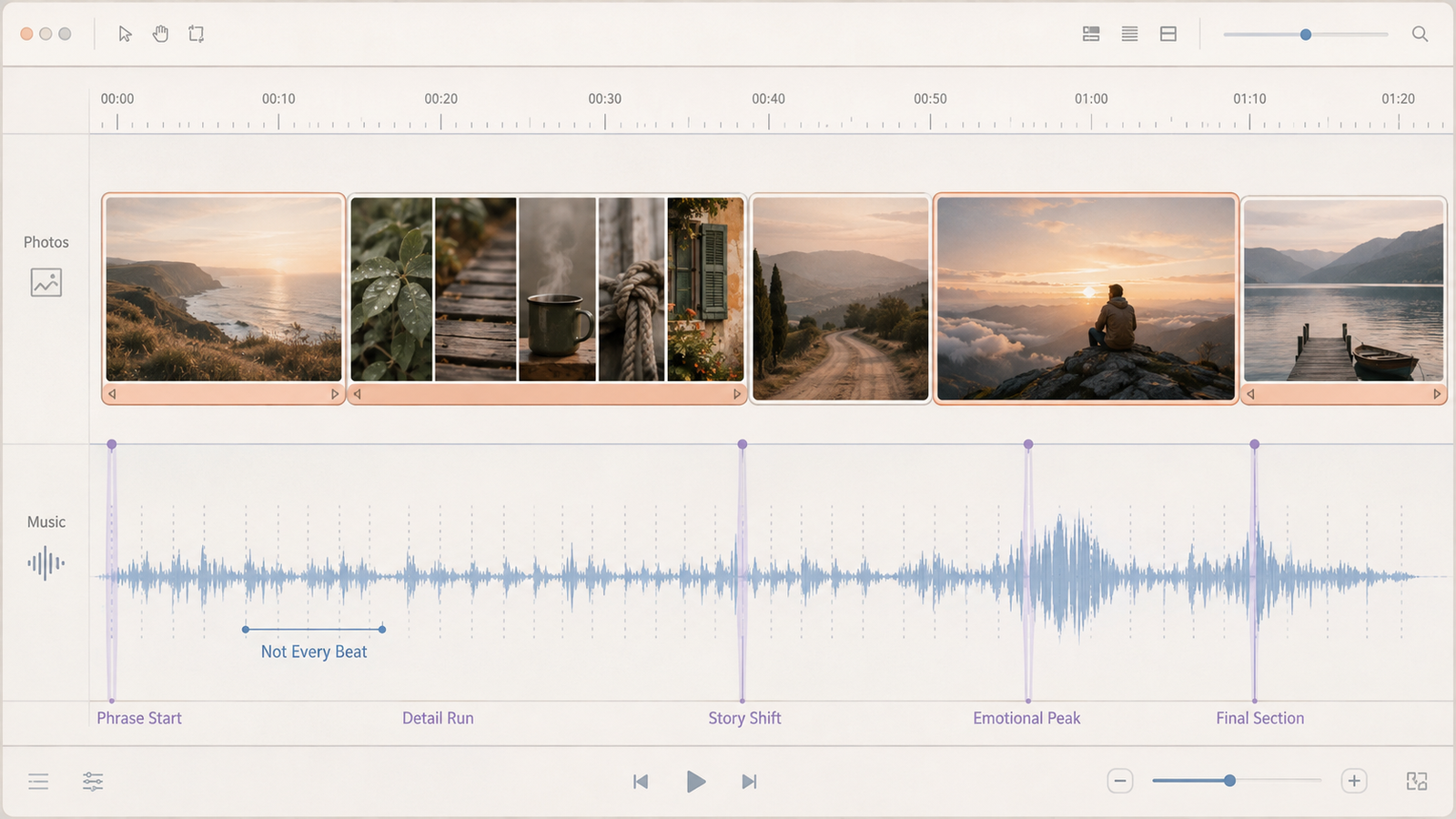
Cutting every photo on a beat usually makes a montage feel mechanical. Music has several timing layers: individual beats, short motifs, full bars, and longer phrases. Photo changes often feel more natural at the ends or beginnings of phrases, where the music itself seems to complete one thought and start another.
Mark the most important musical events first. These might include the first clear rhythm, a new instrument, a lift in harmony, a brief pause, or the start of the final section. Place the major story beats near those points, then arrange the supporting images between them.
Not every cut needs musical emphasis. Let some images change inside a phrase, especially during a quick run of related details. Save exact beat hits for moments that deserve attention: a reveal, a dramatic contrast, a title, or the emotional peak.
The image should determine screen time. A close-up may register quickly, while a group photo, landscape, document, or image containing text needs longer. If viewers cannot understand it before it disappears, musical synchronization is not helping.
Add Motion Without Distracting from the Photos
Subtle motion can keep a still-image sequence visually active and guide attention within the frame. A slow push can move toward a face. A gentle pan can reveal a landscape or group. A restrained pullback can expose context that was not obvious at the start of the shot.
The movement should have a reason. Ask where the viewer’s eye should begin and where it should end. If the answer is unclear, keeping the frame still may be stronger than adding an automatic zoom.
Use one motion direction long enough to feel intentional. Reversing from push-in to pull-out on every photo creates visual noise. Faster movement can support an energetic sequence; portraits and reflective scenes usually need less.
Watch the crop throughout the move. Portrait photos placed in a wide canvas can lose faces near the edges; landscape photos placed in a vertical canvas can lose the environment that gives them meaning. Reposition key subjects for each output instead of applying the same motion preset to every image.
Fit the Soundtrack to the Final Image
The last photo and the last musical event should feel designed together. Choose the final image early enough that you can build toward it, then decide whether the viewer needs a clean stop, a short hold, a fade to black, or time to read an end card.
Do not stretch the last image because the track keeps playing. If the story has ended, trim the music, use an earlier cadence, or create a controlled fade. Cutting the audio as the last photo appears can feel equally clipped.
A practical test is to look away from the timeline controls and watch the final ten seconds as a viewer. The last image should arrive before the emotional resolution, remain long enough to register, and leave without an awkward musical fragment after it.
If a logo, date, dedication, or call to action follows the photo sequence, treat it as a separate ending beat. Give it visual space and simpler music rather than forcing it onto the emotional peak.
Review Aspect Ratio and Export Quality
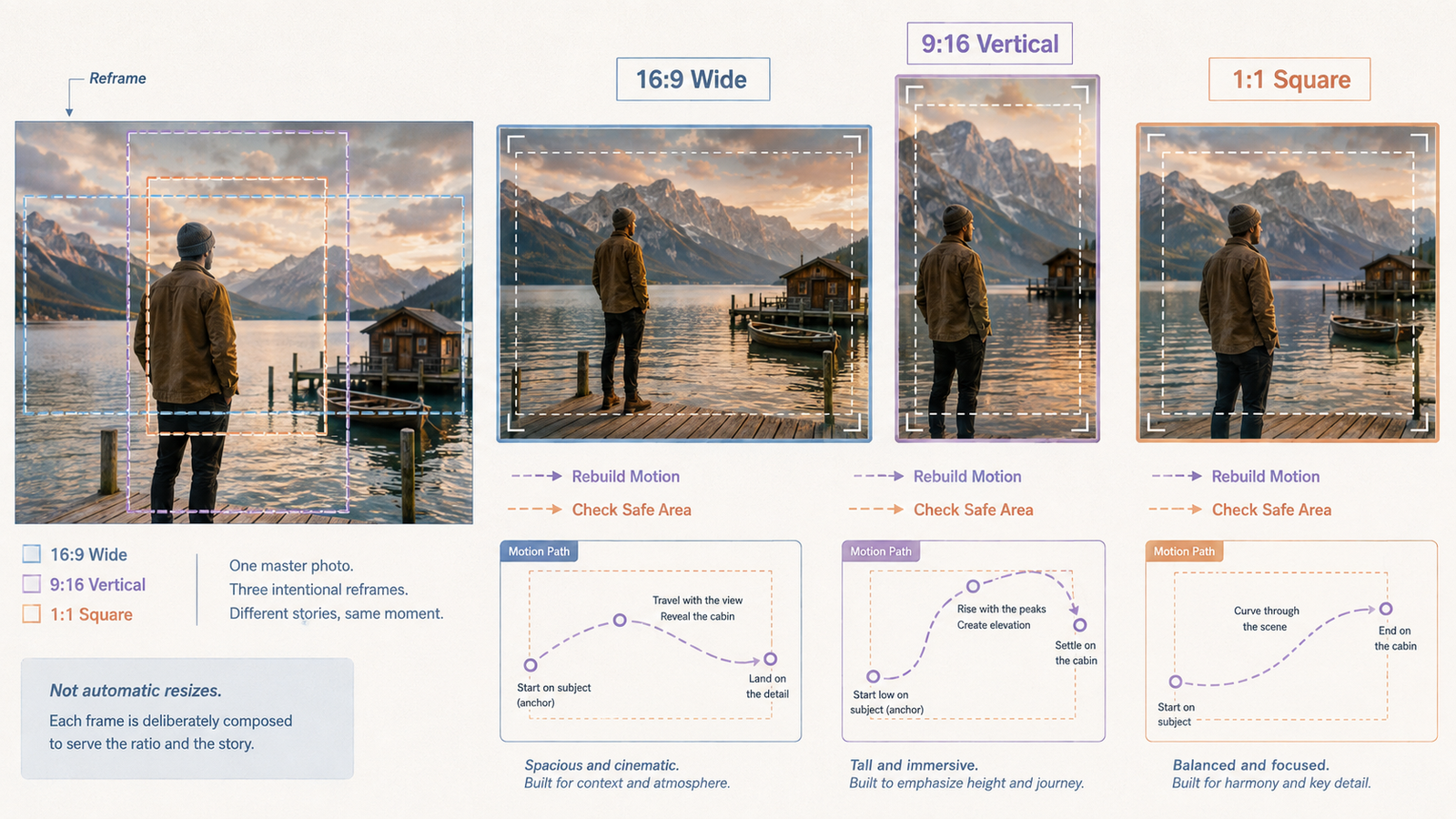
Decide the destination before building complex crops and motion. A wide 16:9 version, a vertical 9:16 version, and a square version do not show the same part of a photograph. One master timeline can guide the story, but each format needs its own framing review.
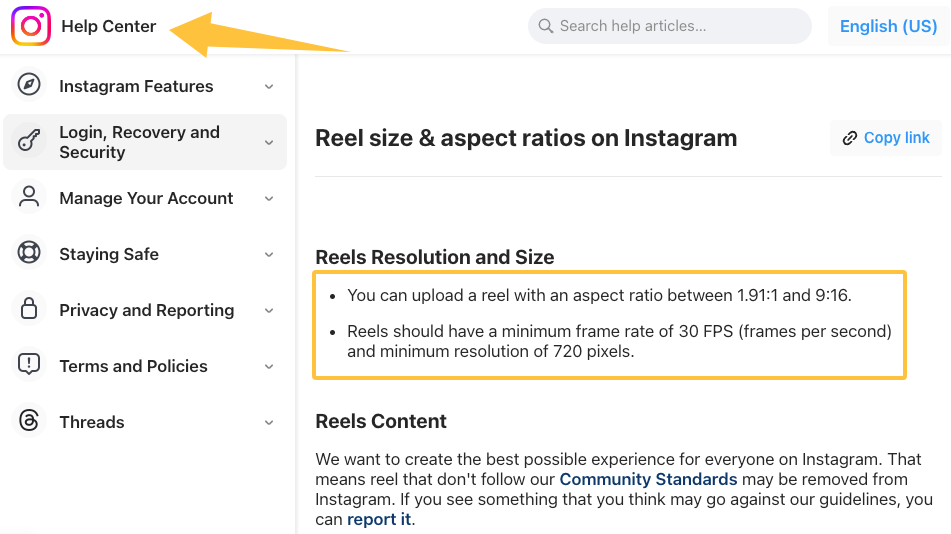
YouTube’s current upload guidance identifies 16:9 as the standard desktop aspect ratio and says its player adapts to vertical and square uploads. It also provides current codec, bitrate, resolution, audio, and frame-rate recommendations. Instagram’s official Reel specifications accept aspect ratios from 1.91:1 to 9:16 and currently list a minimum frame rate of 30 FPS and a minimum resolution of 720 pixels.
For every alternate crop:
- Recheck faces, text, horizons, and important objects inside the safe composition area.
- Rebuild pans and zooms; do not assume motion created for 16:9 will work vertically.
- Check captions and end cards on a phone-sized preview.
- Confirm that the soundtrack ending still lands after any platform-specific trim or revised title card.
Export from the highest-quality sources rather than copies compressed by messaging or social apps. Keep the originals untouched and create a master for each ratio. Before publishing, confirm that you have permission to use, upload, and publish the photographs, identifiable likenesses, logos, quotations, narration, and music as applicable. A downloadable track is not automatically cleared for every platform or commercial use.
Finally, watch the exported file, not only the editing preview. Check for soft images, unexpected black bars, cropped faces, abrupt audio, missing captions, and a final frame that disappears too quickly. A photo video maker with music can assemble the pieces, but this viewing pass is what turns the assembly into a finished story.
FAQ
Can portrait and landscape photos be mixed?
Yes. Put them on one consistent canvas, then frame each image intentionally. Portrait photos may need a background treatment or selective crop in a wide video; landscape photos may need a slow pan or tighter crop in a vertical version. Avoid stretching either orientation, and check faces and important details after every reframing move.
What source resolution should photos have?
Use the highest-resolution originals available and avoid files already compressed by messaging or social platforms. The necessary dimensions depend on the export canvas and how far you plan to zoom. Preview every motion at full output size: if a push-in reveals softness or artifacts, reduce the crop or replace that image with a stronger source.
How should the original image order be archived?
Keep the untouched originals in one folder and create a separate selection folder or non-destructive project collection. Save a numbered edit list, such as 001-opening, 002-detail, and 003-portrait, plus the project file and accepted music version. That makes the story order understandable even if another editor opens the project later.
What changes when the video is recut for another aspect ratio?
The story order can usually remain, but framing, motion paths, caption placement, title cards, and sometimes shot duration need review. A vertical crop may remove contextual details that made a wide photo readable. Build from the same master sequence, then treat each aspect ratio as a deliberate edit rather than an automatic resize.
The final test is simple: mute the video and check whether the images still tell a story, then play it again and ask whether the music makes that story clearer rather than merely louder. Where does your own photo sequence need the most work right now: the order, the motion, or the ending?