Inspiration
MiniMax Music 3 for Video Soundtracks: Fit and Limits
- Written by
- Sonilo Team
- Published
MiniMax Music 3.0 is a prompt-first music-generation model that can produce complete songs or instrumental tracks. For video creators, that makes it a potential source of background music, opening themes, montage tracks, and other soundtrack material. When the goal is a full song rather than a fitted bed, use the practical guide to making an original song.
It is important, however, to classify the model correctly. Music 3.0 generates music from text instructions and optional lyrics. MiniMax’s current documentation does not describe it as a video-aware scoring system that reads an uploaded edit, detects scene changes, or automatically synchronizes music with a timeline.
That distinction determines where MiniMax Music 3 for video can be useful and where additional editing remains necessary.
MiniMax Music 3 as a Soundtrack Source
The official model name is Music 3.0, although searches and informal references often omit the decimal point.
MiniMax describes Music 3.0 as a music-generation model with improved creative-intent understanding, sound quality, instrument control, and vocal synthesis. These descriptions are vendor claims and should not be treated as independent assessments of output quality. The company’s Music Generation documentation presents the model as a system that uses prompts and lyrics to arrange, perform, and output complete music.
For a video project, the resulting track can be imported into editing software in the same way as another externally generated music file. The editor still decides where the music begins, how it relates to narration, whether sections need trimming, and how the ending should resolve.
Music 3.0 is therefore best understood as a soundtrack source, not a replacement for the video editor’s timing and mixing decisions.
What the Model Accepts
Style Descriptions and Lyrics
The model accepts a prompt describing characteristics such as style, mood, instruments, vocal direction, and intended scenario. It can also accept lyrics for vocal music.
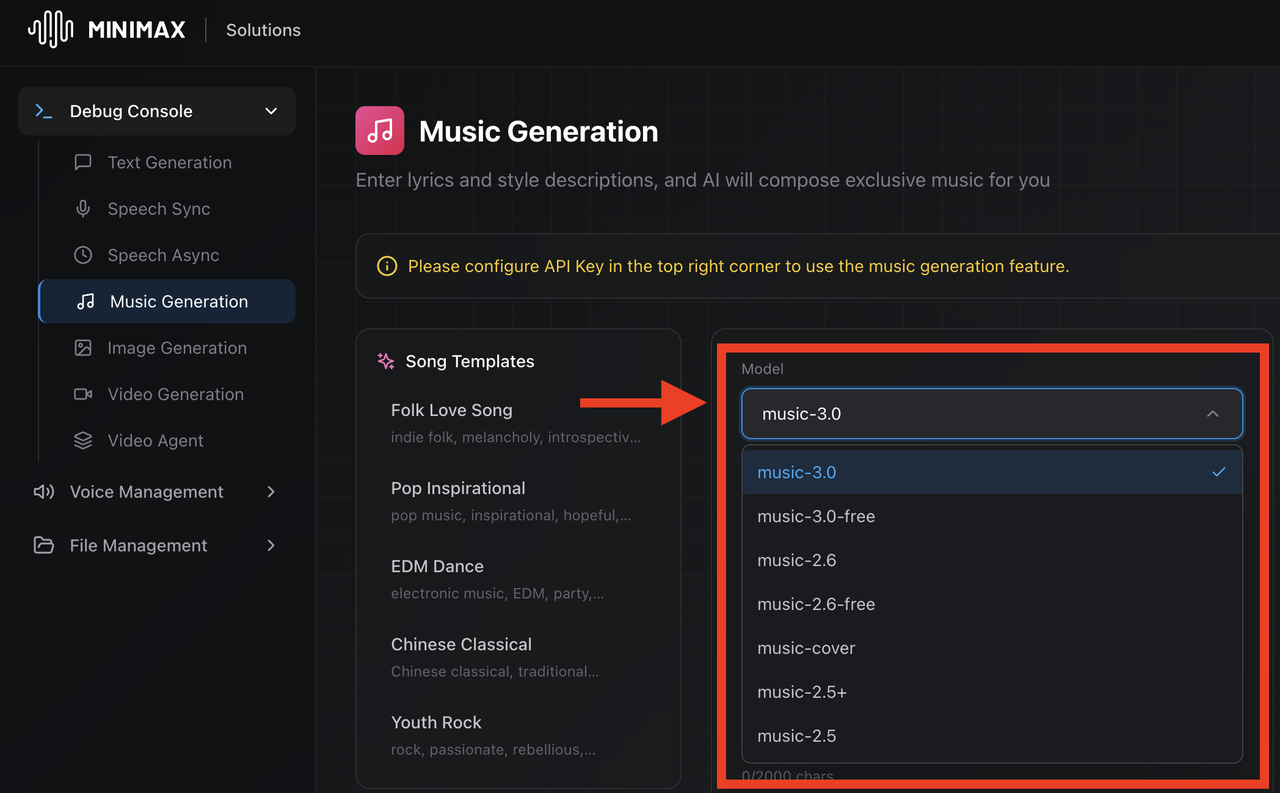
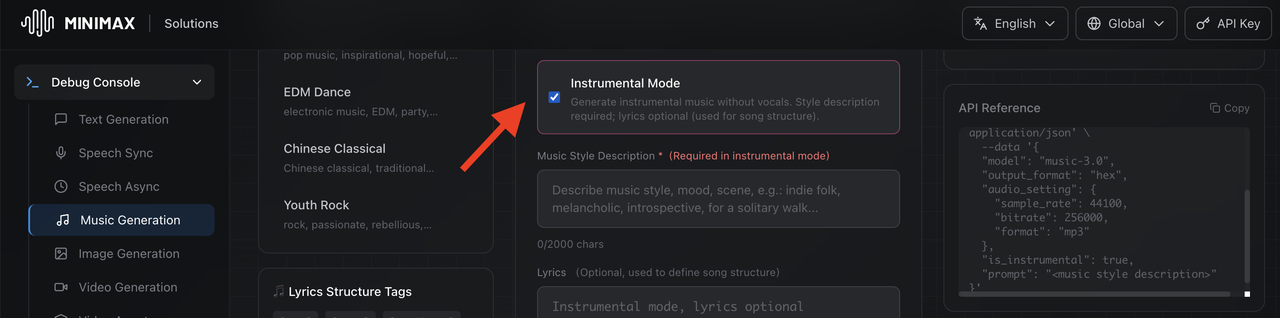
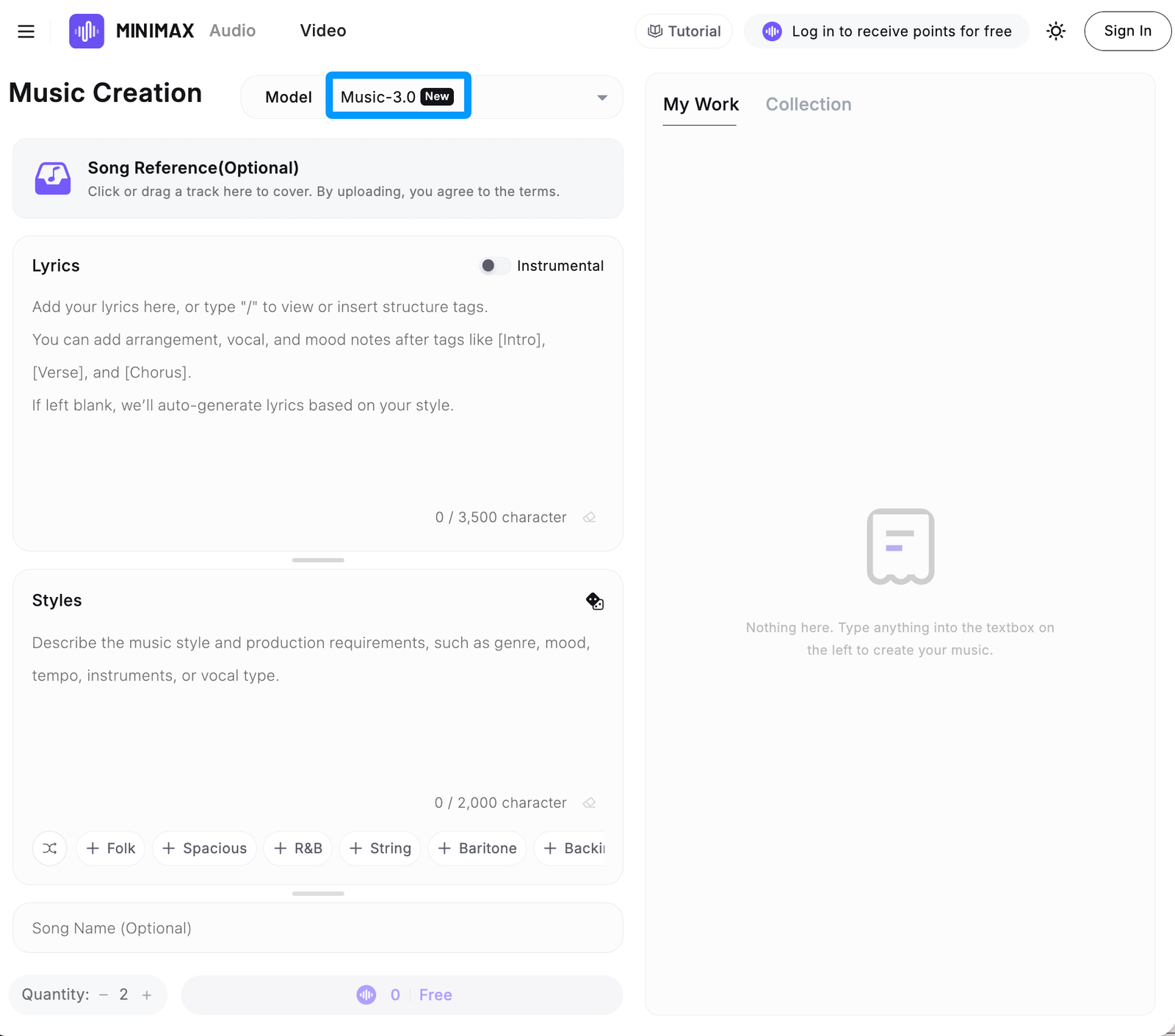
MiniMax’s current API documentation supports structured lyrics with section labels such as [Intro], [Verse], [Chorus], [Bridge], [Hook], [Interlude], and [Outro]. The company’s music-generation console displays these controls and identifies music-3.0 as its latest recommended model.
These inputs describe the desired music. They do not provide the model with information about the actual frames, cuts, dialogue pauses, or cue points in a finished video.
A creator might describe a calm instrumental passage that develops into a stronger ending, for example. That can communicate a broad musical direction, but it does not tell Music 3.0 where a particular scene transition occurs unless that timing is handled separately after generation.
Instrumental-Only Requests
Music 3.0 supports instrumental-only generation. In the API, this is represented by the is_instrumental option; the console similarly includes a dedicated instrumental mode.
This matters for video creators because a song with vocals may compete with narration, interviews, or important production sound. An instrumental result can be easier to place beneath speech, although it still requires listening and mixing in context.
“Instrumental” does not necessarily mean sparse or narration-friendly. A dense melody, bright lead instrument, or busy rhythm may still mask speech. The suitability of each result has to be evaluated against the actual video.
What the Model Returns
Complete Music Tracks
MiniMax’s documentation describes Music 3.0 as producing complete songs from the supplied prompt and lyrics. The documented output settings include generated audio and associated output information.
This is different from receiving a score already divided into timeline cues. A complete track may have its own introduction, development, repeated sections, and ending, regardless of the structure of the video.
Consequently, editors may still need to reposition the track, shorten sections, create transitions, or test different results against the same cut. Music 3.0’s current documentation does not promise exact-duration generation tied to a video timeline.
Vocal and Instrumental Outputs
Music 3.0 can produce music with vocals or generate an instrumental-only result. These are alternative kinds of finished music output, not documented stem packages.
As of August 17, 2026, the official Music Generation documentation does not list a Music 3.0 stem-export feature that separately returns vocals, drums, bass, and other musical elements. Editors who require independently adjustable layers should verify the current console and API documentation before selecting the model for production.
This wording reflects the documented interface rather than claiming that stem generation is technically impossible or will never be added.
Where Music 3.0 Fits in Video Production

Music 3.0 may fit projects where the creator wants a new piece of music in a defined style but is prepared to perform the final placement manually.Possible applications include:
- Background music for a montage with flexible cut points
- An instrumental bed beneath a lightly narrated sequence
- A channel theme or recurring opening cue
- Music for a title sequence, concept video, or mood piece
- A song-led edit in which the visuals can be adjusted around the music
The strongest fit is usually a project with some tolerance for editorial adjustment. If a generated track is close to the intended direction, the editor can test it beneath the video and decide whether the music or picture should change.
The model may be less efficient when the soundtrack must follow numerous fixed cues, dialogue pauses, product actions, or exact transitions that cannot move.
Where It Does Not Replace Video-Aware Music Tools
The current Music 3.0 API documents inputs for the model, prompt, lyrics, instrumental mode, lyrics optimization, and audio settings. It does not document video input, timeline data, cut markers, or cue-point controls.
Reference-audio input appears in MiniMax’s separate music-cover workflow. It should not be confused with video analysis or with Music 3.0 automatically scoring an uploaded edit.
Accordingly, Music 3.0 should not be described as a system that:
- Watches or interprets a video
- Detects scene changes automatically
- Matches musical events to individual cuts
- Produces an exact-length score from a video timeline
- Automatically creates space around narration
- Exports synchronized music stems for the editor
A video-first soundtrack system may be more appropriate when analysis of an uploaded cut is central to the workflow. Music 3.0 serves a different category: it creates music from music-oriented instructions, after which the result can be adapted to video.
Good-Fit and Poor-Fit Video Projects
A good-fit project usually has a clear musical direction and enough editorial flexibility to accommodate a newly generated track. Visual montages, creator intros, mood sequences, and music-led social videos may fit this pattern.
A poor-fit project may contain tightly locked animation, many short cue points, precise demonstrations, or uninterrupted narration that requires detailed control over musical density. The model can still provide source material, but the amount of editing required may reduce the workflow advantage.
The decision should therefore be based on control requirements rather than on whether a project simply “needs AI music.”
Access, Rights, and Current Limitations
The current API and console list music-3.0 and an associated free-tier model option. Availability, pricing, rate limits, supported settings, and account requirements can change, so creators should verify the current MiniMax documentation before committing a project to the service.
MiniMax’s Music Creation Terms of Use for the MiniMax Audio product require users to hold the necessary rights or permissions for submitted material, including lyrics, music, audio, video, and voices. The terms also address output notices, lawful use, technical restrictions, and possible service changes.
Those product-specific terms should not be treated as the complete legal basis for API use. MiniMax’s App and Web Terms state that API services offered to businesses and developers are governed separately by the MiniMax Open Platform Terms of Service.
Teams should review the terms applicable to their access method, together with notices and service rules presented in the relevant product or API platform. Generating a track does not by itself establish that every client, advertising, distribution, or commercial use is permitted.
This information is for general reference and does not constitute legal advice.
FAQ
Can a MiniMax Music 3 draft be revised after export?
An exported result can be edited as an audio file using suitable editing software. Whether MiniMax itself can regenerate a closely related version depends on its current controls. Music 3.0 should not be assumed to reproduce the same output from identical inputs.
How should teams name versions created from the same style description?
Use identifiers that distinguish the project, music direction, generation date, model version, and review status. Avoid relying only on names such as “final” or “new version.”
Can collaborators review a Music 3 draft without sharing the account?
Teams can generally review an exported audio file through their normal approval system. Account credentials and private API keys should not be included in the handoff.
What should be archived with an approved Music 3 track?
Keep the approved audio file, model name, generation date, relevant input text, edit version, source records, applicable terms or notices, and the final video in which the music was used.
When should a team request a different music direction?
A new direction is appropriate when repeated revisions still leave the track structurally incompatible with the edit, unclear beneath speech, or unable to support the intended emotional movement. At that point, changing the musical concept may be more useful than continuing to trim the same result.