Guides
Funny Sound Effects for Videos: How to Time the Joke
- Written by
- Sonilo Team
- Published
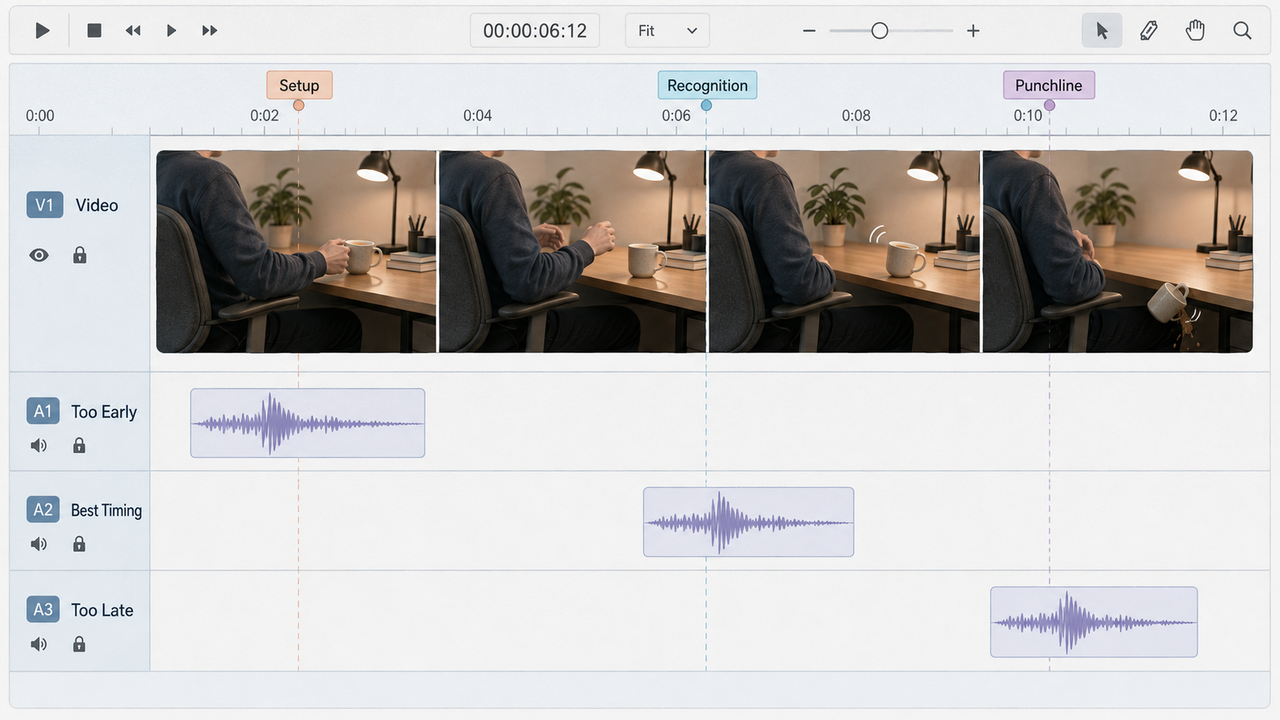
Move the same reaction sting slightly earlier, and the joke can feel impatient. Move it later, and the audience may already be past the turn.
That narrow timing window is why funny sound effects for videos need more than a loud noise and a familiar reference. The sound has to support the setup, leave room for the pause, and land with the visual or verbal punchline.
The goal is not to make every action funny. It is to help viewers notice the moment that changes the meaning of the scene.
Product and platform sources reviewed August 25, 2026.
Disclosure: Sonilo publishes this guide and appears as one example of an AI sound-effects workflow.
Why Funny Sound Effects Fail When Timing Is Wrong
Comedy depends on expectation. The setup gives viewers a pattern, the pause lets that pattern settle, and the punchline breaks or redirects it. A sound placed before the break can reveal the joke too soon.
An effect placed on the visible action often feels direct and physical. Moving it slightly later can make it feel like commentary. Placement depends on what viewers should recognize first.
Sound cannot repair a missing setup. If viewers do not understand the situation, adding a horn, impact, or record scratch only makes the confusion louder.
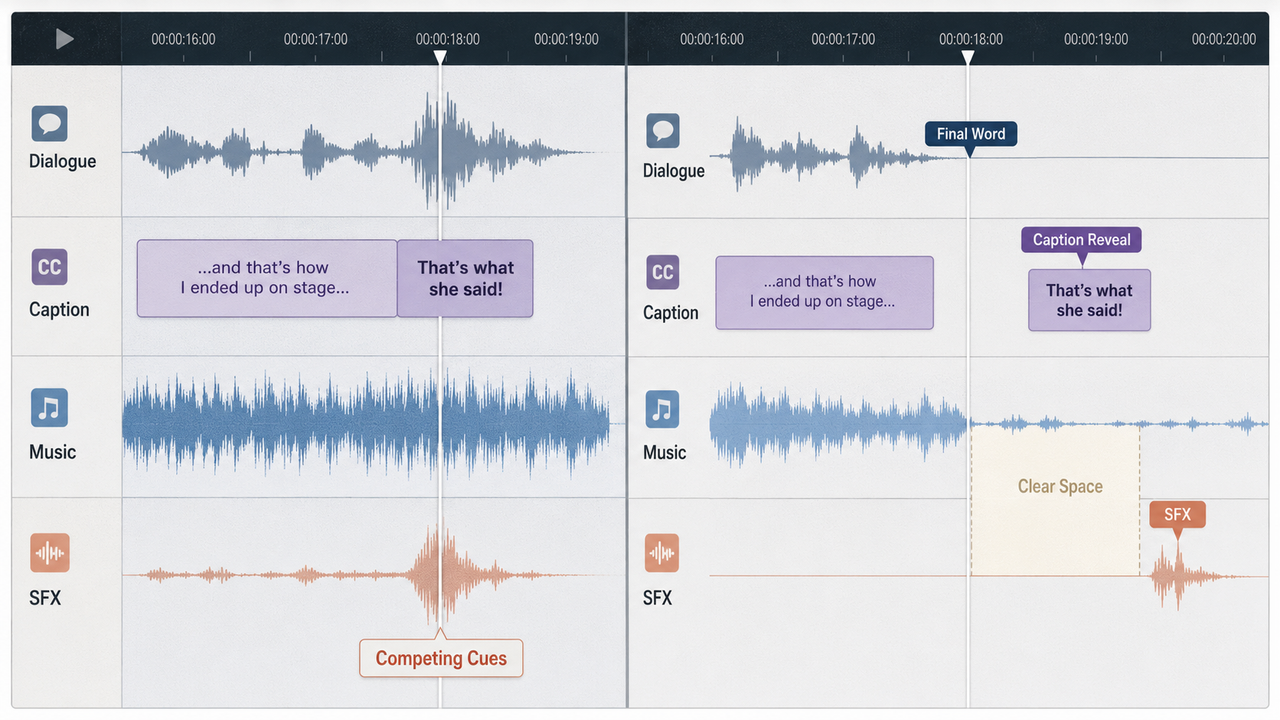
Silence is part of funny SFX timing. A short gap before the effect can create anticipation. A clean stop after it can prevent music or ambience from stepping on the audience’s reaction.
Choose the Right Type of Comedy Sound
Reaction Hits and Stings
Reaction hits tell viewers that a look, mistake, or realization matters. Short impacts, rimshots, tonal stings, and restrained musical accents can all serve that job.
Match the scale to the reaction. A huge hit under a raised eyebrow can work when the mismatch is the joke. Used repeatedly, the same choice can make every expression feel equally important.
Keep reaction sound effects short enough to clear the next line. If a sting has a long musical tail, trim or fade it before it competes with the following setup.
Awkward Pauses and Silence
An awkward pause is not empty time. Room tone, a quiet appliance, distant traffic, or one small body movement can make the silence feel intentional.
Remove busy music before the pause when possible. The contrast gives the next word, glance, or effect somewhere to land. Adding another joke sound inside the gap often weakens the discomfort that made the pause useful.
Exaggerated Movement Sounds
Movement sounds enlarge physical behavior. A tiny head turn becomes a fast whoosh, a slow reach becomes mechanical, or a soft landing becomes a heavy impact. The effect works because the audio scale disagrees with the visible scale.
Follow the motion arc. Start the sound with the movement, place its strongest point near contact or direction change, and let the tail end before the next important action.

Reveals and Reversals
A reveal changes what viewers know. A reversal changes what they expected. Both need a clear before-and-after relationship.
Try the scene without an effect first. If the turn already reads, a small accent may be enough. If the sound has to explain the reversal, the picture or edit may need a clearer setup.
Place Effects Around the Setup and Punchline
Mark three points on the timeline: the setup cue, the recognition moment, and the release. The punchline sound usually belongs at recognition or release, not wherever the nearest cut happens to be.
For a visual mistake, recognition may be the first frame where the result becomes visible. For dialogue, it may be the final word or the reaction shot after it. For a reversal, silence may hold through the reveal before a small effect confirms the new meaning.
Test three placements: on the action, slightly before it, and slightly after it. Compare complete sequences rather than isolated frames. The best placement is the one that preserves the setup while making the turn easy to read.
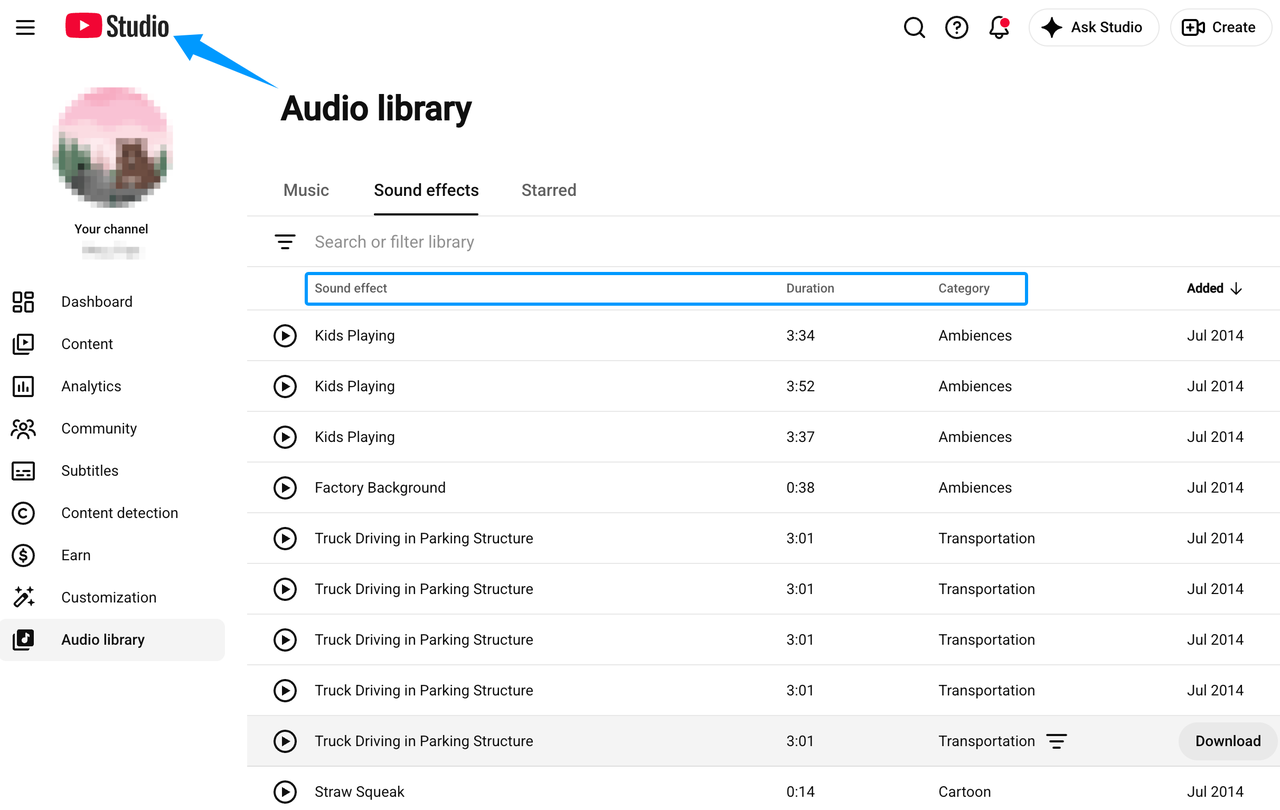
Libraries work well for familiar one-shot effects. The YouTube Audio Library, for example, lets creators search sound effects by keyword, category, and duration. Check the displayed source and license before using any downloaded asset in the intended project.
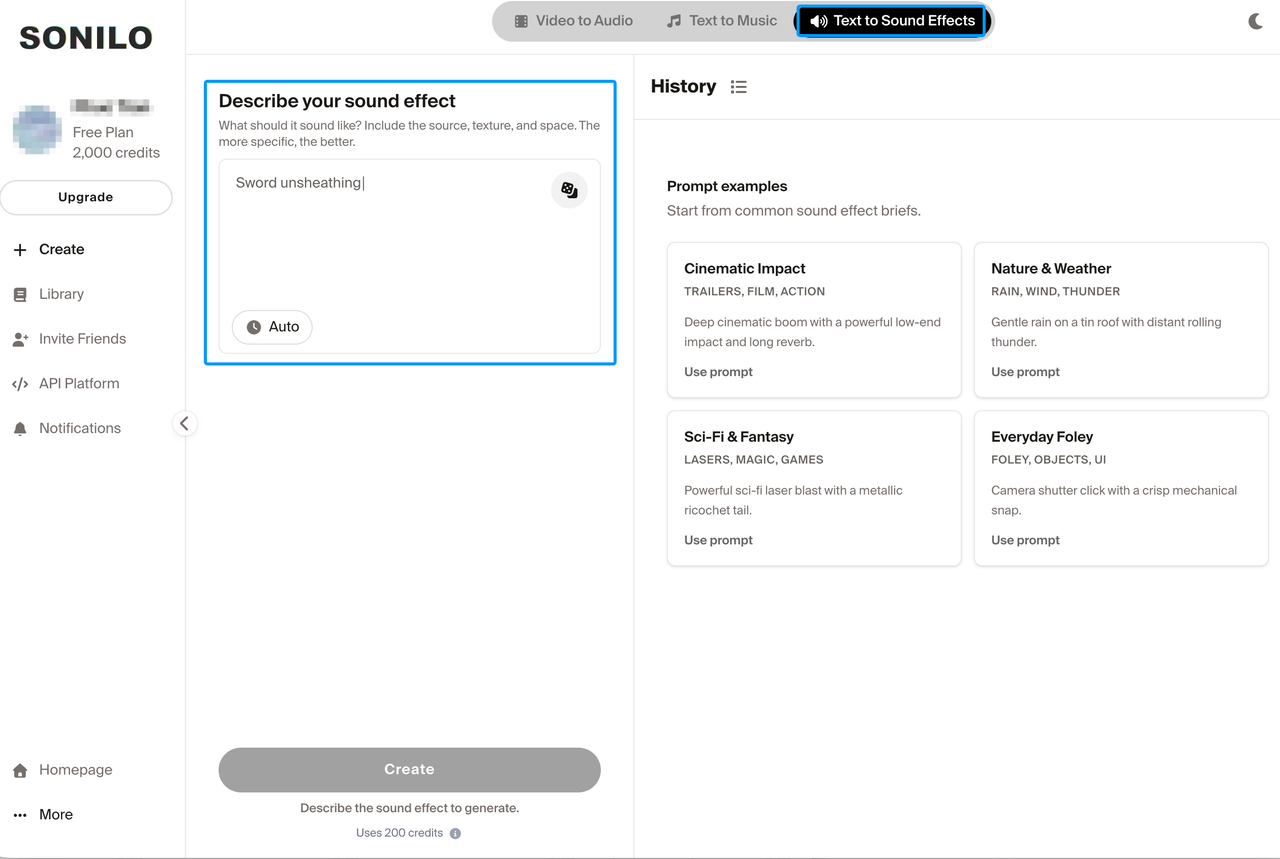
AI is useful when a familiar effect feels too generic or the sound needs to follow a specific movement. Sonilo’s current product page describes both video-based and text-based sound-effect generation, including effects matched to a video timeline or requested length. Treat each result as a candidate and review its timing, artifacts, and plan terms before publishing.
Sonilo’s current homepage says Free and Creator are personal and non-commercial. Commercial work requires an eligible plan and review of the current terms. AI provides another source for variations; it does not guarantee that the joke will land.
Keep Effects Clear of Dialogue, Captions, and Music
Choose one element to lead at the punchline. If the joke is verbal, the sound should leave the final words clear. If the reaction is visual, music and dialogue may need to step back for the effect.
Captions also control timing. A subtitle that reveals the final word early can spoil a spoken punchline before the sound arrives. Break caption lines so viewers receive the setup and turn in the intended order.
Reduce competing frequencies and layers before simply increasing volume. A short effect can feel clear at a moderate level when music, ambience, and voice are not fighting for the same moment.
Use Repetition Without Wearing Out the Joke
Repetition creates recognition. A recurring sound can connect one character, editing mistake, or type of reaction across several videos.
Do not trigger it automatically. Leave out the effect once, shorten it, change its intensity, or reserve it for the largest version of the joke. Variation protects the pattern from becoming an editing reflex.
Track frequency across the whole video, not only within one scene. An effect used twice in each section may feel restrained during editing but exhausting in the finished sequence.
Test the Edit on Real Playback Devices
Comedy sound often reaches viewers through phone speakers, laptop speakers, earbuds, or a television. A low impact that feels strong on headphones may disappear on a phone. A bright sting may become harsh after platform compression.
Play the full sequence on at least one small speaker and one set of headphones. Check dialogue clarity, effect level, stereo balance, and the silence around each joke.
Watch once without looking at the timeline. If the effects make you anticipate every punchline, remove or delay some of them. If an important turn disappears, test a clearer sound before making it louder.
FAQ
Can one recurring effect become a channel signature?
Yes, if it has a consistent meaning and a traceable source. Reserve it for one recognizable event rather than every joke. Keep the clean master, source record, license, and approved variations so later editors do not recreate the signature from a compressed upload.
How should creators handle culturally specific comedy sounds?
Test the effect with people who understand the intended audience and context. A sound may carry a different association across regions, age groups, or platforms. Avoid treating one group’s accent, language, ceremony, or stereotype as the joke, especially in client work.
Who should approve comedy sound choices in client work?
Assign one approval owner from the client or creative lead. That person should review brand tone, audience context, source clearance, and final timing. Record approval on the named version so a later edit does not restore a rejected joke.
Should meme sounds be cleared separately before reuse?
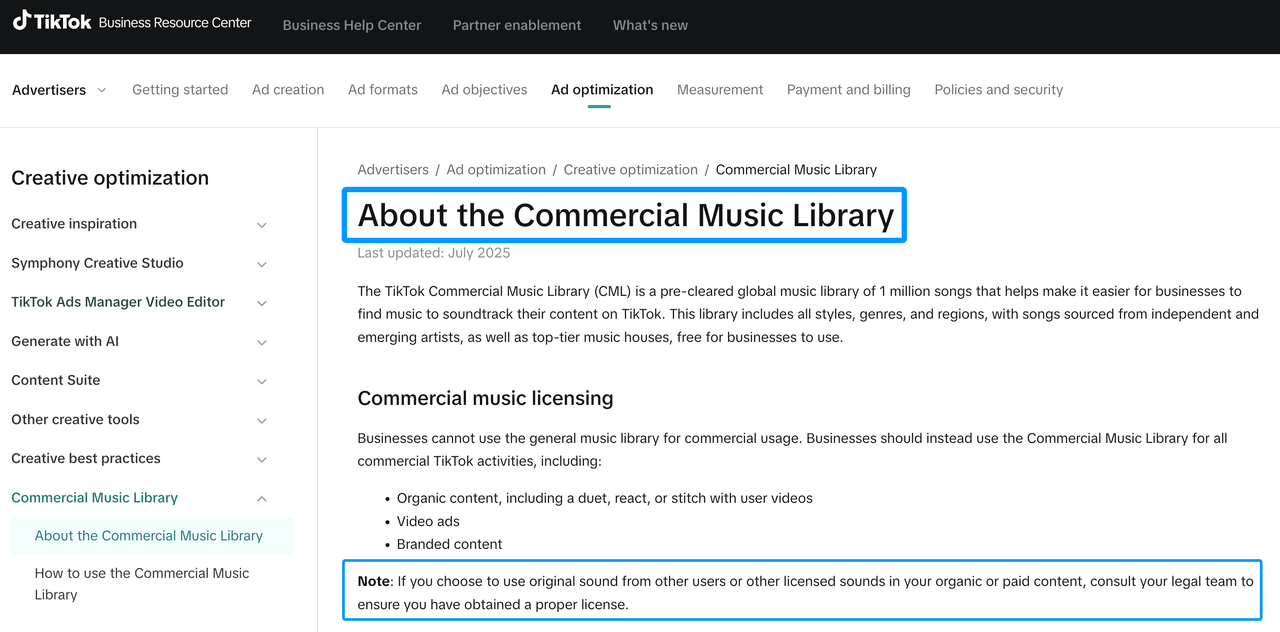
Yes. A popular clip can contain protected dialogue, music, or a particular sound recording. The U.S. Copyright Office’s sound-recording guidance explains that copyright can protect the fixed performance and production. TikTok also tells businesses using original sounds outside its commercial library to confirm that they have the proper license.
This is general information, not legal advice. Trace the original source, check the publishing platform’s current rules, and obtain permission when the intended use requires it.
How can teams archive successful comedy sound patterns?
Save a short cue map with the setup, pause length, effect position, mix level, and reason the pattern worked. Link the original audio source and license record. Archive the result as a reusable timing decision, not as proof that the same joke will work in every video.


