Guides
Sound Effects for YouTube Videos: Choose, Sync, Mix
- Written by
- Sonilo Team
- Published
Before searching for sound effects for YouTube videos, mute the music and watch the cut once. Mark only the moments that become unclear, weightless, or strangely empty without sound.
Those marks—not every movement—are your SFX list. A reveal may need impact. A fast graphic may need motion. A quiet room may need ambience. Everything else has to earn space beside the voice and music.
Decide What the Sound Effect Should Add
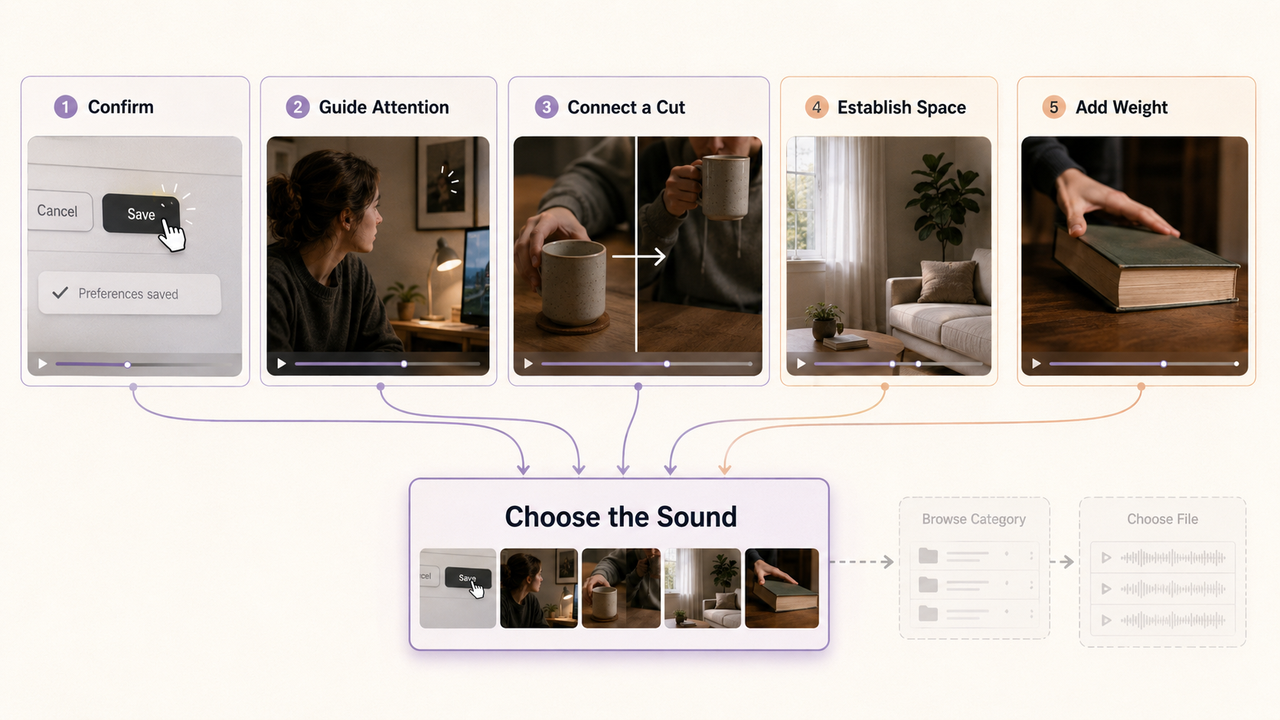
Name the effect's job before choosing the file. It may confirm an action, guide attention, connect a cut, establish a location, or make a physical object feel believable.
The job matters more than the category name. A soft click can make an interface readable without interrupting narration. A deep hit can give a product reveal weight, but it may feel absurd behind a small text change. Room tone can make a dialogue edit smoother even when viewers never notice it consciously.
Leave some visible actions alone. Sounding every hand movement, zoom, caption, and transition turns the mix into commentary on the edit. Use effects where the viewer needs information, emphasis, or a believable sense of space.
Find Effects in the YouTube Audio Library
The YouTube Audio Library is the simplest starting point when a familiar effect fits. In YouTube Studio, open Audio Library, select the Sound effects tab, and search by title or keyword. The current interface also supports category and duration filters, according to YouTube's Audio Library help page.
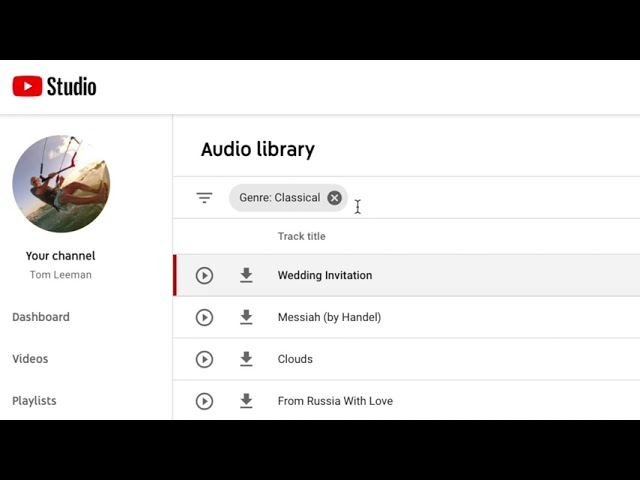
Preview several options against the picture before downloading. A door close recorded nearby will feel different from one heard across a room. A short digital click may suit a fast tutorial, while a longer mechanical button can slow the same moment down.
YouTube currently provides MP3 downloads from the library. Keep the downloaded filename and note the source rather than renaming the file immediately. That makes later source checks easier when several editors share the project.
YouTube describes music and sound effects from its Audio Library as copyright-safe and says they will not receive a rights-holder Content ID claim. It also says only Audio Library assets are known to YouTube to be copyright-safe. That statement does not extend to similarly named files from YouTube channels, third-party libraries, or external generators.
Use Custom Generation When a Library Effect Does Not Fit
A library is efficient for doors, clicks, impacts, weather, movement, ambience, and other familiar events. Custom generation becomes useful when the sound needs an unusual texture, a specific duration, or timing shaped around a visible action.
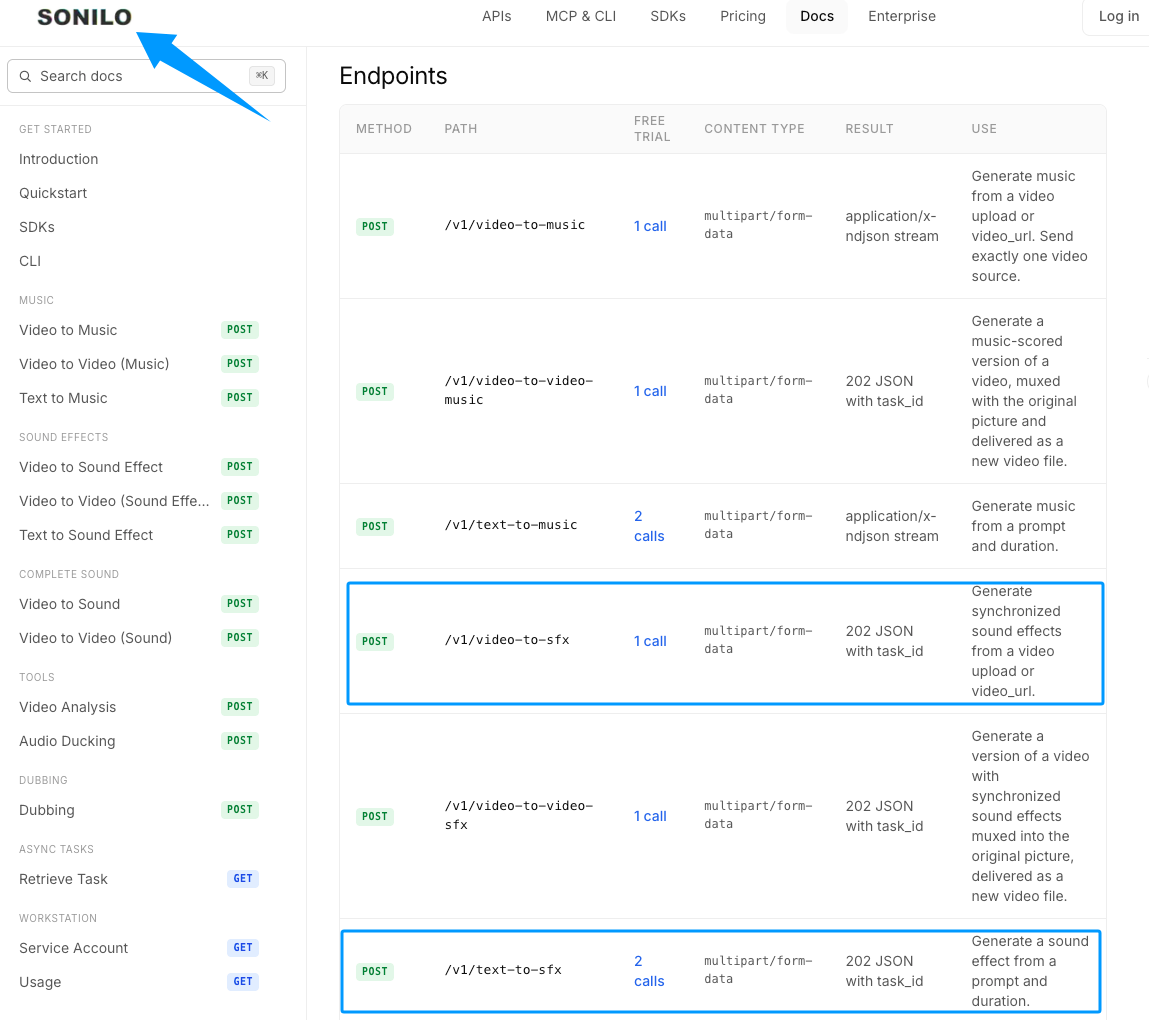
Sonilo's current API documentation lists text-to-SFX for prompt-and-duration generation and video-to-SFX for synchronized effects from video. Those input paths were checked on September 2, 2026. They confirm the available workflows, not independent performance inside a YouTube edit.
Editorial disclosure: Sonilo publishes this guide.
Use text input when the effect can be described without seeing the cut. Use video input when motion, contact, or a reveal determines where the sound should land. Either way, compare the result with the original sound and voice before keeping it.
Upload only footage and reference material you have permission to provide. Check the provider's current terms, account, and intended commercial use before publishing. A platform outside YouTube's Audio Library does not inherit YouTube's copyright-safe statement.
Place Effects Against Visual Cues
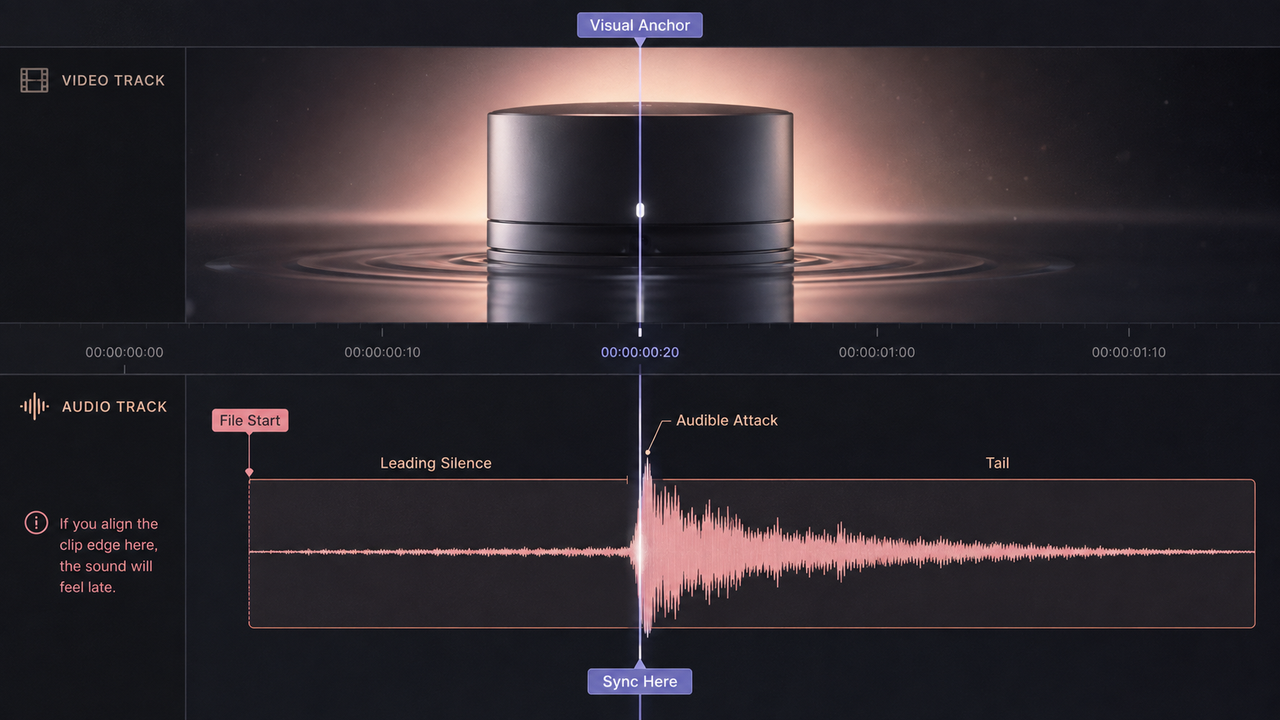
Choose a visible or narrative anchor: first contact, completed movement, a graphic reaching position, a reaction, or the moment an off-screen event becomes clear.
Align the audible part of the effect, not merely the clip edge. Many files contain leading silence, a soft swell, or room tone before the transient. Zoom into the waveform, place the main attack near the anchor, and then judge it at normal playback speed.
Early, on-time, and late placements communicate different things. A whoosh can begin before motion and carry the viewer through it. A hit usually lands on contact or completion. A reaction sting may arrive after the picture because it comments on what just happened.
Check sync SFX to video decisions again after trimming the picture. Moving a clip by a few frames can leave an impact behind even when the audio track itself was untouched.
Balance Effects With Voice, Music, and Original Sound
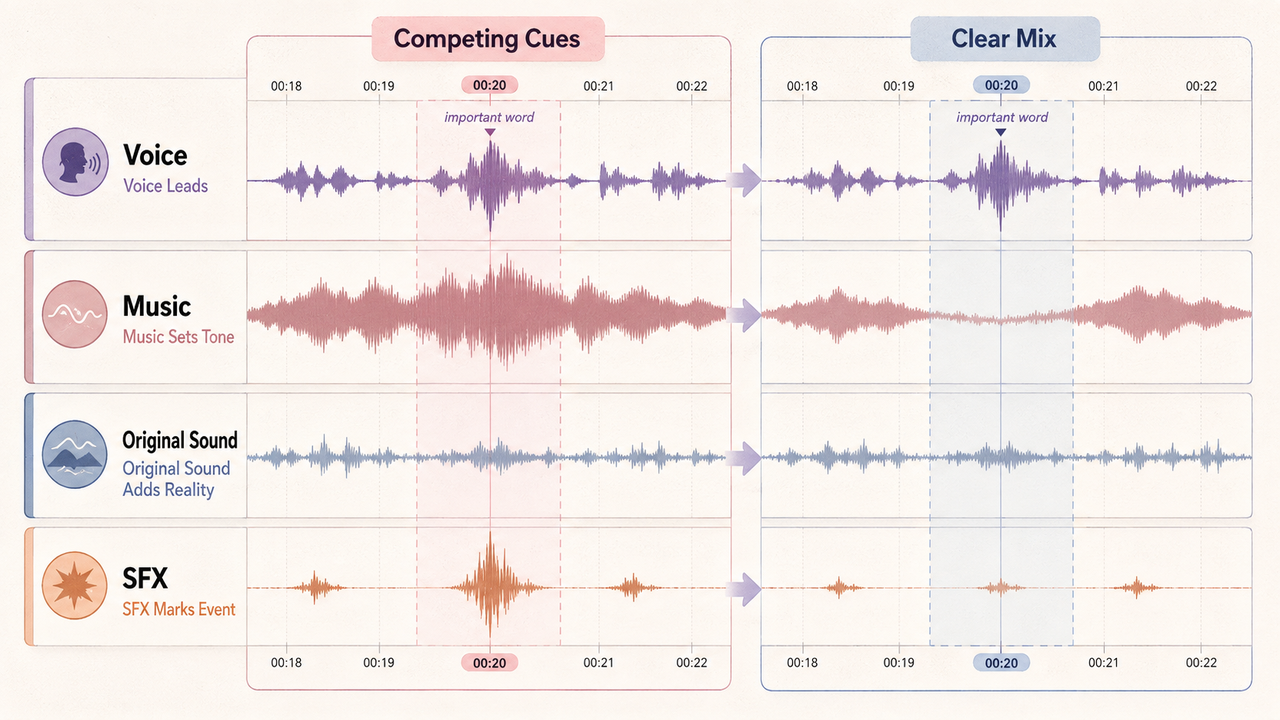
Mix with every active layer playing. Solo playback makes almost any effect sound clear; the problem appears when narration, music, ambience, and original location sound return.
Protect speech first. If an effect masks a word, shorten its tail, choose a less dense version, or move it away from the line. Lowering the entire effect may make the action disappear without fixing the frequency conflict.
Music often contains its own hits, sweeps, and transitions. Avoid stacking a separate impact on every musical accent. If the music already sells the reveal, the cleanest SFX choice may be none.
Preserve useful original sound. A real button press, laugh, footstep, or room response can carry more credibility than a replacement. Add another layer only when it improves clarity or tone.
Listen through headphones, laptop speakers, and a phone speaker before export. Low rumbles may vanish on small devices, while sharp clicks and bright whooshes can become tiring. Review the uploaded private or unlisted version as well, because the final platform encode may not match the editor preview exactly.
Check Licensing and Attribution Before Publishing
For every asset, save the source page, original filename, download or generation date, and the license information shown at that time. Record whether attribution is required and whether the intended monetized, sponsored, client, or advertising use is covered.
Do not treat “royalty-free” as a guarantee of unrestricted use. YouTube explicitly says it is not responsible for problems involving royalty-free audio from other channels or libraries. Third-party license terms may differ by account, project type, territory, redistribution method, or paid placement.
If an Audio Library item displays attribution instructions, copy the required wording into the video description and keep it with the project notes. Do not assume credit repairs a use that the license did not permit.
These checks are general information, not legal advice. Current platform rules and provider terms control, so review them again before publication when the source or use has changed.
Avoid Common YouTube Sound Effect Mistakes
Do not add an effect simply because a transition exists. Repeated whooshes can make a calm tutorial feel rushed, while oversized impacts make ordinary edits feel staged.
Avoid using one full-volume preset across Shorts and long-form videos. A recurring sound can support channel identity, but its length and level should fit each format.
Do not flatten every effect, voice, original sound, and music cue into one file too early. Separate tracks make late timing fixes, caption changes, alternate language versions, and claim-related replacements easier.
Finally, review the opening and busiest section without looking at the timeline. If the mix keeps pulling attention away from the subject, remove effects before adding more automation.
FAQ
Why can an effect sound louder after YouTube processing?
Platform encoding, loudness handling, and the listener's device can change the perceived balance. Bright, short effects may stand out more than broad music or low ambience. Compare a private or unlisted upload with the local export, then adjust the source mix rather than assuming the editor preview is final.
How should editors label effects from multiple sources?
Include the project, event, source, version, and status in the filename or asset log. Keep the original supplier filename in a separate field. Labels such as logo-hit_libraryA_v02_approved make replacements easier without destroying the information needed for license checks.
Can Shorts and long-form videos share recurring effects?
Yes, when the sound still fits both edits. Keep one clean master, then make format-specific versions if the Short needs a faster attack or shorter tail. Test each version beneath the real voice and music instead of changing only the file length.
What happens when a downloaded source later disappears?
Keep the audio file, source URL, download date, license text or receipt, and attribution instructions from the time of acquisition. A saved copy helps explain the source, but it does not expand the original permission. Recheck before reusing the asset in a new type of project.
Who should handle a claim on a team channel?
Assign the channel owner or publishing lead to inspect the claim in YouTube Studio and collect the asset records. Do not dispute automatically. YouTube's current claim-dispute guidance says uploaders should dispute only when they are confident they have the necessary rights. Escalate uncertain cases appropriately.
Related Posts
- Foley Artist Sound Effects: How They Are Created for Video
- Best Sound Effects Apps for Video Creators in 2026
- Transition Effect Sound: How to Use It in Video Edits
- Free Sound Effects for Video Editing: Libraries vs AI
- Sonilo Sound Effects 1.0 launches on fal.ai: realistic sound effects from video and text


