Guides
What Is AI-Generated Music? A 2027 Video Guide
- Written by
- Sonilo Team
- Published
When an editor says a soundtrack was “made with AI,” the label can hide four different jobs. It may mean generating the composition, repairing a recording, mastering a mix, or fitting music to picture. Treating them as one category creates bad expectations before the track reaches the timeline.
I’m Nico. This guide separates those jobs, then shows what a finished video still needs you to judge. AI-generated music is audio created substantially by a generative model from instructions or other conditioning inputs. It is not every piece of music that an AI tool has touched.
For video creators, the practical question is bigger than “Who made the notes?” You also need to know what guided the generation, what changed afterward, and whether the final track actually serves the cut.
What AI-Generated Music Means
AI-generated music begins when a model produces new musical content: melody, harmony, rhythm, arrangement, timbre, vocals, or a combination of them. The input might be a sentence, an image, an audio reference, or a video.
The label describes a creation method. It does not, by itself, answer whether the track is good, original, licensed for your project, protected by copyright, or acceptable on a particular platform.
Fully Generated Music and AI-Assisted Editing
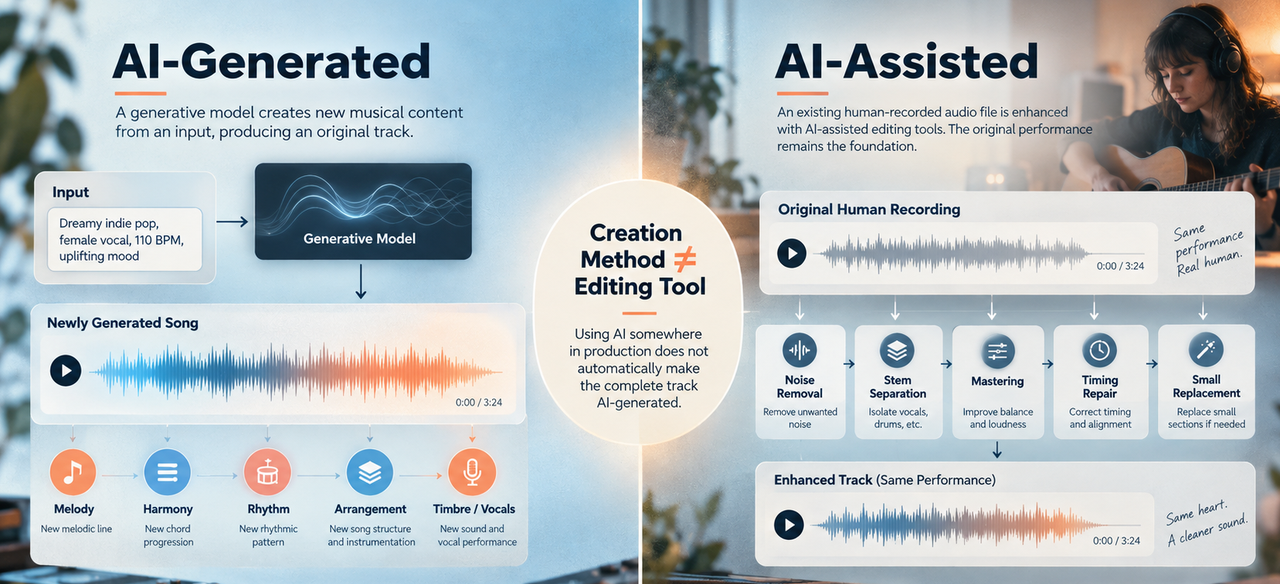
Fully generated music usually means the model created most or all of the audible musical result. A creator may still choose prompts, reject versions, extend sections, edit lyrics, and mix the export.
AI-assisted editing is different. A musician might record a performance, then use AI for noise removal, stem separation, mastering, timing repair, or a small replacement section. Calling that entire track “AI-generated” can erase the human source and hide which part actually changed.
The cleanest description names the role: “generated from a text prompt,” “human performance with AI-assisted mastering,” or “AI-generated instrumental edited to picture.” That wording is more useful than a vague “made with AI.”
Songs, Instrumentals, and Video Soundtracks
A generated song can include lyrics, vocals, verses, and choruses. A generated instrumental leaves vocal space open, although that does not guarantee it will sit comfortably under speech.
An AI soundtrack has another job: it must support specific pictures over a specific runtime. A strong standalone song may still be wrong for a product demo if its busiest section arrives during the key explanation. A simple bed may be the better edit because it knows when to stay out of the way.
How AI Music Generation Works
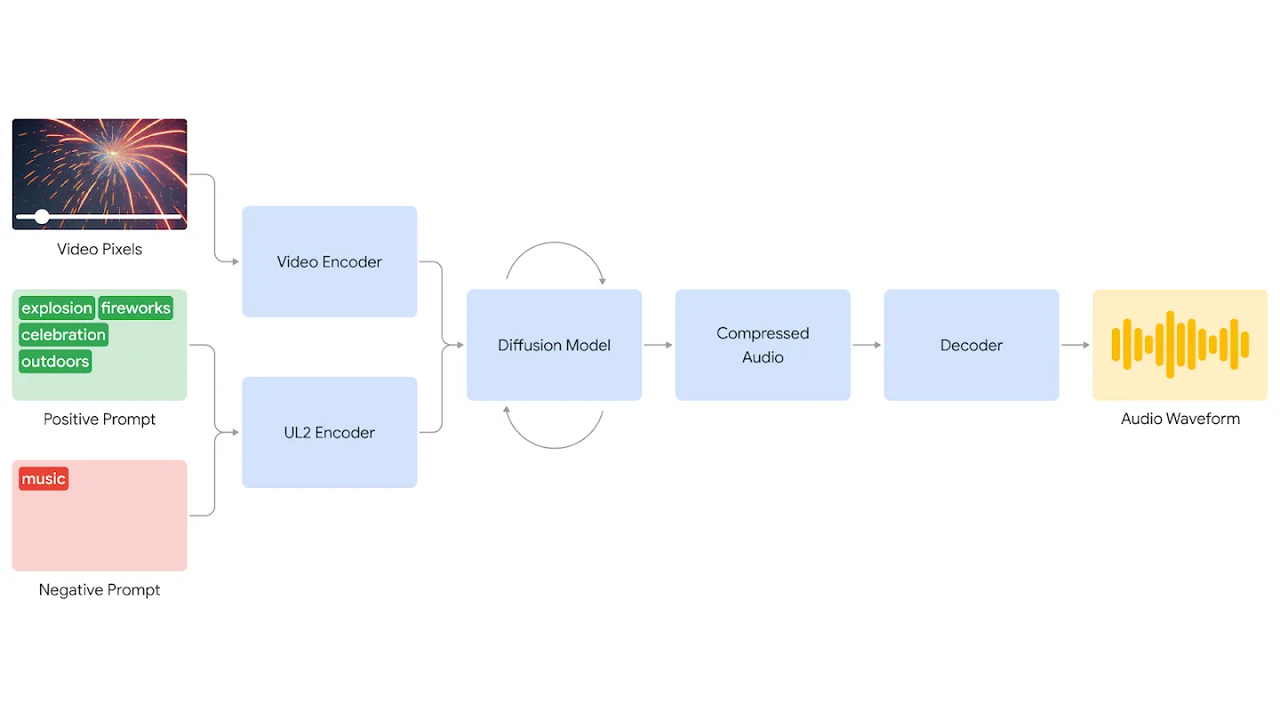
There is no single architecture behind every text-to-music generator. Some systems predict sequences of compressed audio tokens; others use diffusion to refine noise into audio in a learned latent space. Google’s current Lyria 3 model card is one concrete example: it describes text-conditioned music synthesis using latent diffusion over temporal audio latents.
The plain-English version is simpler. During training, a model learns relationships among musical sound, structure, and descriptions. At generation time, your input steers those learned relationships toward one possible output. It does not retrieve a ready-made song from a shelf.
That last sentence is a technical description, not a promise of originality or legal clearance. Training sources, safeguards, terms, and output rights vary by provider.
Text, Audio, Image, and Video Inputs
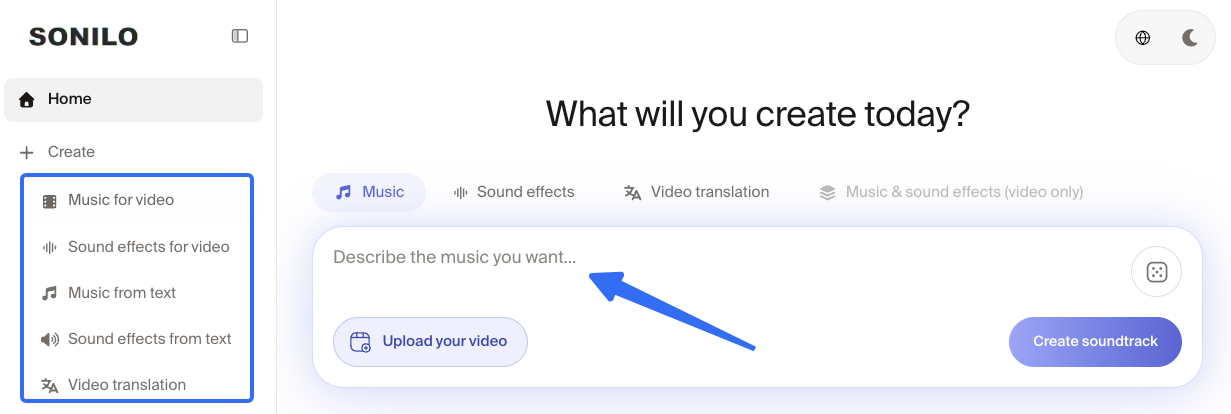
Text prompts can describe genre, mood, instrumentation, tempo, energy, and structure. “Restrained electronic instrumental, no lead melody, gradual lift after the midpoint” gives a model more usable direction than “good corporate music.”
Audio input may act as a reference, continuation, melody, rhythm, or editing target, depending on the tool. An image can condition mood and visual associations. Neither input automatically gives the model your intended narrative.
Video-to-music uses the moving image as conditioning input. The system may encode frames, motion, scene information, timing, or accompanying text before creating audio. Google DeepMind’s published video-to-audio research description shows one diffusion-based route from encoded video and prompts to a decoded waveform. That is an example, not a blueprint for every commercial tool.
From Conditioning to a Finished Audio File
Most creator-facing systems hide the technical middle. A useful simplified path looks like this:
- The service interprets the prompt or other input.
- The model generates a compressed musical representation, such as tokens or latent audio.
- A decoder turns that representation into a waveform.
- The service packages the result as a playable audio file.
- The creator selects, edits, mixes, and places that file.
Generation produces an output, not an approval. A model cannot infer that a client logo needs a downbeat unless the inputs communicate it. Even then, the editor must check the result.
Where AI-Generated Music Fits a Video Workflow
AI music can enter before the edit, after picture lock, or somewhere between. Where it enters changes the brief and the amount of repair left for the timeline.
Starting From a Soundtrack Brief
A prompt-first route works when the musical direction leads. For a travel montage, you might define a rising sense of movement, acoustic percussion, a spacious middle, and an ending that resolves rather than fades.
The editor then shapes the picture around promising musical phrases or trims the track around fixed moments. This route offers broad musical exploration, but it can create extra work when the picture already has immovable dialogue or branded timings.
If you are still choosing a product, this existing AI music tool overview for video creators covers text-to-music and video-first generation options. This page does not rank them because the input route matters more here.
Starting From a Locked Video Edit
A locked cut turns the picture into the constraint. The target runtime, scene changes, narration, and final frame already exist; the music has to arrive around them.
That is where video-to-music can reduce translation work. Instead of explaining every visual beat in prose, the creator supplies the cut and adds direction only where needed. Sonilo publishes this guide and offers that kind of video-first soundtrack generation; its product claims are first-party, not independent proof that every result will fit.
Before uploading a client cut anywhere, confirm you can submit its footage, dialogue, logos, and existing audio under the service’s current terms.
For a product video, mark the feature reveal, the densest voiceover, and the final logo before generating. Those three moments will tell you more than whether the opening eight bars sound polished.
Reviewing the Track on the Timeline
Always review the soundtrack with the picture. Listen once for the story, once for speech, and once for the ending. Then watch the exported video away from the edit controls.
The timeline exposes problems that a music player hides. A transition may arrive two shots late. A bass pulse may mask the narrator’s consonants. A graceful musical tail may continue over a logo that needed silence.
If timing is the issue, this guide to syncing video with music shows how to mark visual anchors without forcing every cut onto a beat.
How to Evaluate AI Music for a Finished Video
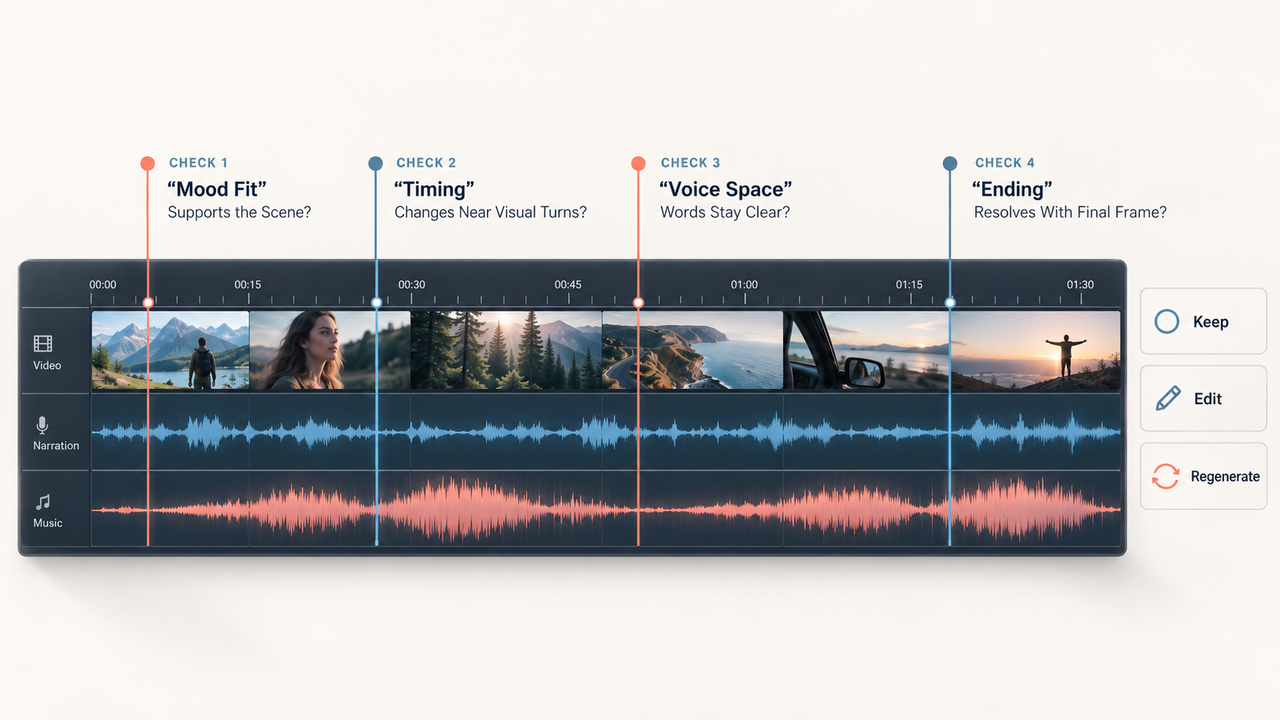
Do not score a soundtrack with one “quality” number. Judge what the music does to the finished video, especially where picture, speech, and sound effects compete.
Mood and Scene Fit
Start with emotional direction, then check local changes. A travel montage may need curiosity at the opening, lift during movement, and calm at the destination. One mood word cannot describe that whole arc.
Watch for music that labels the scene too aggressively. “Inspirational” strings can make an honest customer story feel like an advertisement. “Epic” drums can turn a small product benefit into a trailer for the end of the world.
Timing, Structure, and Endings
Compare musical sections with visible sections. Does the build support the reveal? Does a new phrase arrive when the location changes? Can the ending resolve before the final frame disappears?
Exact duration is not the same as structural fit. A 60-second file can still spend 18 seconds introducing itself, peak after the important shot, and finish with an awkward hard cut. Count the edits required to make it usable: trims, loops, fades, section swaps, or regeneration.
Voiceover and Sound-Effect Space
For a voiceover video, lower the music to the intended listening level before judging it. If the track loses all energy before the words become clear, the problem may be arrangement density rather than volume.
Sound effects also need room. A product click, door close, or location ambience can carry information the music should not cover. If you need a ready-made effect for that layer, Sonilo’s royalty-free sound effects library lets you browse downloadable sounds before returning to the timeline. The best soundtrack is sometimes the one with fewer ideas during the busiest scene.
Benefits, Limitations, and Trade-Offs
AI-generated music can shorten early exploration, create variations without a stock-library search, and give non-musicians a workable way to describe mood and structure. Video-conditioned systems can also begin from timing information that would be tedious to rewrite as a prompt.
The trade-off is that control remains uneven. The same prompt can produce different results, longer tracks can drift, vocals can mispronounce words, and a requested ending may still need repair. Model output also does not settle licensing, ownership, disclosure, or platform treatment.
Before client or commercial use, keep the source page, prompt, model and version, generation date, original export, edited export, applicable plan or license, and approval notes. Review the current provider terms for the intended use. Copyright and disclosure rules vary by place and platform, so this is practical production guidance, not legal advice.
FAQ
Can a detector prove that a soundtrack was AI-generated?
No detector should carry that conclusion alone. A score reflects the detector’s model, training data, threshold, and the file it received. Start with source disclosures, generation records, metadata, and provenance; use audio analysis as supporting evidence. This AI music detection guide explains why “undetermined” is sometimes the responsible result.
Do video platforms require creators to disclose AI-generated music?
Rules differ. As checked September 21, 2026, YouTube lists AI-generated music among content creators need to disclose. TikTok requires labels for certain realistic AI-generated content and encourages broader AI labeling—verify against TikTok’s current AI-generated-content policy before publication. Recheck the platform and upload flow before publishing; a label does not resolve music rights.
Does trimming or looping AI music change how it should be described?
Trimming or looping changes the edit, not the track’s origin. “AI-generated music, edited to picture” is clearer than calling a looped version either wholly untouched or merely AI-assisted. If human performance or composition is added, describe that contribution separately rather than forcing the project into one label.
What creation records should a team keep for a client video?
Keep the prompt and input list, provider, model/version, generation date, original outputs, selected file, timeline edits, approval history, license or plan evidence, invoice, and the disclosure decision. A cue sheet can connect the accepted track to the delivered video. Records support traceability; they do not create rights that the agreement never granted.
Can provenance signals survive audio compression and video export?
Sometimes, but not universally. The C2PA explainer says provenance can become incomplete when an asset passes through software that does not update it; missing credentials do not prove deception. Provider-specific watermarks may be more durable. Google says SynthID audio survives common changes such as MP3 compression and speed adjustments. That claim should not be generalized to every watermark, editor, or export chain.
Conclusion
The answer to what is AI generated music is not “music made without people.” It is music whose audible content was substantially produced by a generative model, with people still choosing inputs, versions, edits, mixes, and publishing decisions.
For video, keep four questions separate: What generated the audio? What did the editor change? Does the track serve the cut? What records and permissions support release? When those answers stay separate, an impressive waveform has less room to distract from the video you actually need to finish.


